介绍
Gravity Shift
Walk on walls. Stand on ceilings. Fall sideways.
Gravity Shift lets players change which way their own gravity pulls, in any of six directions. Walking, sprinting, jumping, sneaking, stepping up blocks and fall damage all work relative to your new floor. Mobs and items keep normal gravity, so the world stays the same and only you are turned around.
New in 0.2.0: Gravity Blocks
You can now change gravity in survival without commands.
- Gravity Blocks (×6, one per direction): touch one and you start falling the way it points. Sneak to walk past without triggering it.
- Magnet Block: whatever face you touch becomes your floor. Walk off an edge and you roll onto the next face, with the camera turning as you go. Jump or sneak to step off without rolling. You can build a magnet cube and walk all the way around it.
Crafting
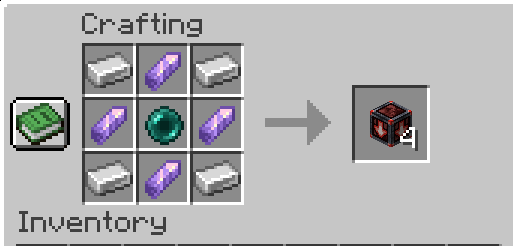
Gravity Block
Iron ingots in the corners, amethyst shards on the sides and an ender pearl in the centre make 4 Down Gravity Blocks.
Changing the direction
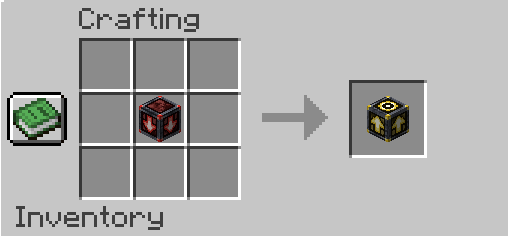
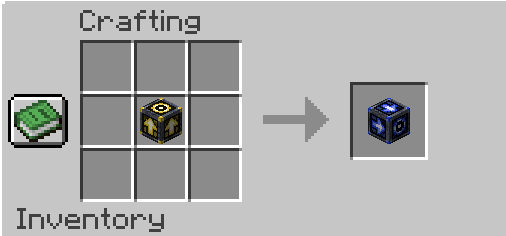
Put a Gravity Block alone in the crafting grid to turn it into the next direction. Keep doing this to cycle through all six:
Down → Up → North → South → East → West → Down
Down becomes Up
Up becomes North
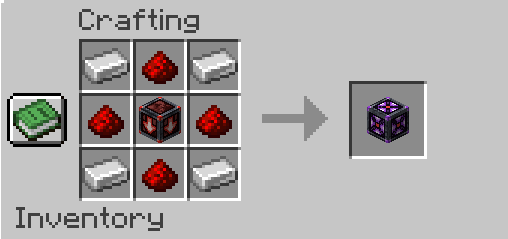
Magnet Block
Iron ingots in the corners, redstone on the sides and a Gravity Block of any direction in the centre make a Magnet Block.
Commands
/gravity set <direction> [players]: set gravity to up, down, north, south, east or west/gravity get [player]: show a player’s current gravity/gravity reset [players]: set gravity back to normal
Commands need operator permission (level 2) by default. With the server config option Allow Self Use turned on, any player can change their own gravity.
Multiplayer
Every player has their own gravity, and it syncs to everyone on the server. The server and every player need the mod installed.
Game rules and behaviour
gravityshift:keep_gravity_on_death(default on): players respawn with the gravity they had when they died.- With up gravity there is a void above the world. Fall more than 64 blocks above the highest block and you start taking void damage.
- Riding a vehicle or sleeping in a bed puts normal gravity back on hold. Your own gravity returns when you get off or wake up.
- Blocks you place face you in the direction you’re looking, even when you’re standing on a wall.
Known limitations
- Water and lava, ladders and vines still work on normal world gravity.
- Teleports, nether portals and ender pearls can leave you slightly stuck in a block for a moment until you fall clear.
- Ranged mobs aim less accurately at a player standing on a wall.
Requirements
- Minecraft 26.3
- NeoForge 26.3 (26.3.0.48-beta or newer)
Credits
The physics approach is adapted from GravityChanger (MIT).
常见问题
Gravity Shift 支持哪些 Minecraft 版本?
Gravity Shift 支持 Minecraft Java 版 26.3,可用的加载器:NeoForge。下载时注意选择和你游戏版本一致的文件。
Gravity Shift 怎么安装?
先用 PCL2 或 HMCL 启动器安装对应版本的 NeoForge,再把下载的 .jar 文件放进游戏目录的 mods 文件夹,重新启动游戏即可。开启了版本隔离的,mods 文件夹在 versions/版本名 下面。
评论
登录后评论和评分