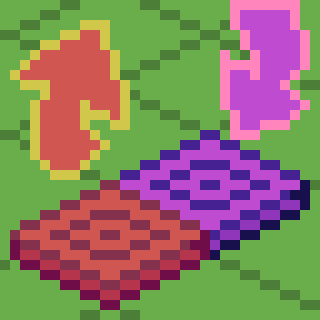
截图


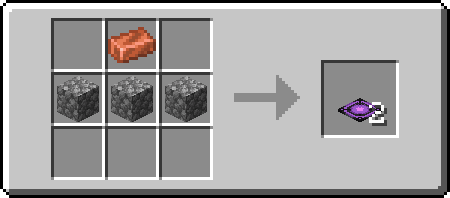
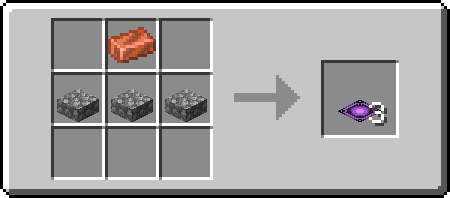
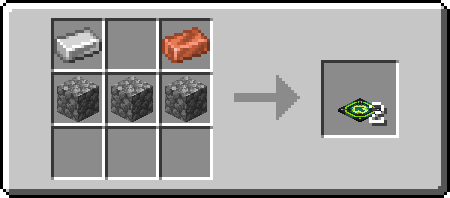
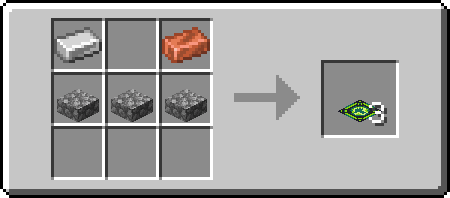
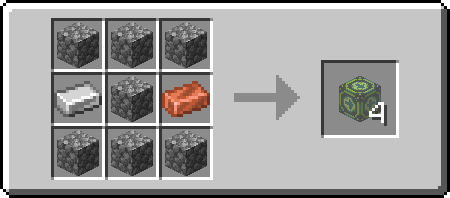
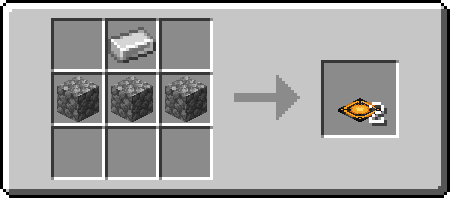
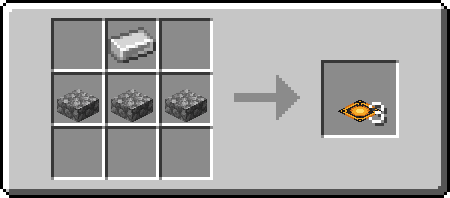
介绍
Gravity Pads
Just a simple Gravity Pad mod.
Explanation
Pushing Gravity Pads (Orange) sets your gravity to the direction it’s facing, while Pulling Gravity Pads (Purple) sets your gravity to the direction its facing away from (Think of it as pulling).
Directional Gravity Pad/Block allow you to choose the direction that the gravity will go by targeting the edge of a block when placing. Targeting center of the block will place a “towards” directional pad/block (signified by the + sign, the gravity direction is towards to player). Sneak placing will invert the direction you are placing. Placing targeting the center of the block while sneaking will result in an “away” directional pad/block (signified by a ◼ square, the gravity direction is away from the player). You can also rotate it using a wrench (configurable) using the side you right click as rotation axis.
The mod also comes with anti-softlock. It triggers when you are 64 blocks above the block height limit (configurable) and will reverse your gravity back to normal (configurable).
Recipes
Pulling
Pushing
Directional
常见问题
Gravity Pads 支持哪些 Minecraft 版本?
Gravity Pads 支持 Minecraft Java 版 1.19.2–1.20.1,共 2 个版本,可用的加载器:Quilt。下载时注意选择和你游戏版本一致的文件。
Gravity Pads 怎么安装?
先用 PCL2 或 HMCL 启动器安装对应版本的 Quilt,再把下载的 .jar 文件放进游戏目录的 mods 文件夹,重新启动游戏即可。开启了版本隔离的,mods 文件夹在 versions/版本名 下面。运行环境:客户端和服务端都要装。
Aikoyori 的其他作品
查看全部 →
Big Fan of It
Adds a functional fan based on real-life fan!
Big Fan of It
Adds a functional fan based on real-life fan!

PET Bottle Rocket
Make a Water Bottle Rocket! Inspired by STEM Learning.

Unhinged Carnival Supplies
Basically Party Supplies that might be just a little off
评论
登录后评论和评分