
Graves
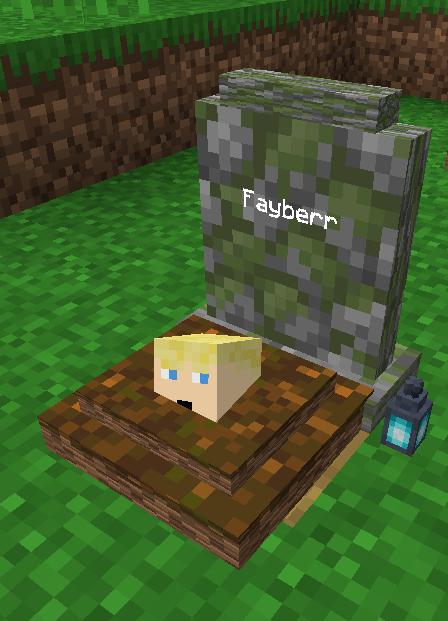
Never lose your items on death. A grave spawns where you died, holding your inventory and XP.
截图
介绍
Graves
Die and a grave marks the spot, holding your inventory and XP so you can come back and recover everything instead of losing it to a five-minute timer.
Features
- A grave spawns where you die (with keepInventory off), holding your items and XP.
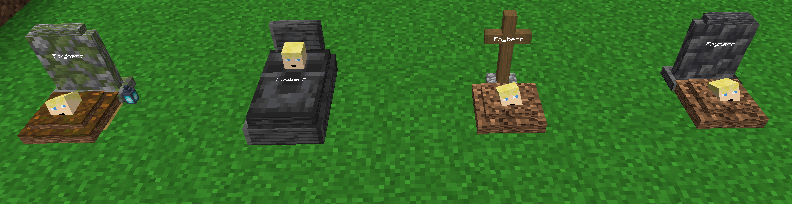
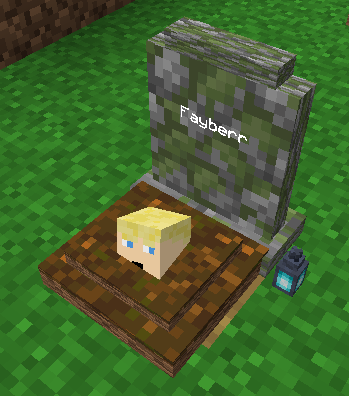
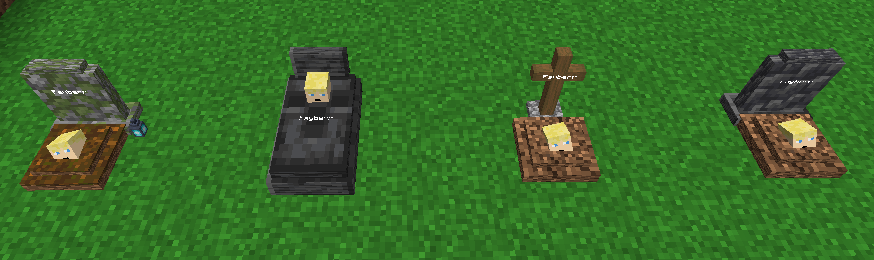
- Four grave looks: a deepslate headstone, a wooden cross, a tombstone, or a mossy soulgrave. One is picked at random, each can be turned off.
- Recover everything at once: items return to their original slots, XP is paid back, anything that does not fit drops on the ground.
- Graves are owner-only by default; robbing can be turned on to let anyone take the loot.
- Grave Keys let admins open any grave.
- Graves persist across restarts, and ones that fall into the void get a cobblestone platform to rest on.
Commands
/graves listlists your active graves./graves locatepoints you to your nearest grave./graves keyhands you a Grave Key (operator level 2)./graves configshows or changes the config (operator level 2).
Notes
- The config lives in
config/graves.json, changed with/graves configor from the Mods screen in singleplayer. That GUI needs Mod Menu and Cloth Config, but they are optional and only needed for the GUI. - Server-side. Clients do not need the mod installed.
Inspired by the classic Vanilla Tweaks Graves datapack.
常见问题
Graves 支持哪些 Minecraft 版本?
Graves 支持 Minecraft Java 版 26.1–26.3,共 5 个版本,可用的加载器:Fabric。下载时注意选择和你游戏版本一致的文件。
Graves 怎么安装?
先用 PCL2 或 HMCL 启动器安装对应版本的 Fabric,再把下载的 .jar 文件放进游戏目录的 mods 文件夹,重新启动游戏即可。开启了版本隔离的,mods 文件夹在 versions/版本名 下面。运行环境:仅服务端。
Fayber 的其他作品
查看全部 →
Infinite Trading
Lets you trade infinitely without Trades locking up with per player configuration

Villager Pickup
Turn villagers into spawn eggs to move them easily, keeping all trades and data.

Timber
Break one log and the whole tree comes down. Inspired by the classic Vanilla Tweaks Timber datapack.
Timber
Break one log and the whole tree comes down. Inspired by the classic Vanilla Tweaks Timber datapack.
评论
登录后评论和评分