
Graphics Optimizer
This mod adds a button to the Minecraft options menu, allowing you to easily manage and customize your game settings.
介绍
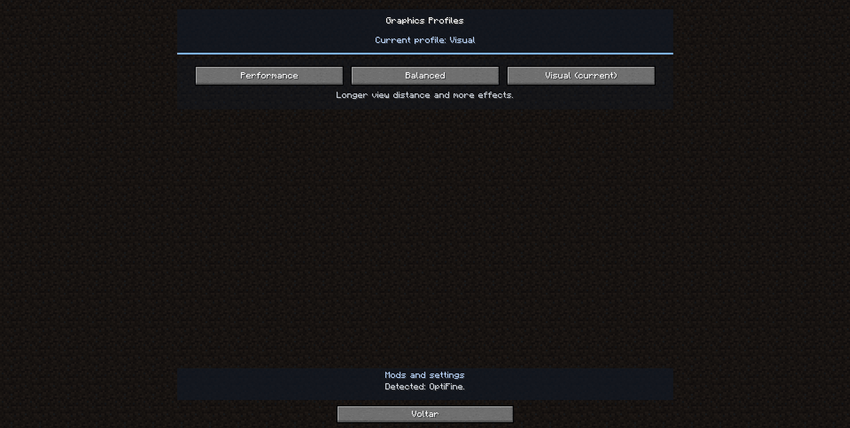
Graphics Optimizer is a Minecraft mod that lets you switch between Performance, Balanced, and Visual graphics profiles from the Options menu.
Each profile adjusts Minecraft’s graphics settings with one click. When supported optimization mods are installed, Graphics Optimizer can also adjust their known settings. With OptiFine, it can tune shader quality and apply a shader pack’s built-in quality profile when available.
Shader packs are not included. External mod settings may require restarting Minecraft to take effect.
Compatible mods
- Embeddium
- Rubidium
- Sodium
- OptiFine
- Entity Culling
- ImmediatelyFast
- ModernFix
- FerriteCore
- Canary
- Radium
- Starlight
- Memory Leak Fix
- Saturn
- Performant
Warning: Some mods may conflict with OptiFine.
Recognized shader packs
- Complementary Reimagined
- Complementary Unbound
- BSL
- Sildur’s Vibrant
- SEUS Renewed
- Chocapic13
- MakeUp Ultra Fast
- projectLUMA
- Nostalgia
常见问题
Graphics Optimizer 支持哪些 Minecraft 版本?
Graphics Optimizer 支持 Minecraft Java 版 1.20.1,可用的加载器:Forge。下载时注意选择和你游戏版本一致的文件。
Graphics Optimizer 怎么安装?
先用 PCL2 或 HMCL 启动器安装对应版本的 Forge,再把下载的 .jar 文件放进游戏目录的 mods 文件夹,重新启动游戏即可。开启了版本隔离的,mods 文件夹在 versions/版本名 下面。

评论
登录后评论和评分