介绍
This mod is not for survival gameplay. It was written for a class project, downloadable from CF for anyone who wishes to play around with it in Creative or Spectator mode.
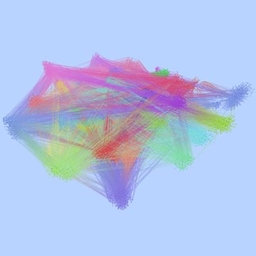
Explore a visualization of Minecraft’s code in a Minecraft world! The code is organized into classes, which come from compiled named Java files and are linked by references. Strongly-connected logic in Minecraft’s code are divided into clusters.
This graph is available as a world type; among Default, Amplified, Flat, Debug, etc. Hold alt/option while pressing the world type button until you get “Class Graph”.
The graph is generated from Minecraft 26.3 classes, using jdeps for class dependency analysis.
Enter the Class Graph world with Creative or Spectator mode for optimal viewing. Flying your character around lets you get close and distant views of the graph.
The panel on the right side of the window gives you finer control:
- Filtering for nodes by class names, package names, or fully-qualified names.
- The filtered nodes has a further option to reveal their connected class nodes, and whether you see connections between those adjacent nodes.
- Showing packages that the class nodes belong to.
- Hiding the visualized edges between class nodes or merging node-to-node into cluster-to-cluster.
- Hiding each cluster of classes. Each are named after a common package.
Also, class node closest to your crosshairs will show the Java class’s fully-qualified name above the Clusters subpanel.
Pressing F12 switches the panel in and out of the game window.
常见问题
Graph Machine 支持哪些 Minecraft 版本?
Graph Machine 支持 Minecraft Java 版 26.3,可用的加载器:NeoForge。下载时注意选择和你游戏版本一致的文件。
Graph Machine 怎么安装?
先用 PCL2 或 HMCL 启动器安装对应版本的 NeoForge,再把下载的 .jar 文件放进游戏目录的 mods 文件夹,重新启动游戏即可。开启了版本隔离的,mods 文件夹在 versions/版本名 下面。
Drullkus 的其他作品
查看全部 →
暮色森林 The Twilight Forest
一个笼罩在神秘与诡异暮光中的领域,你将征服可怕的生物,在暮色森林中开启一段终生难忘的冒险。

凿子 Chisel
建筑师的得力助手。

天境 The Aether
天境团队带来原版天境模组!持续维护并适配现代 Minecraft 版本,完全兼容多人游戏!

YUNG’s API
YUNG's 系列模组的前置库。
评论
登录后评论和评分