
介绍
中文介绍正在准备中,下面暂时显示原文。
Gooey Red is a centralized redstone control mod — instead of running physical wire everywhere, you tune blocks to named channels and flip them on/off from anywhere.
Core blocks:
- Goo Activator — outputs a redstone signal whenever its tuned channel is on. Right-click to toggle it directly (like a lever); Shift+right-click to open the tuning screen and rename it, change its channel, or make it public/private.
- Goo Controller (and a wall-mounted variant) — a monitor screen showing every channel you have access to. Toggle individual channels or whole groups, reorder them, rename/edit, or remove them entirely.
- Portable Goo Controller (item) — the same controller GUI from your inventory, opened with a configurable keybind. Right-click also opens it.
Channels & groups:
- Channels are named and either public (anyone can see/toggle) or private (owner-only).
- Channels can be organized into groups — toggle an entire group at once instead of hunting down individual channels.
- Server admins get emergency override commands (
/gooeyred channel|group on|off <public|player> <name>,/gooeyred all on|off) to force-toggle anything without needing to find the physical block — useful as a lag/griefing circuit breaker.
Redstone Goo (wiring):
- A solid, waterloggable alternative to redstone dust — behaves identically (connections, power propagation) but isn’t destroyed by water, so it survives underwater builds and flooding.
Redstone Goo Block:
- Combines Slime Block’s bounce/sticky behavior with a permanently-on redstone power source (like a Redstone Block) — mostly a crafting ingredient and a bit of “lore” flavor, but functional if you want a stackable always-on source with slime physics.
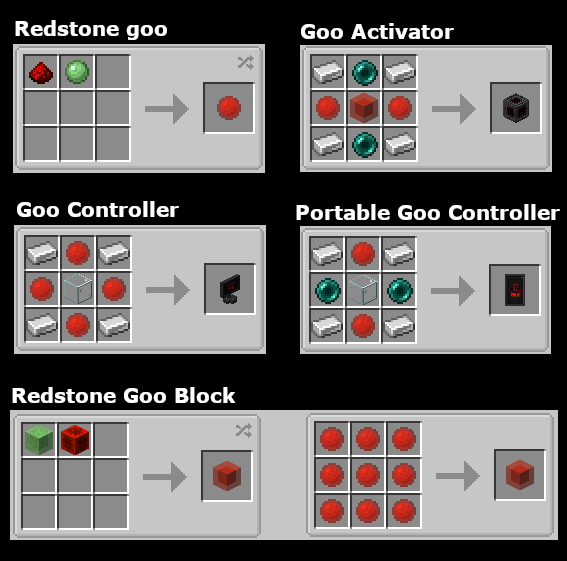
Crafting:
常见问题
GooeyRed 支持哪些 Minecraft 版本?
GooeyRed 支持 Minecraft Java 版 1.20.1–26.1.2,共 3 个版本,可用的加载器:Forge / NeoForge。下载时注意选择和你游戏版本一致的文件。
GooeyRed 怎么安装?
先用 PCL2 或 HMCL 启动器安装对应版本的 Forge / NeoForge,再把下载的 .jar 文件放进游戏目录的 mods 文件夹,重新启动游戏即可。开启了版本隔离的,mods 文件夹在 versions/版本名 下面。
评论
登录后评论和评分