
截图
介绍
Good Flags



Beta 1.7.3 mod to add flags to the game. Flags have a 48×32 canvas supporting the 16 colours of
wool, and can be painted on by players by right-clicking the flag.
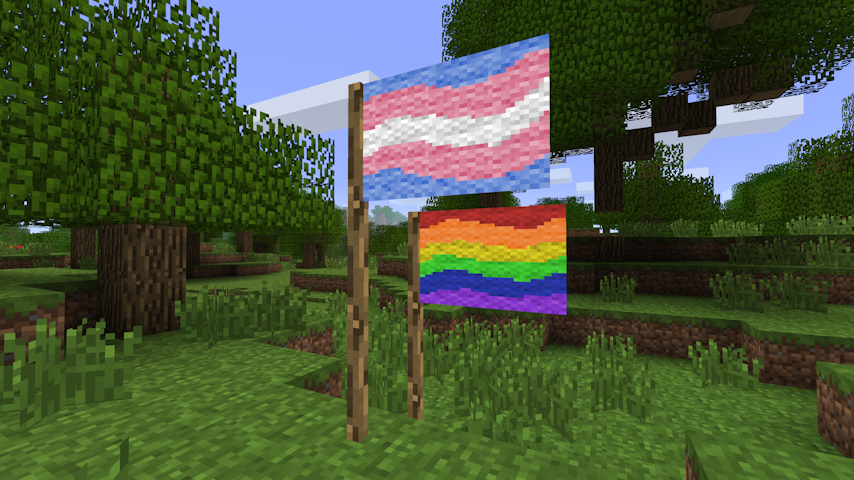
<img src="https://raw.githubusercontent.com/tmpim/my-good-mods/HEAD/good-flags/images/demo.png" alt="Screenshot of Minecraft Beta 1.7.3 showing two flags painted by a player placed in the world. One flag is the
transgender pride flag, and the other is the rainbow pride flag.” loading=”lazy”>
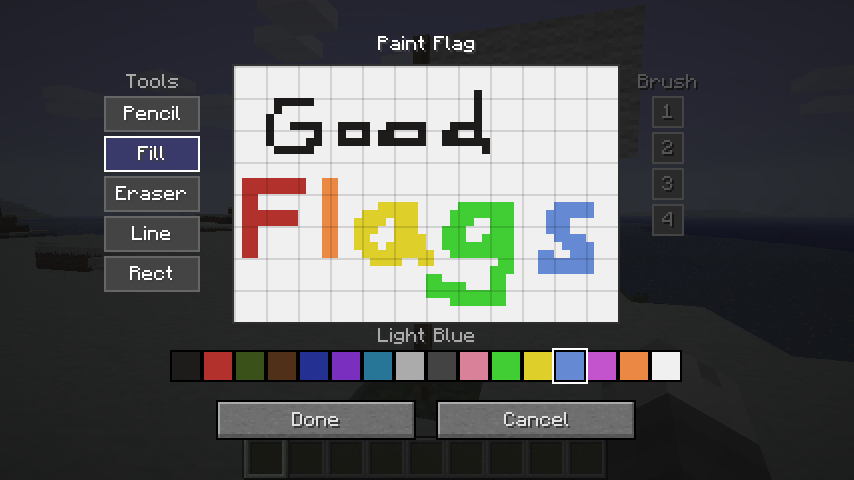
<img src="https://raw.githubusercontent.com/tmpim/my-good-mods/HEAD/good-flags/images/demo3.png" alt="Screenshot of Minecraft Beta 1.7.3 showing the flag painting screen. The player has drawn the text "Good Flags" using
the pencil tool, and filled each letter with red, orange, yellow, green, and light blue using the fill
tool.” loading=”lazy”>
Items
Flag
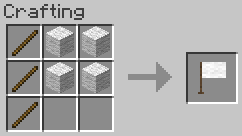
3x Stick + 4x Wool → 1x Flag. Any wool can be used.
Painting
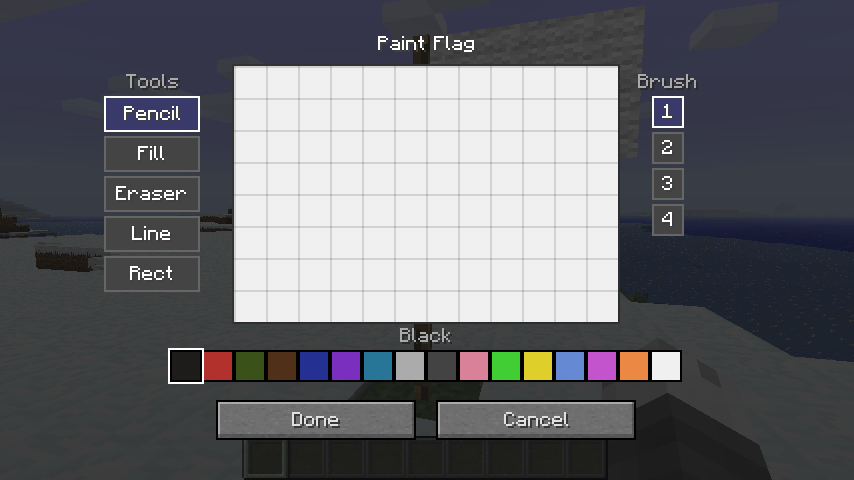
Right-clicking a placed flag pole opens the paint editor.
Canvas
The flag’s canvas is 48 × 32 pixels using the 16 wool colours as a palette.
Tools
| Tool | Description |
|——–|—————————————————————-|
| Pencil | Freehand drawing. Respects brush size. |
| Eraser | Erases pixels back to white. Respects brush size. |
| Fill | Flood-fills a contiguous region with the selected colour. |
| Line | Draws a straight line between two points. Respects brush size. |
| Rect | Draws a filled rectangle. |
| Circle | Draws a filled ellipse. |
Undo / Redo
The paint screen supports up to 32 levels of undo/redo history.
| Action | Shortcut |
|——–|————————|
| Undo | Ctrl+Z |
| Redo | Ctrl+Y or Ctrl+Shift+Z |
Flag Item
Design Preserved on Break
Breaking a painted flag drops it as an item that carries the full pixel data. Placing the item
down restores the original design exactly.
Inventory Preview
A downsampled miniature of the flag’s design is rendered on top of the item icon in inventory
slots, giving you a quick visual reference without needing to place the flag.
Copying a Flag
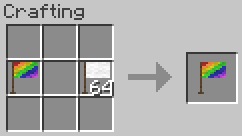
Place a blank flag and a painted flag together anywhere in the crafting grid to produce a
copy of the painted flag. The painted source is not consumed.
Clearing a Flag
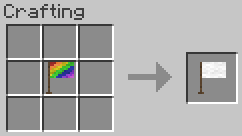
Place a painted flag alone in the crafting grid to receive a blank flag back.
Configuration
Configuration is exposed via Glass Config API and
can be edited in-game with Mod Menu Babric.
| Option | Default | Description |
|————————-|———|—————————————————————-|
| Item Renderer Enabled | true | Draw the flag preview on the item icon in inventory. |
| Item Texture Resolution | 16 | Base icon resolution in pixels; increase for HD texture packs. |
| Flag Preview X | 3 | X offset of the preview region within the item icon. |
| Flag Preview Y | 0 | Y offset of the preview region within the item icon. |
| Flag Preview Width | 12 | Width of the preview region (item pixels). |
| Flag Preview Height | 8 | Height of the preview region (item pixels). |
Compatibility
This mod has no known compatibility issues. It adds explicit compatibility with
Always More Items and
Entity Culling.
Requirements
- Minecraft Beta 1.7.3
- Babric
- StationAPI
- Fabric Language Kotlin
- Glass Config API
- Glass Networking
Recommended
- Mod Menu Babric (for in-game configuration)
License
This mod is licensed under the MIT license.
tmpim 的其他作品
查看全部 →
Good Compression
Beta 1.7.3 mod that adds compressed blocks such as Stone Bricks, Hay Bales, Coal Blocks, and Redstone Blocks.

Good Sign Editing
Beta 1.7.3 mod that allows editing signs by right-clicking, as well as exiting the sign screen with Escape.

Good Asset Fetcher
Beta 1.7.3 library mod to provide assets from any version of Minecraft to other mods.

Good Clumps
Beta 1.7.3 mod to merge nearby dropped items together.
评论
登录后评论和评分