
截图


介绍
GeyserTPC
🌏 Need instructions in other languages? Please visit the GitHub
A teleportation utility mod designed specifically for Geyser-Fabric servers.
GeyserTPC is based on TeleportCommands, a teleportation mod that provides
homes, warps, teleport requests, spawn teleportation, and other quality-of-life commands for Minecraft servers.
This fork extends the original experience with Bedrock Edition support, offering Floodgate-powered graphical interfaces
and cross-platform usability improvements for players joining through Geyser.
*NOTE
The compatibility of this mod version follows Geyser-Fabric,
and older versions will not be on the compatibility list.
Features
- Home management system
- Server-wide warps
- Teleport request (tpa) system
- Death location teleportation (/back)
- Overworld spawn teleportation (/worldspawn)
- Bedrock-friendly GUI interfaces
- Cross-platform gameplay support through Geyser
- Java Edition keyboard shortcuts (When installed on both server and client)
Bedrock Edition Support
When Floodgate is installed, Bedrock Edition players can access the Bedrock Edition native interface for:
- Home management (/ghome)
- Warp management (/gwarp)
- Teleport request management (/gtpa)
- Back / Worldspawn dialog
This provides a more user-friendly experience than command-only interaction on mobile and console devices.
*WARNING
Without Floodgate installed on the server, Bedrock Edition players must use the standard inventory-based interface
instead.
GUI
Tpa Menu (Java/Bedrock Edition)
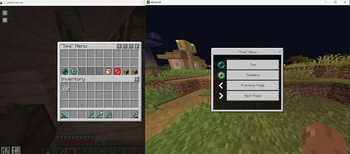
The “/gtpa” command menu
Tpa to… Menu (Java/Bedrock Edition)
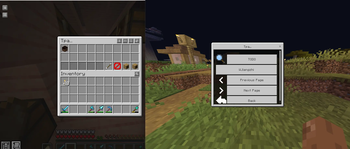
The gui when you choose tpa player
Home Menu (Java/Bedrock Edition)
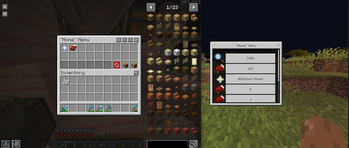
The “/ghome” command menu
The ‘/gwarp’ command is similar as well
No safe location dialog
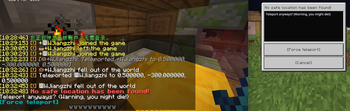
When you enter /back or /worldspawn, the target location is not safe
Commands
World & Utility Teleportation
/worldspawn [<skipSafetyCheck>]
Teleports the player to the Overworld spawn point.
If set to true, safety checks will be bypassed.
/back [<skipSafetyCheck>]
Teleports the player to their last death location.
If set to true, safety checks will be bypassed.
Home System
Homes are private teleport locations bound to individual players.
/sethome <name>
Creates a new home at the current location.
/home [<name>]
Teleports to the specified home.
If omitted, the default home will be used.
/ghome
Opens the home management GUI for teleportation and deletion.
/delhome <name>
Deletes an existing home.
/renamehome <name> <new_name>
Renames an existing home.
/homes
Lists all saved homes.
/defaulthome <name>
Sets the default home.
Warp System
Warps are server-wide teleport points managed by administrators.
/warp <name>
Teleports to a specified warp point.
/gwarp
Opens the warp management GUI (admin only).
/warps
Lists all available warps.
/setwarp <name>
Creates a new warp point. Requires permission level 4.
/delwarp <name>
Removes an existing warp point. Requires permission level 4.
/renamewarp <name> <new_name>
Renames a warp point. Requires permission level 4.
Player Teleport Requests (TPA System)
/tpa <player>
Sends a teleport request to another player.
/gtpa
Opens the TPA request management GUI, allowing players to accept or deny requests.
/tpahere <player>
Requests a player to teleport to your location.
/tpaaccept <player>
Accepts an incoming teleport request.
/tpadeny <player>
Denies an incoming teleport request.
Planned Features
- Search support in Bedrock Edition UI
Credits
Special thanks to the original author MrSnowy.
This project is heavily inspired by TeleportCommands, which provided the
foundation for this fork.
License
This project is licensed under
the MIT License.
The original Teleport Commands project is also licensed under
the MIT License.
常见问题
GeyserTPC 支持哪些 Minecraft 版本?
GeyserTPC 支持 Minecraft Java 版 26.1–26.3,共 5 个版本,可用的加载器:Fabric。下载时注意选择和你游戏版本一致的文件。
GeyserTPC 怎么安装?
先用 PCL2 或 HMCL 启动器安装对应版本的 Fabric,再把下载的 .jar 文件放进游戏目录的 mods 文件夹,重新启动游戏即可。开启了版本隔离的,mods 文件夹在 versions/版本名 下面。运行环境:客户端 / 服务端。
ZCT Studio 的其他作品
查看全部 →
Hardcore Disabled Fix
A lightweight client-side mod that fixes and restores usability of certain world options when playing in Hardcore mode.
Hardcore Disabled Fix
A lightweight client-side mod that fixes and restores usability of certain world options when playing in Hardcore mode.

Better Mob Griefing GameRule
BMGG (Better Mob Griefing GameRule) allows you to control mob_griefing for each entity.

Teleport Commands – Interim
This mod is an extra version adapted from TeleportCommands
评论
登录后评论和评分