
GearSwap
Save and instantly swap complete equipment setups — hotbar, armor, and offhand. One key, one click.
截图
介绍
GearSwap
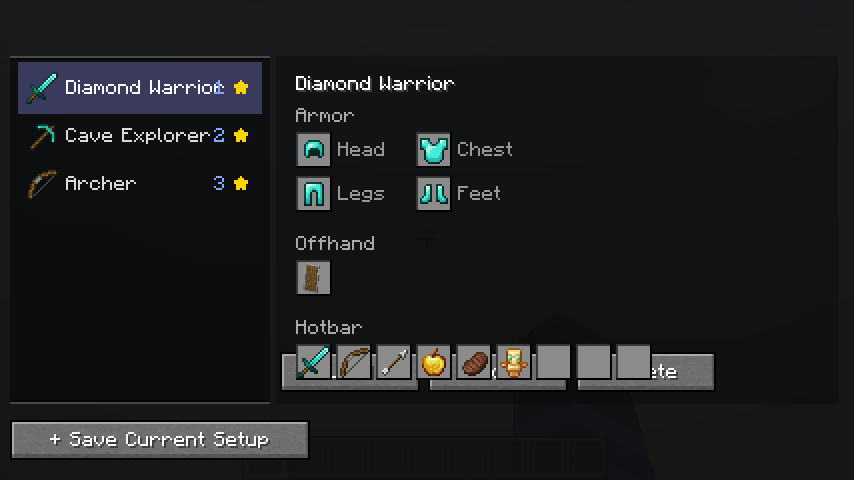
Tired of rearranging your hotbar every time you switch tasks? Loadouts lets you save your complete equipment setup — hotbar, armor, and offhand — and restore it in one click.
Features
Save Any Setup
Capture your current hotbar (9 slots), armor (4 slots), and offhand as a named loadout with a custom icon. Loadouts are stored per-world or globally across all worlds.
Load in One Click
Open the loadout screen with L, select a loadout, and hit Load. Items are moved using standard inventory clicks — fully compatible with vanilla servers, Realms, and multiplayer.
Radial Quick-Switch Menu
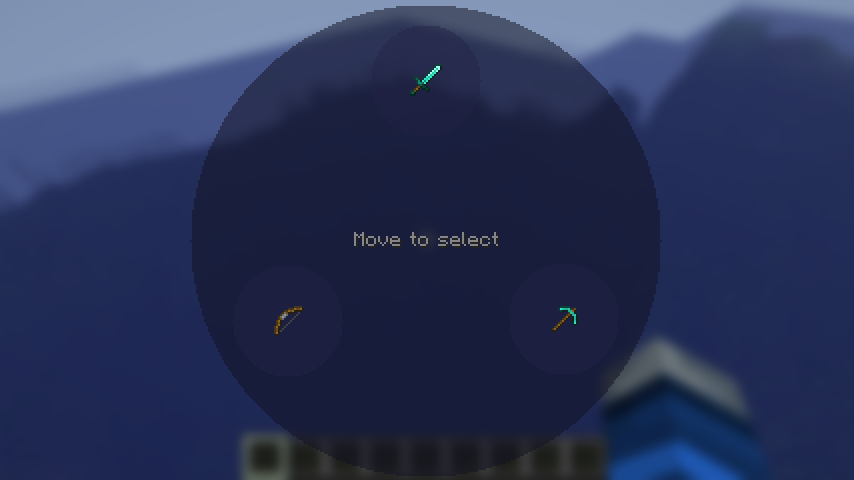
Hold L to open a radial wheel showing all your loadouts. Move your mouse to the one you want and release to apply it instantly — no menus needed.
Direct Hotkeys
Bind loadouts to L + 1–9 for instant one-handed switching without opening any screen.
Smart Item Matching
Loadouts find your items wherever they are in your inventory. Choose simple matching (any matching item) or exact matching (same enchantments and custom name).
Toast Notifications
Get a clean slide-in notification when a loadout is applied, including which items couldn’t be found.
Controls
| Key | Action |
|—–|——–|
| L (tap) | Open loadout management screen |
| L (hold) | Open radial quick-switch menu |
| L + 1–9 | Apply loadout bound to that number |
Configuration
Config file: config/loadouts/settings.json
Options include click delay (for anti-cheat compatibility), radial menu opacity, max loadouts per world/global, and whether to close the screen after loading.
Compatibility
- Client-side only — works on any server including vanilla and Realms
- Fabric 0.18.4+ for Minecraft 1.21.11
- Requires Fabric API
常见问题
GearSwap 支持哪些 Minecraft 版本?
GearSwap 支持 Minecraft Java 版 1.21.11–26.1.2,共 2 个版本,可用的加载器:Fabric。下载时注意选择和你游戏版本一致的文件。
GearSwap 怎么安装?
先用 PCL2 或 HMCL 启动器安装对应版本的 Fabric,再把下载的 .jar 文件放进游戏目录的 mods 文件夹,重新启动游戏即可。开启了版本隔离的,mods 文件夹在 versions/版本名 下面。运行环境:仅客户端。
ModTestFactory 的其他作品
查看全部 →
Bonemeal Sugercane 2.0
Now you can grow sugarcane with bonemeal

The Hockey Mod
Adds hockey sticks, pucks, nets, and ice rinks to Minecraft!

Death Recap
See where you died, track lost items, and find your way back with a recovery compass. Client-side — works on any server.

Heads Up
Proactive survival alerts — durability warnings, hunger, inventory full, low health, potion expiry & more. All-in-one notification mod.
评论
登录后评论和评分