Gatehouse
Server-side Fabric whitelist approvals for private offline-mode Minecraft servers, with optional Discord and Telegram workflows.
截图
介绍
Gatehouse
Run a private Fabric server in offline mode? Gatehouse turns whitelist requests into a simple approval workflow for your staff.
When an unknown player tries to join:
1. Gatehouse detects the vanilla whitelist rejection.
2. A durable request is saved automatically.
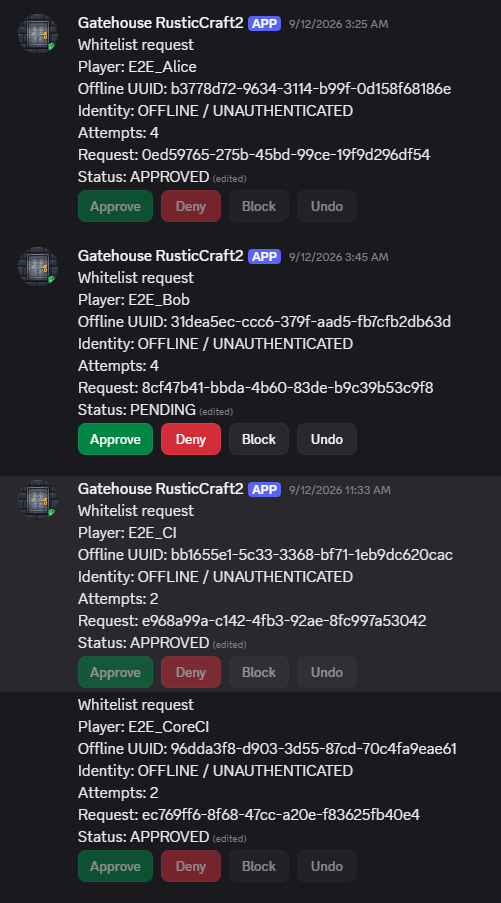
3. Staff review it in-game or receive optional Discord and Telegram notifications.
4. Approval adds the player to Minecraft’s native whitelist.
5. The player reconnects and gets in.
Players do not need a client-side mod, Discord account, or external registration.
FEATURES
– Automatic whitelist request creation
– Optional Discord and Telegram approval workflows
– In-game commands: /gatehouse, /gh, and /wlreq
– Approve, deny, block, unblock, undo, status, and reload actions
– SQLite persistence and restart/outage recovery
– Minecraft’s native whitelist remains authoritative
– Server-side only; no client IP addresses stored by default
INSTALLATION
1. Download the file matching your Minecraft version and place it in the server’s mods/ directory.
2. Install Fabric Loader and Fabric API for that same Minecraft version.
3. Start the server once to generate config/gatehousemc/config.json and the request database.
4. Optionally configure Discord or Telegram integrations. Provider secrets support environment variables such as ${DISCORD_TOKEN} and ${TELEGRAM_BOT_TOKEN}.
Published builds currently cover Minecraft 1.14.4 through 1.21.4. Choose the exact matching file; Java and loader requirements vary by Minecraft version.
OFFLINE-MODE NOTICE
Raw online-mode=false servers do not verify Minecraft identity ownership with Mojang or Microsoft. Approving a username grants access to the offline profile derived from that name; it does not authenticate an account.
LINKS
Source: https://github.com/DurdeuVlad/GatehouseMC
Issue tracker: https://github.com/DurdeuVlad/GatehouseMC/issues
Setup guide: https://github.com/DurdeuVlad/GatehouseMC/blob/main/README.md
常见问题
Gatehouse 支持哪些 Minecraft 版本?
Gatehouse 支持 Minecraft Java 版 1.14.4–1.21.4,共 12 个版本,可用的加载器:Fabric / Forge / NeoForge。下载时注意选择和你游戏版本一致的文件。
Gatehouse 怎么安装?
先用 PCL2 或 HMCL 启动器安装对应版本的 Fabric / Forge / NeoForge,再把下载的 .jar 文件放进游戏目录的 mods 文件夹,重新启动游戏即可。开启了版本隔离的,mods 文件夹在 versions/版本名 下面。
dwurdy 的其他作品
查看全部 →
Rustic Craft 2
The official modpack for Rustic Craft 2

HeapHammer
Deterministic Minecraft server stress testing and retained-memory regression detection.

Dwurdy Sharks
All the sharks. Maintained.** A credited community fork of Ben's Sharks for NeoForge 1.21.1, with 26 registered marine entity types and the wild-shark despawn fix.
评论
登录后评论和评分