介绍
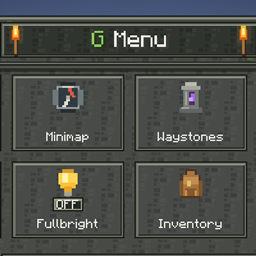
G Menu brings your most-used mod screens together in one convenient menu. Press G while playing to open a compact, Minecraft-inspired interface with stone textures, moss, torches and clear icons.
Instead of remembering several different shortcuts, you can access these features from one place:
-
World Map: open Xaero’s World Map.
-
Minimap: adjust Xaero’s Minimap settings.
-
Waypoints: open Xaero’s waypoint manager to mark and manage locations, such as your base, villages or places you want to revisit.
-
Waystones: open the Waystones settings.
-
Voice Chat: open Simple Voice Chat’s setup or controls.
-
Shaders: open Iris’s shader selection screen.
-
Fullbright: switch Full Brightness Toggle on or off, with a live status indicator.
-
Settings: customize tile visibility, background dimming and hover animations.
G Menu helps you spend less time searching through menus and more time exploring and playing. It does not pause gameplay. Press G again or Escape to close it. English and German translations are included.
Requirements:
Minecraft 26.2, Fabric Loader 0.19.5 or newer, Fabric API for Minecraft 26.2, and Java 25. Install G Menu on the client only.
Optional mod compatibility:
The corresponding mods must be installed separately. This version supports Xaero’s World Map 1.46.1, Xaero’s Minimap 26.5.1, Waystones 26.2.0.12, Simple Voice Chat 2.6.24+26.2, Iris 1.11.4+mc26.2, and Full Brightness Toggle 4.5 for Minecraft 26.2. Their own dependencies are also required. Missing or unsupported integrations appear unavailable.
G Menu provides shortcuts to these mods; it does not include them. The Waystones tile opens settings, not a teleport menu. Shader packs must be installed separately.
If Full Brightness Toggle also uses G, reassign its shortcut in Minecraft Controls so that G only opens G Menu.
常见问题
G Menu 支持哪些 Minecraft 版本?
G Menu 支持 Minecraft Java 版 26.2,可用的加载器:Fabric。下载时注意选择和你游戏版本一致的文件。
G Menu 怎么安装?
先用 PCL2 或 HMCL 启动器安装对应版本的 Fabric,再把下载的 .jar 文件放进游戏目录的 mods 文件夹,重新启动游戏即可。开启了版本隔离的,mods 文件夹在 versions/版本名 下面。
评论
登录后评论和评分