Frogwagons UI
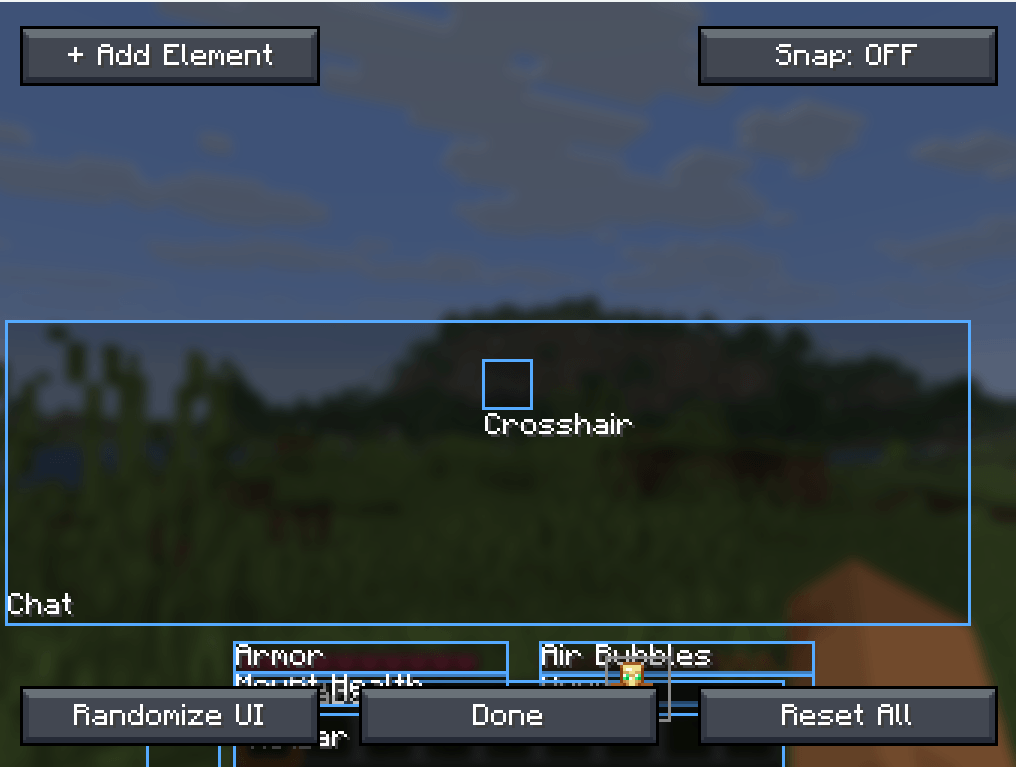
This mod adds a fully customizable UI selection menu. To add a new widget just click "+ add element" and select the widget you want from the drop-down menu.
截图
介绍
This is a mod that adds a customizable UI menu to your game that focuses on making your gaming expirience much better and practical. By pressing U you can move around your UI add new ones, or delete them with a drop down menu you can add new widgets like an item counter, coordinates or a clock. The mod has a whole ton of fun vanilla style widgets that you can place anywhere on your screen so you can have your favorite PVP widgets or have a way to see how many blocks you have at any time. You can even save your favorite preset and load it at any time.
If you have any widget ideas just comment them and ill try to add them.
常见问题
Frogwagons UI 支持哪些 Minecraft 版本?
Frogwagons UI 支持 Minecraft Java 版 1.21.11,可用的加载器:Fabric。下载时注意选择和你游戏版本一致的文件。
Frogwagons UI 怎么安装?
先用 PCL2 或 HMCL 启动器安装对应版本的 Fabric,再把下载的 .jar 文件放进游戏目录的 mods 文件夹,重新启动游戏即可。开启了版本隔离的,mods 文件夹在 versions/版本名 下面。
Frogwagon 的其他作品
查看全部 →
Windswept Waters
This mod makes water actually move: a new wind every day, stronger in storms, pushing rivers and seas that carry you, your boat and anything floating.

02510 The dark age
This modpack is a cool modpack with mods that go well together its just like minecraft but updated a ton. there's new structures and the spaced out plenty. There's almost no things that don't have another mod that makes it better
Jungles Unleashed
The Bronze: an earthbound cousin of the Breeze that hurls pieces of itself and leaves you wading through Slowness II. Comes with a stepped jungle pyramid, three floors of spawner-lined maze, and the Dwarven Pickaxe.
评论
登录后评论和评分