
FriendChat
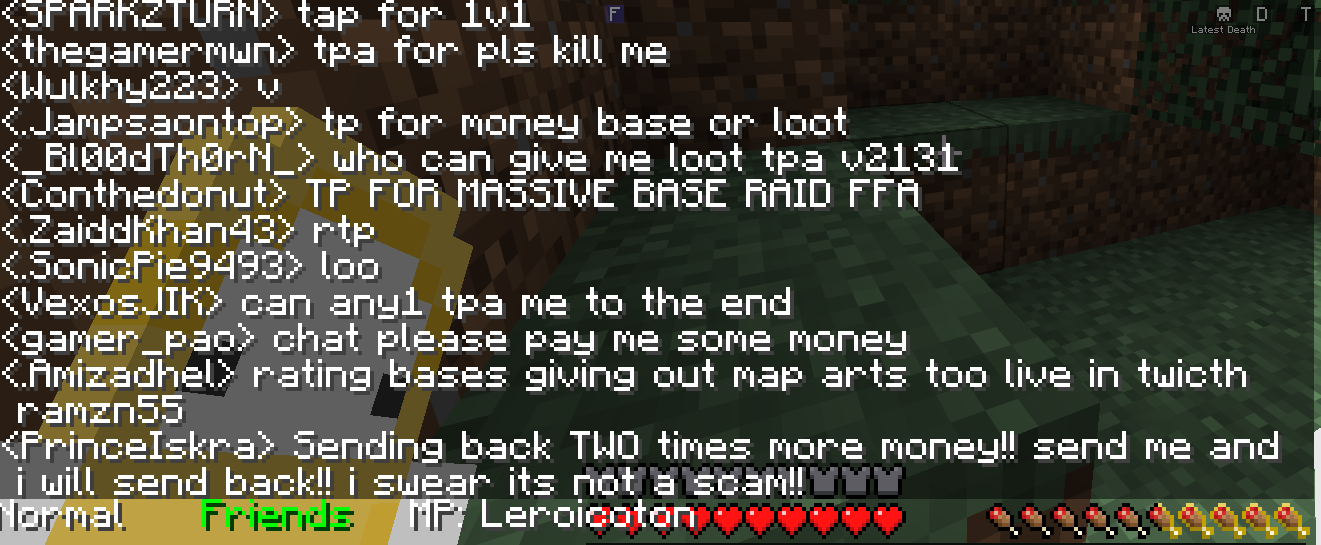
Organize your chat into Normal, Friends, and MP tabs — filter messages by friend list and quickly reply to specific players without typing full commands.
截图
介绍
FriendChat
FriendChat adds a lightweight tabbed chat interface to Minecraft, letting you filter conversations and quickly message specific players — no server-side installation required.
✨ Features
- Three chat tabs: Normal, Friends, and MP (private message focus)
- Friends list: filter chat to only show messages containing names from your custom friend list
- MP tab: focus on a single player and instantly reply to them without retyping commands
- Configurable commands: rename any of the mod’s commands to fit your server or playstyle
- Persistent config: your friend list and settings are saved between sessions
- Client-side only: works on any server, nothing to install server-side
🖱️ How it works
Three tabs appear at the bottom-left of your chat screen. Click a tab to switch between:
- Normal — the regular, unfiltered chat
- Friends — only messages containing a name from your friends list are shown
- MP — only messages involving your currently focused player are shown
📜 Commands
All commands are client-side.
/chatfriend
Manage your friends list.
/chatfriend add <player>— add a player to your friends list/chatfriend remove <player>— remove a player from your friends list
/chatmp <player>
Focuses the MP tab on the given player and switches to it. While the MP tab is active, any message you type in chat that doesn’t start with / is automatically sent as a private message to that player using your server’s message command (see below).
/friendchatconfig <type> <newValue>
Rename the mod’s commands.
/friendchatconfig friend <newValue>— change the name of/chatfriend/friendchatconfig mp <newValue>— change the name of/chatmp
⚠️ A game restart is required for renamed commands to take effect.
⚙️ Configuration
FriendChat automatically creates two files in your config folder:
friendchat_config.json— command names and server message commandfriendchat_friends.json— your saved friends list
Default values:
{
  "friendCmd": "chatfriend",
  "mpCmd": "chatmp",
  "configCmd": "friendchatconfig",
  "serverMsgCmd": "msg"
}
If your server uses a different private message command than /msg (e.g. /tell, /w, /pm), update serverMsgCmd in the config file to match — this is what FriendChat uses under the hood when you type in the MP tab.
📋 Requirements
- Only Minecraft 1.21.11 for now
- Fabric Loader 0.18.1+
- Fabric API
- Java 21+
📄 License
MIT
常见问题
FriendChat 支持哪些 Minecraft 版本?
FriendChat 支持 Minecraft Java 版 1.21.11,可用的加载器:Fabric。下载时注意选择和你游戏版本一致的文件。
FriendChat 怎么安装?
先用 PCL2 或 HMCL 启动器安装对应版本的 Fabric,再把下载的 .jar 文件放进游戏目录的 mods 文件夹,重新启动游戏即可。开启了版本隔离的,mods 文件夹在 versions/版本名 下面。运行环境:仅客户端。
评论
登录后评论和评分