
FrameGuard
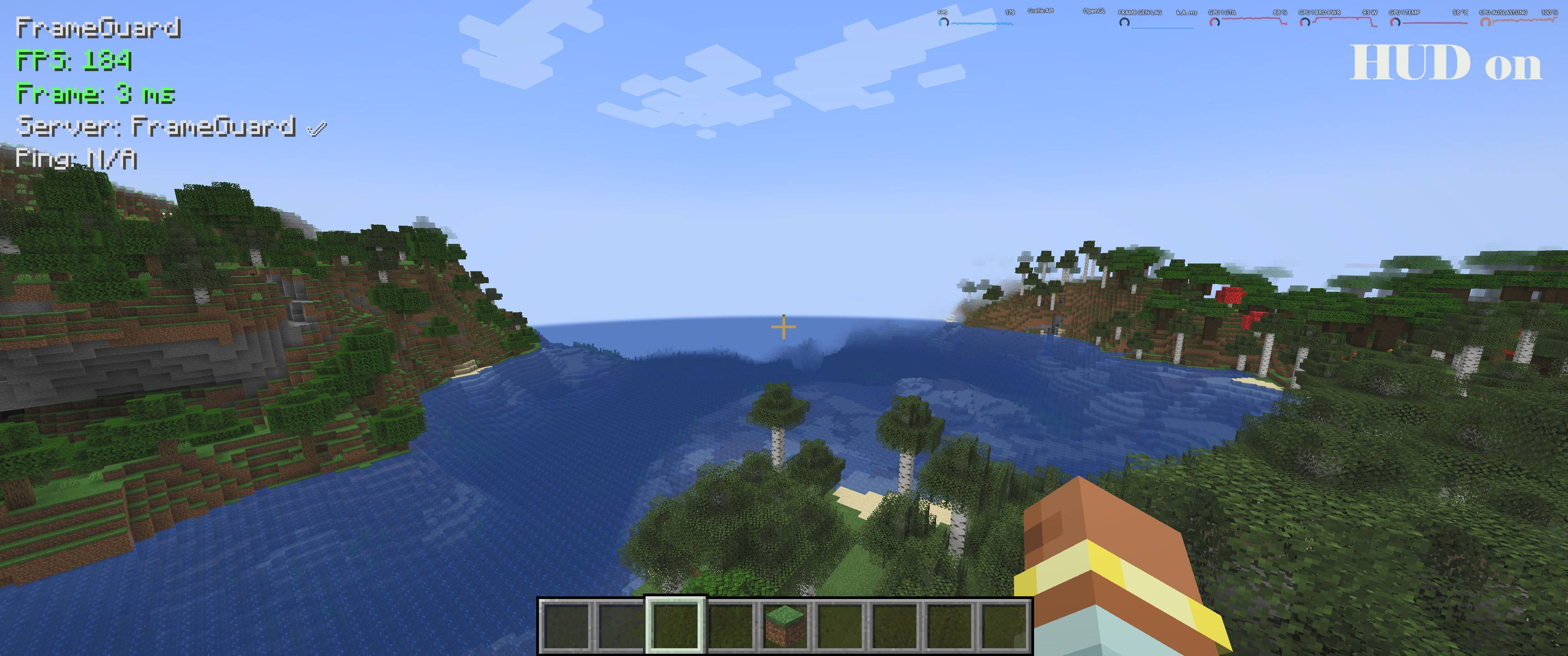
FrameGuard ist eine Client-Performance-Mod für große Modpacks: HUD mit FPS/Frametime/1% Lows & Stutter-Zähler, Hotkeys zum Umschalten und Report-Export in Logs. Hilft Lag-Spikes zu finden und das Spiel flüssiger zu machen.
截图


介绍
FrameGuard
FrameGuard is a configurable performance, protection, monitoring, and diagnostics mod for Minecraft, available for Forge and NeoForge.
It combines server-side optimizations with client-side rendering improvements, performance monitoring, and local diagnostic tools. FrameGuard is designed for dedicated servers, single-player worlds, technical builds, and larger modpacks.
Its systems can be enabled, disabled, and configured individually, allowing players and server administrators to choose the features that suit their setup.
Supported Editions
FrameGuard is distributed as separate Forge and NeoForge files.
| Edition | Minecraft | Minimum Mod Loader Version | Java |
|---|---|---|---|
| Forge | 1.20.1 | Forge 47.4.20 or newer | Java 17 |
| NeoForge | 1.21.1 | NeoForge 21.1.230 or newer | Java 21 |
Always install the file matching your Minecraft version and mod loader. Do not install both editions together or keep multiple FrameGuard versions in the same mods folder.
Server-Side Features
-
XP orb merging: Combines nearby experience orbs while preserving their accumulated experience.
-
Dropped-item merging: Combines compatible item entities using configurable distances, intervals, processing budgets, and ground-stack limits.
-
Player-drop protection: Temporarily protects recently dropped player items from FrameGuard merging and cleanup.
-
Optional item cleanup: Removes excessive unprotected dropped items, with configurable warning messages and removal limits.
-
Entity Cramming Guard: Handles overcrowded groups of selected non-living entities, with configurable exclusions and limits.
-
TNT and explosion optimizations: Reduces work in TNT collision and explosion processing. Compatible block drops can be combined before item entities are created. Restrictive legacy TNT behavior is optional rather than the default optimization method.
-
Hopper optimization: Reduces unnecessary idle work through sleep-and-wake behavior that responds to relevant inventory, neighbor, and redstone changes.
-
Item bans: Lets administrators manage banned item IDs and prevent or remove those items through supported inventory, interaction, and dropped-item paths.
Performance profiles and individual settings control how these systems operate. Cleanup, item bans, and configured entity removal can delete affected objects, so their settings should be reviewed before use on an existing world.
Chunk Management and World Generation Diagnostics
FrameGuard provides tools for managing and investigating chunk-related load:
-
Adaptive server-load and view-distance control.
-
Prioritized chunk delivery.
-
Configurable client-side chunk mesh upload budgets.
-
Chunk activity monitoring and world-generation profiling.
-
Diagnostic commands for inspecting unusually slow generation stages.
-
Configurable overload relief for persistently loaded chunks.
Persistent-chunk relief supports temporary pauses and stronger optional intervention, with protection areas and blacklist exceptions. Temporarily suspended registrations are restored without recreating registrations that were removed while relief was active.
These systems do not replace terrain generation or guarantee that every world-generation mod will run faster.
Client-Side Features
Performance HUD
The HUD provides Normal, Advanced, and Debug display modes.
Depending on the selected mode and settings, it can show:
-
FPS and current frame time.
-
Average, maximum, and P99 frame time.
-
1% low FPS.
-
Ping, server TPS, and FrameGuard server status.
-
RAM, CPU, and GPU information where reliable measurements are available.
Position, spacing, visible values, update intervals, and warning thresholds are configurable. Unavailable measurements can be displayed as N/A.
Default controls:
-
F9: Show or hide the HUD.
-
F10: Switch HUD modes.
-
Alt + F9: Reset collected performance statistics.
Key bindings can be changed through Minecraft’s controls.
Rendering Optimizations
-
Entity Render Guard: Can reduce the rendering of distant living entities in crowded areas while protecting configured categories and exceptions. It does not delete entities or change server-side AI.
-
Static chest rendering: Supports closed normal chests, trapped chests, double chests, and ender chests while retaining opening and closing animations.
-
Item-frame batching: Groups suitable item frames for rendering, with fallback paths for maps, clocks, dynamic content, and protected items.
-
TNT smoke reduction: Provides configurable filtering based on distance, overlapping particle density, and particle budgets.
Central Blacklist and Optional Mod API
FrameGuard includes a dedicated frameguard-blacklist.toml for compatibility exceptions.
It provides rules for supported entity, item, storage, dimension, TNT, and diagnostic-file operations. An exception applies to its relevant FrameGuard system; it is not automatically a global exemption from every feature.
Other mod developers can use the public blacklist API to register compatibility exceptions without access to FrameGuard’s source code. Runtime registrations do not automatically rewrite the saved configuration.
API registrations can be disabled globally or controlled through allowed and blocked mod IDs.
Local Diagnostics
The client command:
/frameguard exportlogscreates a local diagnostic ZIP in the frameguard-exports folder.
Exports use configurable size limits, filtering, context lines, and file-access rules. Full raw-file inclusion is disabled by default. Optional automatic crash diagnostics can also recover pending reports at the next safe startup.
FrameGuard does not automatically upload diagnostic packages to an external service. Always review a package before sharing it, as diagnostic information may still contain personal or server-specific details.
Official signed releases also support offline authenticity verification.
Installation and Configuration
-
Server only: Provides server-side optimization, protection, and diagnostics. Players do not need FrameGuard merely to connect.
-
Client only: Provides the HUD, client rendering systems, configuration interface, and local diagnostics.
-
Client and server: Enables both sets of features and allows server TPS synchronization when enabled.
Configuration files are generated under config/frameguard/:
-
frameguard-client.toml— client settings. -
frameguard-server.toml— server settings. -
frameguard-blacklist.toml— compatibility exceptions and API policy.
Back up worlds and configurations before updating. Stop the game or server before manually editing configuration files.
FrameGuard can reduce specific sources of load and help identify performance problems, but it cannot guarantee lag-free gameplay. Test compatibility when combining mods that modify the same rendering, merging, cleanup, TNT, hopper, or chunk-management behavior.
License
FrameGuard is released under All Rights Reserved.
You may:
-
Use FrameGuard on private and public servers.
-
Include the unmodified FrameGuard
.jarin free modpacks, provided the modpack is not sold. -
Share customized FrameGuard configuration files.
-
Accept voluntary donations for servers or modpacks, provided donations are not required to download the modpack or access FrameGuard itself.
You may not:
-
Sell FrameGuard or modified versions.
-
Redistribute modified FrameGuard
.jarfiles. -
Redistribute or publish FrameGuard’s source code or modified source code.
-
Claim FrameGuard as your own work.
Links
常见问题
FrameGuard 支持哪些 Minecraft 版本?
FrameGuard 支持 Minecraft Java 版 1.20.1–1.21.1,共 2 个版本,可用的加载器:Forge / NeoForge。下载时注意选择和你游戏版本一致的文件。
FrameGuard 怎么安装?
先用 PCL2 或 HMCL 启动器安装对应版本的 Forge / NeoForge,再把下载的 .jar 文件放进游戏目录的 mods 文件夹,重新启动游戏即可。开启了版本隔离的,mods 文件夹在 versions/版本名 下面。
Nachtvisionar 的其他作品
查看全部 →
NJGSMP staffel 1
EN: Official modpack for the NJGSMP server with a focus on adventure, magic, technology, and exploration. Access only via whitelist on our Discord.

Ages of Arcane Industry
Ages of Arcane Industry is a Minecraft modpack that combines medieval fantasy with advanced magic and complex technology into a cohesive world.
CityGuard
A server-side citybuild economy mod with jobs, markets, bounties, teams, and chunk claims.
Dungeons of the North
Dungeons of the North ist ein Erkundungs- und PvE-Modpack mit neuen Biomen, Dungeons, Strukturen und Bossen. Quests und Skill-Progression begleiten dich auf deiner Reise – atmosphärisch, herausfordernd und performancefreundlich.
评论
登录后评论和评分