Framed Perfect
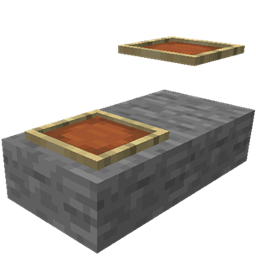
Ever wanted the Item Frame to sit on the voxel itself? This is the mod for you, this mod brings back 26.3 Cushion Tech to Item Frames allowing the item frame to sit on any voxel surface rather than hover!
介绍
Framed Perfect
Ever wanted the Item Frame to sit on the voxel itself?
Vanilla Item Frames only stick on full block surfaces regardless of whether the block placed on has a surface to support it, placed on a Slab, Fence Post, Signs, the Item Frame just hangs in the air.
This mod brings back Cushion Tech from 26.3 and applies it to a new item frame; Free Frame, Instead of hovering at a fixed offset from the block face, Free Frames reads the voxel / collision shape of the block it’s attached to and sit flush against the voxel.
What it does
Voxel-aware placement: The frame snaps to the real collision shape of the supporting block, not the imaginary full cube.
Works on partial blocks: Slabs, stairs, walls, fences, chests, cauldrons, trapdoors, pistons, custom modded shapes — if it has a voxel face, a frame can sit on it.
Everything else behaves: Rotation, item rendering, comparator output, and maps all work the way you already expect from a frame.
Vanilla frames untouched: Existing builds don’t change. Nothing is overwritten or replaced.
Compatibility
Required on both client and server, since the mod adds a new entity type.
No config required. Install it and craft one.
Reads voxel shapes at runtime rather than using a hardcoded block list, so blocks from other mods should work without a patch.
Removing the mod will remove any placed free frames and drop their contents. Back up your world before uninstalling.
常见问题
Framed Perfect 支持哪些 Minecraft 版本?
Framed Perfect 支持 Minecraft Java 版 1.21.1,可用的加载器:NeoForge。下载时注意选择和你游戏版本一致的文件。
Framed Perfect 怎么安装?
先用 PCL2 或 HMCL 启动器安装对应版本的 NeoForge,再把下载的 .jar 文件放进游戏目录的 mods 文件夹,重新启动游戏即可。开启了版本隔离的,mods 文件夹在 versions/版本名 下面。
评论
登录后评论和评分