
介绍
FPShud,
a mod that displays FPS with high precision on a customizable HUD
Mod features:
Main FPSis the main FPS value, regulated by theMain Update IntervalAvererage FPSis the average FPS value from all the values took inAverage Update IntervalMax FPSis the maximum FPS value from all the values took inMin Update IntervalMin FPSis the minimum FPS value from all the values took inMax Update Interval

FPShud with default settings
HUD Features:
- General Settings:
–
Toggle HUDtoggles the entire HUD
–
X Positionchanges the X position of the HUD on the screen
–
Y Positionchanges the Y position of the HUD on the screen
–
Text Colorchanges the color of the entire HUD
–
Shadowenables or disables the text shadow on the HUD
–
Polling Rateindicates how frequently the mod should poll FPS
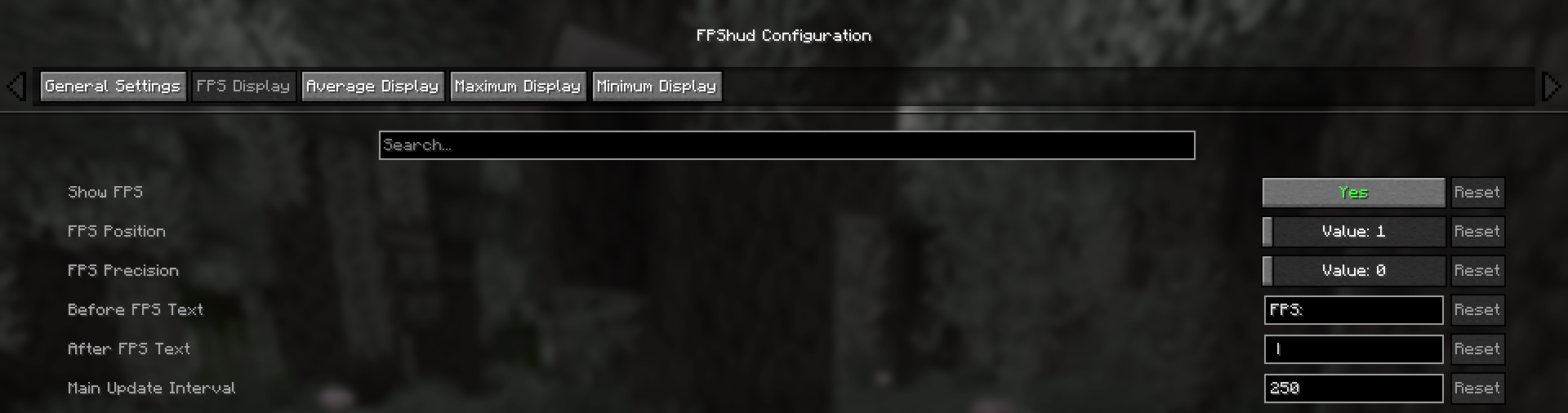
- FPS Display, Average Display, Maximum Display, Minimum display
Those settings can be changed for every one of the 4 fields:
–
Show FPStoggles the FPS field
–
FPS Positionindicates the position of the field (first, second, third, fourth)
–
FPS Precisionindicates how many points of precision the field have
–
Before FPS Textchanges the text displayed before the specific field FPS value
–
After FPS Textchanges the text displayed after the specific field FPS value
ModMenu config:
- GUI config is accessible from the ModMenu mods list
The config screen is divided into 5 categories:
– General Settings:
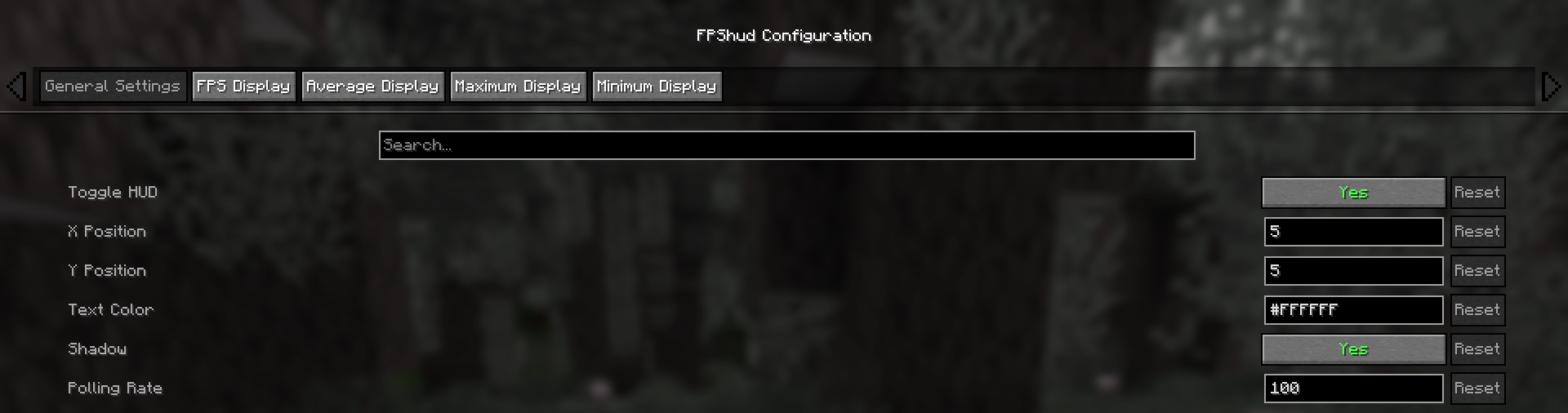
– FPS Display, Average Display, Maximum Display, Minimum display:
Why FPShud?
Highly precise:
FPShud uses time elapsed from frame to frame for the FPS value calculation;
This method of sampling elevates precision and customization, permitting millisecond precise calculations and FPS displaying
FPShud works with a
Polling Ratealgorithm; samples are taken every frame, then smoothen every poll-time and finally processed to make them match the required
Main Update Interval,Average Update Interval,Maximum Update IntervalandMinimum Update Intervalrequirements
For those reasons, it is not recommended to set
Polling RateandUpdate Intervalto low values because results may appear very fluctuating
Highly customizable:
You can customize the HUD to match every style:

only showing Avr and Max, modified 'Before Text', changed 'Text Color', removed 'Shadow', changed 'Precision' and modified 'Update Intervals'
Other:
If you are using ModMenu install ClothConfigAPI to access the config screen
Don’t want ModMenu? The config file is accessible and editable in your config directory, changes apply after a game restart
Settings will be saved in your config folder and updated at runtime
The mod is client side (works on multiplayer)
Links:
常见问题
FPS hud 支持哪些 Minecraft 版本?
FPS hud 支持 Minecraft Java 版 1.21–26.2,共 16 个版本,可用的加载器:Fabric / Quilt。下载时注意选择和你游戏版本一致的文件。
FPS hud 怎么安装?
先用 PCL2 或 HMCL 启动器安装对应版本的 Fabric / Quilt,再把下载的 .jar 文件放进游戏目录的 mods 文件夹,重新启动游戏即可。开启了版本隔离的,mods 文件夹在 versions/版本名 下面。运行环境:仅客户端。
Flavio6561 的其他作品
查看全部 →
Tiers
PvPTiers 官方 tiertagger 模组

Lightning Death
Spawns a lightning bolt on a player death position

Bind Quit
Disconnects you with the press of a button

ItaTiers
Display tiers from the Official Italian Tierlist
评论
登录后评论和评分