
介绍
This library adds no actual content on its own, but it contains a lot of code that would otherwise have to be copied between projects. Feel free to reference the library in your project, too! (ask me about maven repository, if you want to make it the easiest way)
It adds all kinds of things like @Configurable annotation to make config files easy to generate and many other things (see source on GitHub). There is no documentation for it yet, it will be eventually written if somebody requests it.
Modpacks
Feel free to use it in any modpack if you desire, I love modpacks! You just should not have a direct income from the modpack itself (streaming is fine, ads on the launcher etc are fine). Also, if you have the chance, show your support and link this page in your modpack description/mod listing, please!
Rehosting
Please, do not rehost unless required and absolutely necessary – like launchers. Otherwise keep it on Curse. And source code? Just fork it on GitHub!
Bug reports
I am watching OpenEye for crashes, but if you run into some other issue/do not use OpenEye, please, open an issue on github and I will look into it and fix it. Bugs reported on Curse or CurseForge will most likely will not be noticed! Use GitHub issues!
Contact
IRC: Esper.net / #CallMeFoxie, nickname Ashlee
Twitter: https://twitter.com/CallMeFoxie
常见问题
FoxieLib 支持哪些 Minecraft 版本?
FoxieLib 支持 Minecraft Java 版 1.8.9–1.10.2,共 4 个版本,可用的加载器:Forge。下载时注意选择和你游戏版本一致的文件。
FoxieLib 怎么安装?
先用 PCL2 或 HMCL 启动器安装对应版本的 Forge,再把下载的 .jar 文件放进游戏目录的 mods 文件夹,重新启动游戏即可。开启了版本隔离的,mods 文件夹在 versions/版本名 下面。
CallMeFoxie 的其他作品
查看全部 →
Better Sleeping
修改Minecraft中床的工作方式

Hydraulicraft
A mod about Hydraulics
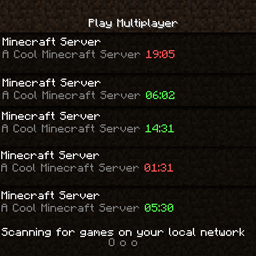
Can I Join Now?
Updates MOTD to reflect current in-world time to show if it is safe to join
Calendar API
Universal API for all your day and time needs!
评论
登录后评论和评分