
Forge Retail
This mod introduces new tools, a new forging system and an economy system.
截图
介绍
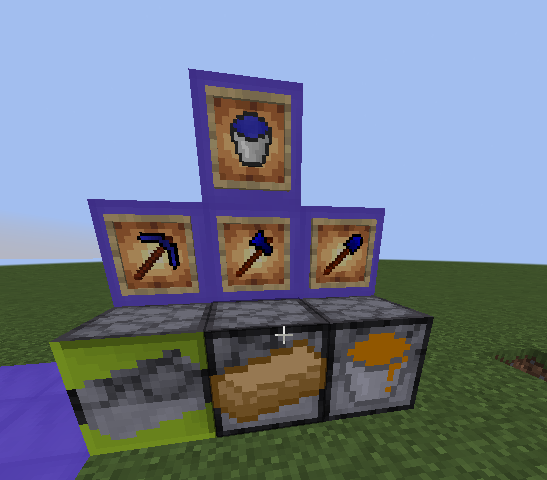
this is the Forge Retail mod! With this mod you can sell items and make tools to get materials faster. The mod adds new ores, new tools and a completly new forging system. To make the new tools you need to melt materials, make casts, cast parts then you can craft the new tools.
Crafting
To make tools, read these:
- workstations
- melting
- cast making
- casting
- last steps
Workstations:
- Melting Station
- Cast maker
- Casting station
Melting:
To melt materials you need meltable materials, a bucket and some coal.
Meltable materials:
- Gold
- Iron
- Copper
- Sapphire
Steps:
- Put any meltable materials, coal and bucket into the melting machine
- Press the button
Cast making:
To make casts you need a Cast maker, Molten gold and a stone tool part.
Steps:
- Craft a Cast maker
- Craft a stone tool part (any type)
- Put the stone tool part into the Cast Maker
- Press the button
Casting:
To make the final tool parts you need the Casting station and the tool materials.
Tool materials:
- Molten iron (for handle only)
- Molten copper (for handle only)
- Molten sapphire (for head only)
Steps:
- Put the one of the casts and a tool material into the casting station
- Press the button
Last steps:
To make the final tool parts you need a tool head and a copper handle (iron handle tools is in the next update).
Steps:
- Craft together a sapphire tool head and a copper handle
- Done
Items:
- Molds (ingot, pickaxe head, axe head, shovel head)
- Sapphire juice: a drink item that gives you effects
- Beanie: cosmetic item
Selling:
To open the selling gui press F.
Steps:
- Put the product in the first slot
- Set a price
- Press the button
Installation:
This mod is in 1.20.1 forge client and server.
常见问题
Forge Retail 支持哪些 Minecraft 版本?
Forge Retail 支持 Minecraft Java 版 1.20.1–1.21.1,共 2 个版本,可用的加载器:Forge / NeoForge。下载时注意选择和你游戏版本一致的文件。
Forge Retail 怎么安装?
先用 PCL2 或 HMCL 启动器安装对应版本的 Forge / NeoForge,再把下载的 .jar 文件放进游戏目录的 mods 文件夹,重新启动游戏即可。开启了版本隔离的,mods 文件夹在 versions/版本名 下面。运行环境:客户端和服务端都要装。

评论
登录后评论和评分