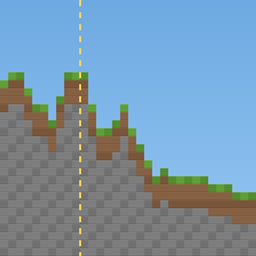
ForceBlend
Smooths the border between old and newly generated terrain, once per world, with a backup first. Works on Fabric and NeoForge, in singleplayer and on servers.
介绍
Original mod by Mauro0805. Maintained by Mauro0805 and SasnycoN
ForceBlend prepares existing Overworld chunks so Minecraft can blend new terrain beside them after seed or
terrain-generator changes, chunk imports, or deletions. Minecraft generates the terrain; ForceBlend marks the existing
side of the border.
Opening a world
ForceBlend defaults to once per world. A read-only client analysis shows affected chunks, regions, deferred work,
and estimated processing time. By default you get Prepare world (backup is on), Open without changes, or Cancel.
With automatic backup turned off, the backup option comes first, followed by Prepare without backup (risky).
Processing uses native Minecraft screens with progress and completion, not desktop dialogs.
Dedicated servers have no menu and always complete a full-world backup before applying. On clients the backup is on by
default and can be turned off in the settings. ZIPs go under backups/forceblend/<world>/, outside the source world.
They exclude only the root runtime session.lock. Keep your own restorable copy of important worlds.
Settings and migration
Edit config/forceblend.properties; Fabric Mod Menu optionally provides a settings screen.
Automatic analysis and client backup default on, detailed logging defaults off, the chunk limit defaults
to unlimited, and processing threads default to all available processors.
Once mode records successful, non-deferred completion in forceblend.json. Existing forceblendonce.json markers
are honored. Every-opening mode ignores those markers for later imports, seed changes, or deletions.
Replace the old ForceBlend Once JAR with the correct loader build; do not install both.
Source and permission
MIT-licensed, free, usable in any modpack without asking, and open to forks.
Updates, response times, and pull-request review are not guaranteed.
Source: Mauro0805/ForceBlend. Release notes and the changelog are on GitHub.
常见问题
ForceBlend 支持哪些 Minecraft 版本?
ForceBlend 支持 Minecraft Java 版 1.18–26.3,共 32 个版本,可用的加载器:Fabric / NeoForge。下载时注意选择和你游戏版本一致的文件。
ForceBlend 怎么安装?
先用 PCL2 或 HMCL 启动器安装对应版本的 Fabric / NeoForge,再把下载的 .jar 文件放进游戏目录的 mods 文件夹,重新启动游戏即可。开启了版本隔离的,mods 文件夹在 versions/版本名 下面。
SasnycoN 的其他作品
查看全部 →
Village Railways
Joins villages with minecart railways (railroads to some), built from vanilla blocks.

Villagers Remember: Quests, Trust & Fair Trades
Villagers ask you for help. Earn their trust, better prices, a share of their work and the title of patron. Server-side.
Wrench and Wand
Tech, Magic and Exploration

Less Villager Chatter
Villagers and wandering traders say "hmm" less often, and quieter if you want. Server-side, works with vanilla clients.
评论
登录后评论和评分