
Floating Damage Indicators
Adds floating damage numbers above every target you hit, and your own incoming damage too. Color-coded by damage type.
截图


介绍
Floating Damage Indicators
Floating damage numbers above every target you hit, and your own incoming damage too. Fully configurable.
Note: FDI must be installed on both the server and client for multiplayer servers.
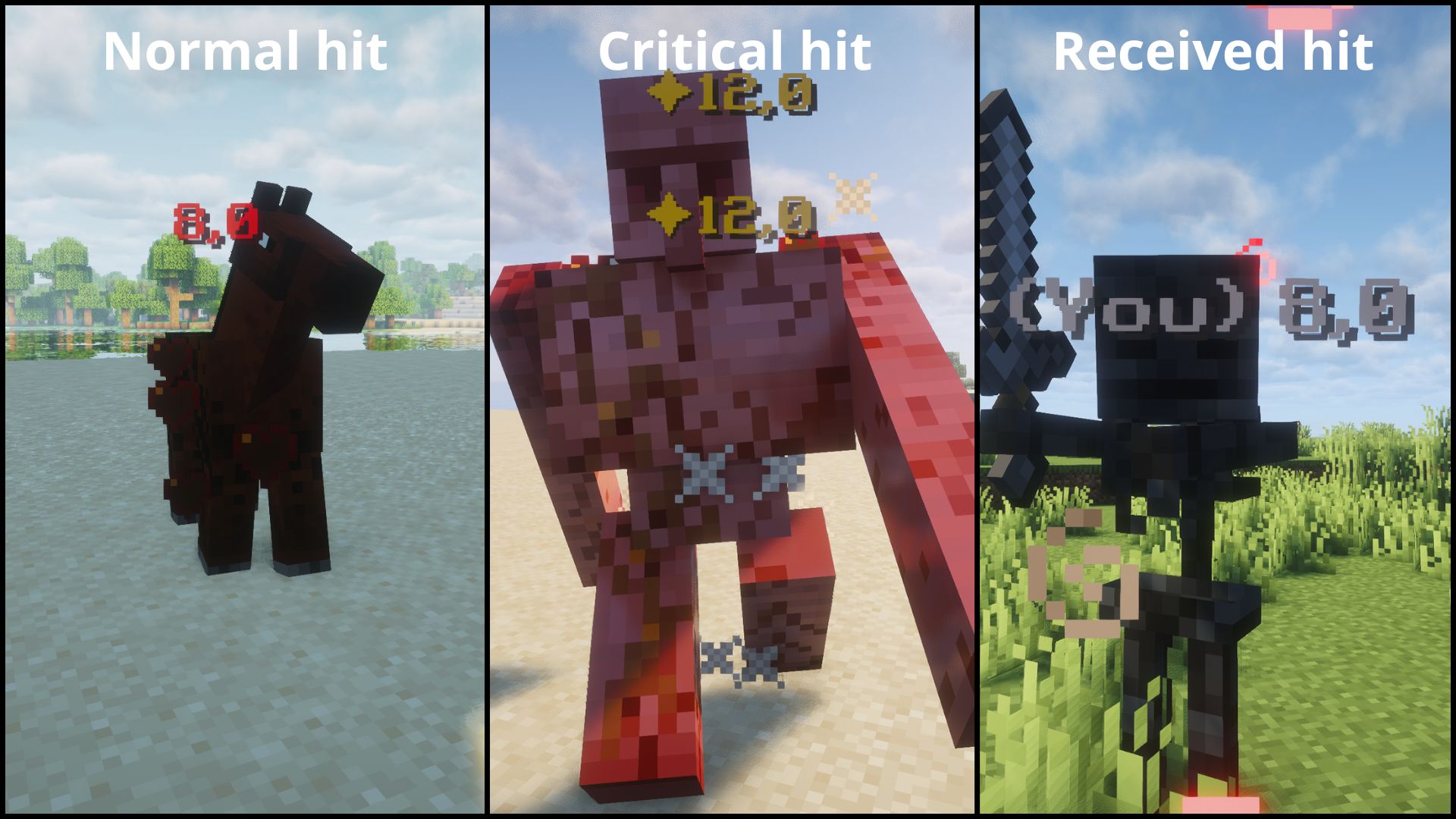
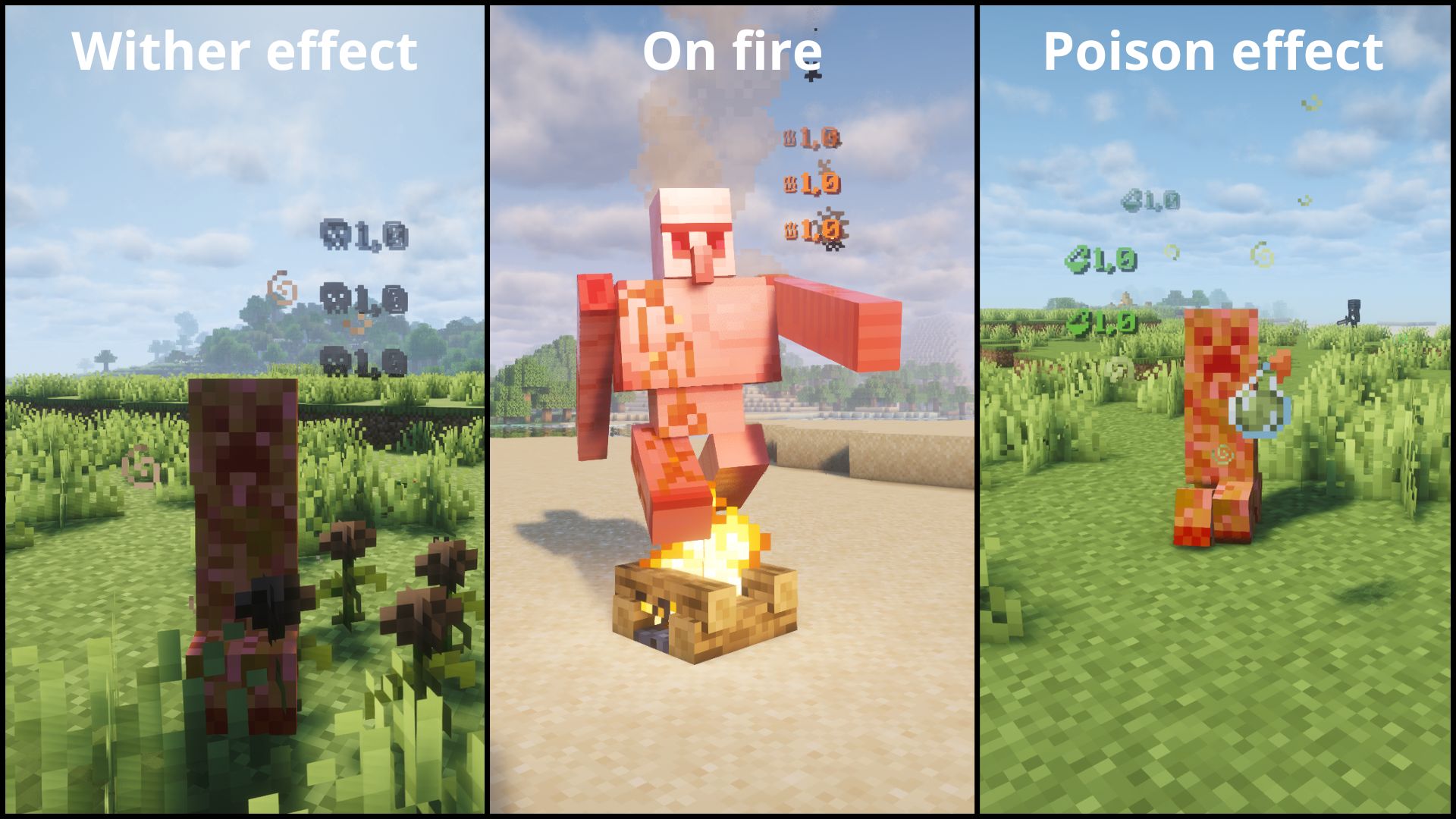
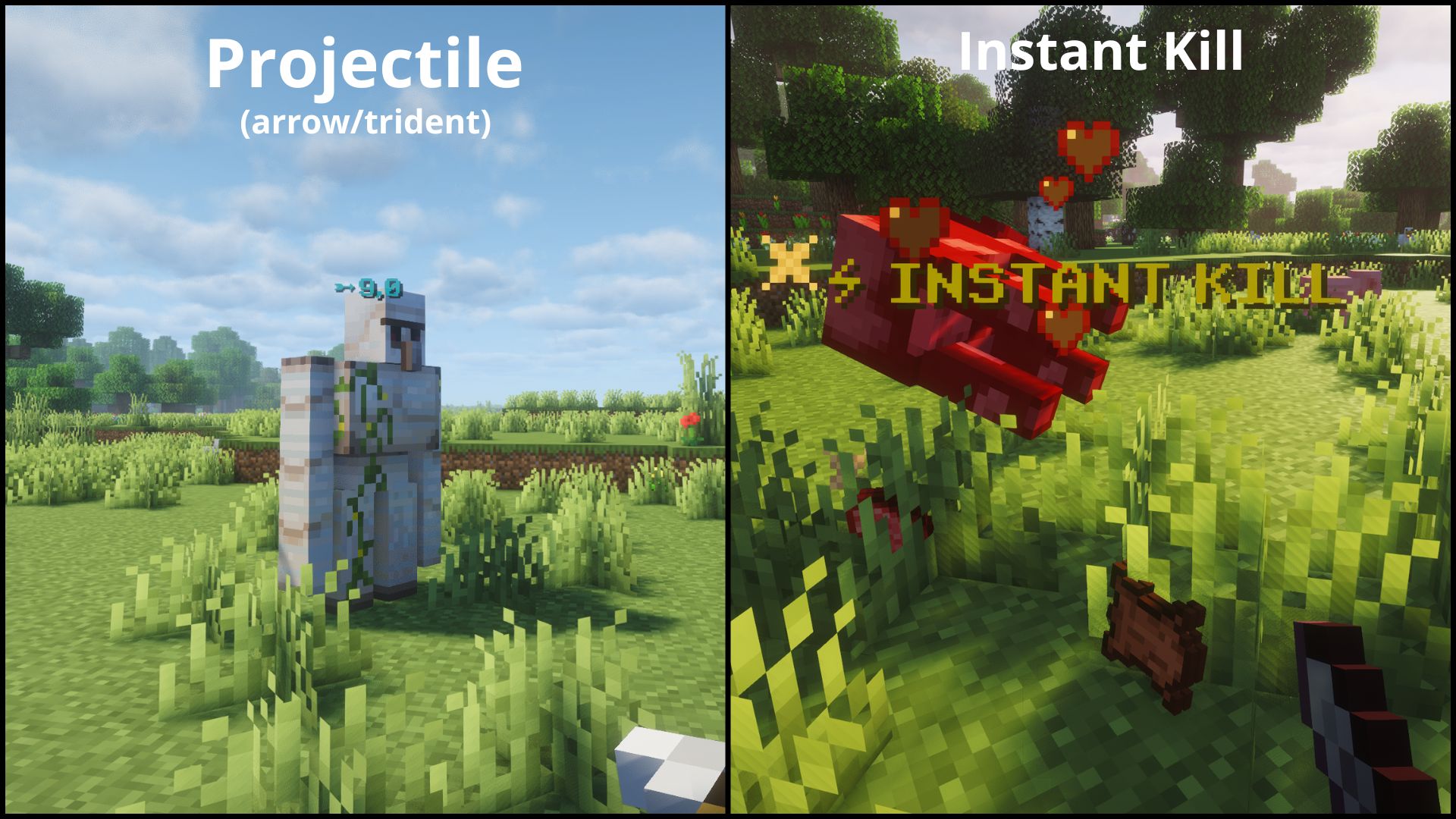
⚡ Features
- Floating damage numbers above any entity you hit.
- See your own incoming damage too.
- Color-coded by damage type.
- Fully Configurable.
- Works in both singleplayer and dedicated multiplayer.
| Type | Icon | Color | Example |
|————–|—————-|————|——————————|
| NORMAL | — | Red | Normal hit |
| CRITICAL | ✦ | Gold | Jump crit |
| PROJECTILE | ➵ | Cyan | Arrow, trident |
| FIRE | ♨ | Orange | Fire Aspect |
| POISON | ⚗ | Green | Poison |
| WITHER | ☠ | Dark gray | Wither effect |
| RECEIVING | — | Light gray | Damage you take |
| INSTANT_KILL | ⚡ INSTANT KILL | Gold | Kill an enemy in one hit |
⚙️ Configuration
The easiest way to configure Floating Damage Indicators is in-game: open Mod Menu (Fabric) or the Config button in the mods list (NeoForge).
Note: The screen has two tabs: General for the two main toggles and Formats for the color, prefix and per-type options. Client-side changes are applied without restarting the game.
After launching the game once, a configuration file will be generated:
config/floatingdamageindicators.jsonAvailable options:
Important:
showDamageis the master switch. If it is set tofalse, no numbers are shown at all, including your own incoming damage.showReceivedDamageonly takes effect whileshowDamageistrue.
Note: The
formatssection is client-side only, exceptINSTANT_KILL‘senabled, which the server also reads. The server only readsshowDamage,showReceivedDamage, andINSTANT_KILL‘senabled. On a dedicated server, the server-side values still require a server restart.
Tip: Some Unicode characters or emojis may not display correctly depending on your Minecraft font. If a character shows as a blank square, try a different one. Stick to basic Unicode symbols for best results.
Tip: Colors use
#RRGGBB. Invalid values like"ZZZ123"or"FF"will silently fall back to the default for that damage type.
{
  "showDamage": true,
  "showReceivedDamage": true,
  "formats": {
    "NORMAL":       { "enabled": true, "prefix": "", "color": "#FF3333", "showDamage": true },
    "CRITICAL":     { "enabled": true, "prefix": "\u2726", "color": "#FFD700", "showDamage": true },
    "PROJECTILE":   { "enabled": true, "prefix": "\u27B5", "color": "#00FFFF", "showDamage": true },
    "FIRE":         { "enabled": true, "prefix": "\u2668", "color": "#FF6600", "showDamage": true },
    "POISON":       { "enabled": true, "prefix": "\u2697", "color": "#4A9E2F", "showDamage": true },
    "WITHER":       { "enabled": true, "prefix": "\u2620", "color": "#3C3C3C", "showDamage": true },
    "RECEIVING":    { "enabled": true, "prefix": "(You) ", "color": "#AAAAAA", "showDamage": true },
    "INSTANT_KILL": { "enabled": true, "prefix": "\u26A1 INSTANT KILL", "color": "#FFD700", "showDamage": false }
  }
}
Each format entry:
- enabled: show/hide this damage type entirely
- prefix: custom text shown before (or instead of) the number
- color: 6-digit hex color (RGB)
- showDamage: if false, only the prefix is shown (no damage number)
📦 Requirements
Fabric
- Fabric API
- Mod Menu (optional)
- (+26.X) Java 25 or newer
NeoForge
- (+26.X) Java 25 or newer
💬 Suggestions & Issues
If you have an idea, a suggestion, or found a bug, feel free to leave a comment on the CurseForge page or open an issue on the GitHub repository.
❓ FAQ
Can I use this mod in a public modpack?
Yes! You’re free to include it in any public or private modpack, no permission needed.
📜 License
This project is licensed under the MIT License.
常见问题
Floating Damage Indicators 支持哪些 Minecraft 版本?
Floating Damage Indicators 支持 Minecraft Java 版 1.21.1–26.3,共 5 个版本,可用的加载器:Fabric / NeoForge。下载时注意选择和你游戏版本一致的文件。
Floating Damage Indicators 怎么安装?
先用 PCL2 或 HMCL 启动器安装对应版本的 Fabric / NeoForge,再把下载的 .jar 文件放进游戏目录的 mods 文件夹,重新启动游戏即可。开启了版本隔离的,mods 文件夹在 versions/版本名 下面。运行环境:客户端和服务端都要装。
3CTeam 的其他作品
查看全部 →
Simple Gunpowder
Adds gunpowder recipes, villager trades, piglin bartering, Abandoned Camps and End City loot, including bulk recipes for large amounts of gunpowder.

Simple Gunpowder
Adds gunpowder recipes, villager trades, piglin bartering, Abandoned Camps and End City loot, including bulk recipes for large amounts of gunpowder.

Villager Phrases
Adds immersive phrases to villagers and iron golems when you interact with or walk near them.

No Mobs Thank You
Prevents unwanted mobs from spawning via JSON presets and override lists.
评论
登录后评论和评分