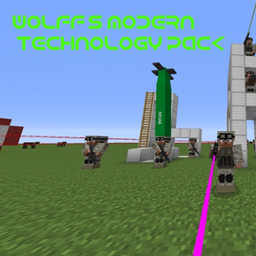
Flan’s Ultimate 2: Wolff’s Modern Technology Pack
为 Flan's Mod Ultimate 2 提供的一系列现代武器配件、光学瞄具和装备。
介绍
Wolff’s Modern Technology Pack adds a collection of modern weapon attachments and specialized equipment to Flan’s Mod Ultimate 2.
Originally released for Minecraft 1.7.10, the pack has been brought back for modern Minecraft and updated for use with Flan’s Mod Ultimate 2.
📦 Content
The pack focuses primarily on weapon attachments and modern equipment, including:
- Optical sights
- Red-dot sights
- Laser attachments
- Binoculars
- Protective equipment and shields
- Additional specialized equipment
- MOAB
The pack is designed to complement weapon-focused content packs by providing additional customization and equipment options.
🔫 Weapon Attachments
One of the main purposes of Wolff’s Modern Technology Pack is expanding the attachment selection available for Flan’s Mod weapons.
Compatible weapons can make use of the pack’s sights, optics, lasers and other attachments through the attachment system provided by Flan’s Mod Ultimate 2.
Actual attachment compatibility may depend on the configuration of the weapon being used.
⚙️ Requirements
Flan’s Mod Ultimate 2 is required.
The content packs are installed through the normal Minecraft mods folder.
No manual installation into a separate Flan folder is required when installing this project.
🛠️ Compatibility
This version is maintained specifically for Flan’s Mod Ultimate 2.
For the best experience, keep both Flan’s Mod Ultimate 2 and Wolff’s Modern Technology Pack up to date.
Problems concerning individual attachments or content from this pack should be reported for this project.
Problems involving the underlying weapon, attachment, rendering or content-loading systems should be reported to Flan’s Mod Ultimate 2.
常见问题
Flan’s Ultimate 2: Wolff’s Modern Technology Pack 支持哪些 Minecraft 版本?
Flan’s Ultimate 2: Wolff’s Modern Technology Pack 支持 Minecraft Java 版 1.20.1–1.21.1,共 2 个版本,可用的加载器:Forge / NeoForge。下载时注意选择和你游戏版本一致的文件。
Flan’s Ultimate 2: Wolff’s Modern Technology Pack 怎么安装?
先用 PCL2 或 HMCL 启动器安装对应版本的 Forge / NeoForge,再把下载的 .jar 文件放进游戏目录的 mods 文件夹,重新启动游戏即可。开启了版本隔离的,mods 文件夹在 versions/版本名 下面。
Wolff 的其他作品
查看全部 →
Flan’s Ultimate: Wolff’s NPC Vehicles
在 Custom NPC 的模型列表中添加 Flan's Mod 的载具

Flan’s Ultimate 2: Wolff’s Star Wars Pack
适用于 Flan's Mod Ultimate 2 的《星球大战》内容包

Flan’s Mod Ultimate 2
对 Flan's Mod 的现代化重制与扩展,加入武器、载具、飞机、机甲和盔甲,并大幅改进内容包。

Flan’s Ultimate 2: Classic Packs
一系列经典 Flan's Mod 内容包,已适配 Flan's Mod Ultimate 2 使用。
评论
登录后评论和评分