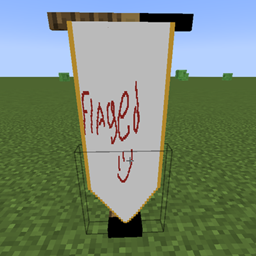
Flaged
Design, import, and build fully customizable multi-block flags and banners in-game with a built-in Paint Engine, custom shapes, and dual-sided support.
介绍
Flagged
Flagged is a feature-packed Minecraft mod that lets you design, customize, and display fully custom banners and flags right inside your world. Whether you want to paint pixel art in-game or import real images, Flagged gives you complete creative freedom to fly your colors in style.
🌟 Key Features
🎨 In-Game Paint Engine
Interact with the Weaver’s Easel to open an intuitive, feature-rich pixel art editor:
-
Tools Included: Brush, Pencil, Fill Bucket, Eraser, and Eyedropper.
-
Canvas Controls: Adjustable brush sizes (1px, 2px, 4px), Undo/Redo actions, and clear coordinate tracking ($X, Y$).
-
Color Palette: Full Hex/HSV picker along with instant access to standard Minecraft dye colors.
-
Design Presets: Save, load, and overwrite your favorite templates for quick reuse.
🖼️ External Image Import
-
Drag-and-Drop: Easily import custom images by dragging them into the game window.
-
Smart Scaling: Choose between Keep Aspect, Crop, or Stretch modes.
-
Color Reduction: Convert images to match the Minecraft color palette automatically.
📐 Unmatched Customization
-
Flexible Sizing: Adjust flag width and height dynamically, supporting resolutions up to 128px per side.
-
Unique Edge Shapes:
-
Straight Edge
-
Swallowtail
-
Pointed
-
Rounded
-
Battlement
-
Concave Arch
-
Pennant
-
-
Decorative Trims: Enhance your borders with Gold or Silver trims using nuggets.
-
Two-Sided Customization: Set back-face rendering to Mirror, Readable (flip text correctly), or draw Separate Art on each side.
🧵 Crafting & Usage
-
Craft a Weaver’s Easel and place it in your world.
-
Open the GUI to start painting or import an image.
-
Gather Materials: Creating or updating a flag requires wool, dyes (1 per block size), and metallic nuggets if adding trims.
-
Place Your Flag: Hang your new custom banner on wall mounts or ground poles.
💬 Support
Found a bug or have an idea? Join the Discord: **[https://discord.gg/uEyNJYWcGM]**
常见问题
Flaged 支持哪些 Minecraft 版本?
Flaged 支持 Minecraft Java 版 1.21.1,可用的加载器:NeoForge。下载时注意选择和你游戏版本一致的文件。
Flaged 怎么安装?
先用 PCL2 或 HMCL 启动器安装对应版本的 NeoForge,再把下载的 .jar 文件放进游戏目录的 mods 文件夹,重新启动游戏即可。开启了版本隔离的,mods 文件夹在 versions/版本名 下面。
AkorpuzZ 的其他作品
查看全部 →
Leyendas de Teagarden Pyroven
Fire, steam and steel. Pyrovenies don't ask if it's possible — they build it.
The Board
The Board is a mod that allows players to make entries or posts of text and images and displays them in a feed along with the player's name, the day (of the world), and the content.
Economics NeoForge
Economics is a complete 1.21.1 economy solution featuring a fully customizable GUI server shop (/shop), player-to-player chest & barrel shops, and built-in vanilla text display holograms for custom text and live rich-list leaderboards (/holo).
KOTH: King Of The Hill
Koth allows to create areas and schedule a pvp event, set a reward and create a leaderboard for servers
评论
登录后评论和评分