
Fiw Graves
Death graves done clean: packet-only markers, vanilla clients welcome, rollback for lost loot. Fabric + NeoForge.
截图
介绍
⚰ Fiw Graves
A place for your things when you’re gone.
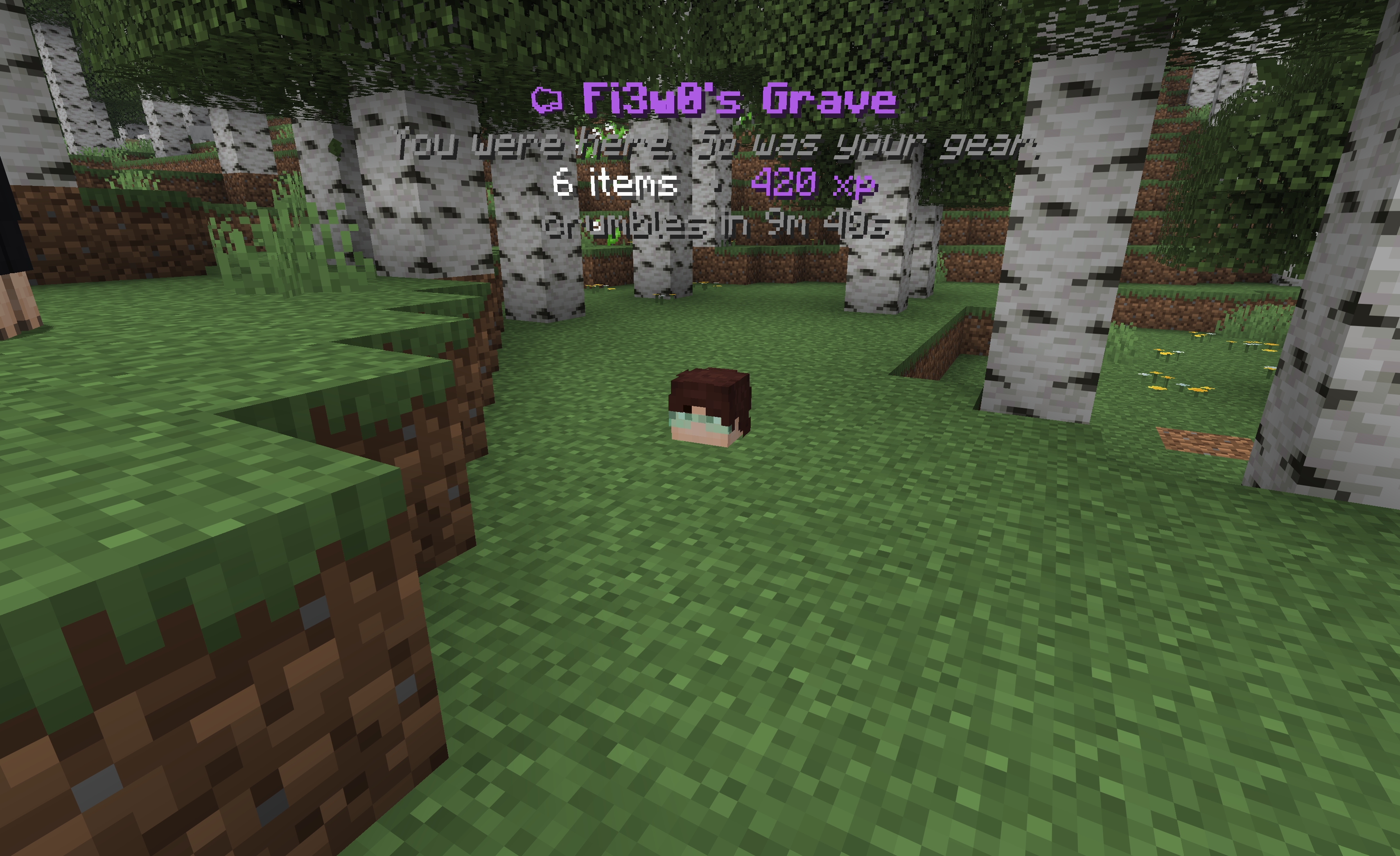
Die, and your items and XP settle into a grave — a floating head, a few lines of text,
and one of seven dry epitaphs. Walk back, crack it open, move on with your life.
For Minecraft 1.21.11 on Fabric and NeoForge.
The graves aren’t really there
The marker you see — head and hologram — is made of pure network packets. No armor
stand, no display entity, nothing is ever written into your world or its chunks.
What that buys you:
- 🖥 Nothing on the client. Players join with a completely unmodified vanilla client. Drop the jar on the server and you’re done.
- 💥 Crash-proof by construction. Server crash, world rollback, mod removed — there is nothing to leak. No floating heads, no orphaned holograms, no ghost entities to
/kill. Markers are rebuilt from the save file on every boot. - 💾 World-native saves. Grave data rides Minecraft’s own
SavedDatapipeline, so it backs up and restores with the world itself.
Griefed? Rolled back. Buggy? Backed up.
Every grave that expires or gets emptied by someone else is kept in a short per-player
history. One command respawns the lost loot as a fresh grave:
/graves rollback <player>On top of that, the original contents of every grave are separately backed up the
moment it’s created — kept for a configurable number of days regardless of whether the
grave was collected normally. If a bug (in this mod or anywhere else) ever eats a
player’s loot, an operator can still pull it back:
/graves restore <player>A safety net most grave mods don’t have — twice over.
In the field
- Right-click the head to open the grave like a chest.
- Sneak + right-click to quick-collect everything — armor jumps straight into empty armor slots.
- XP comes back the moment you interact.
- Die in lava, deep water, or the void and the grave settles at the nearest open, dry spot instead of drowning with you.
- Graves crumble after 10 minutes (configurable) and drop whatever’s left.
Commands
| Command | Who | Does |
|—|—|—|
| /graves | everyone | your graves + help |
| /graves tp [index] | ops* | warp to your latest (or nth) grave |
| /graves list [player] | ops for others | list graves — click an entry to warp |
| /graves rollback <player> [index] | ops | restore a lost grave from history |
| /graves restore <player> [index] | ops | restore from the loot-backup safety net (works even after collection) |
| /graves reload | ops | reload the config |
Admin commands gate on vanilla operator level 2 — no permission mod required.
\* Grave teleporting is off for regular players by default — finding your way back is
part of the game. Set playerGraveTeleport to true if you want everyone to have it;
operators can always teleport.
Config
config/fiwgraves/config.json — gameplay only; all text lives in the mod.
{
  "despawnSeconds": 600,          // grave lifetime, -1 = forever
  "removeWhenEmptied": true,
  "dropItemsOnExpire": true,      // crumbling graves drop their leftovers

  "quickCollectEnabled": true,    // sneak-interact sweep
  "quickCollectOwnerOnly": false,
  "equipArmorOnCollect": true,
  "ownerOnlyAccess": false,       // lock graves to their owner

  "storeItems": true,
  "storeExperience": true,
  "overrideKeepInventory": false, // capture even when keepInventory is on
  "experienceStoredFraction": 1.0,

  "playerGraveTeleport": false,   // let non-ops use /graves tp

  "graveLimitPerPlayer": -1,      // oldest crumbles past the cap, 0/-1 = unlimited
  "rollbackHistoryPerPlayer": 5,
  "rollbackRetentionMinutes": 1440,
  "lootBackupRetentionDays": 7,   // safety-net copy, survives collection; 0 = off, -1 = forever

  "markerHeight": -0.6,           // head offset from the death spot
  "hologramHeight": 0.5,
  "headTextureOverride": "",      // base64 skin for every grave head, "" = owner's skin

  "disabledDimensions": [],       // e.g. "minecraft:the_end"
  "blacklistedDamageTypes": [],   // deaths that never make a grave
  "blacklistedItems": []          // items that drop instead of being stored
}
FAQ
Do players need the mod?
No. Everything is server-side; vanilla clients see graves perfectly.
Does it work in singleplayer?
Yes — install it like any mod. (Your game hosts the world, so the same server logic runs.)
What happens if the server crashes?
Nothing bad. Markers are packets, not entities — the save file is the single source of
truth and everything is rebuilt on boot.
keepInventory?
Respected by default; flip overrideKeepInventory if you want graves anyway.
More than a double-chest of loot?
All of it is kept — overflow shifts into view as you empty slots, and quick-collect
always sweeps everything.
常见问题
Fiw Graves 支持哪些 Minecraft 版本?
Fiw Graves 支持 Minecraft Java 版 1.21.1–1.21.11,共 2 个版本,可用的加载器:Fabric / NeoForge。下载时注意选择和你游戏版本一致的文件。
Fiw Graves 怎么安装?
先用 PCL2 或 HMCL 启动器安装对应版本的 Fabric / NeoForge,再把下载的 .jar 文件放进游戏目录的 mods 文件夹,重新启动游戏即可。开启了版本隔离的,mods 文件夹在 versions/版本名 下面。运行环境:仅服务端。
Fi3w0 的其他作品
查看全部 →
Fiw Bosses
A data-driven custom boss framework for Forge, NeoForge and Fabric Define multi-phase bosses and minions with configurable abilities entirely through JSON no coding, no restarts.

Fiw AntiCheat
Verification and enforcement tools for Minecraft server administrators. Secure your server with powerful anti-cheat utilities and minimal additional mod dependencies.
Fiw AntiCheat
Verification and enforcement tools for Minecraft server administrators. Secure your server with powerful anti-cheat utilities and minimal additional mod dependencies.

Fiw Custom Items
A data-driven custom items framework for Fabric or NeoForge. Define NBT, Attributes, configurable abilities, mechanics, curses, upgrades and more entirely through JSON no coding, no restarts.
评论
登录后评论和评分