
Fishing Progression
Earn Fishing XP to unlock upgrades like auto-fish, auto-cook, and XP/luck boosts. Features 4 new upgradeable rods (Starter to Netherite) with a prestige system (up to 4x) for extra stat multipliers, stacking vanilla enchants, and an auto-sorting bag.
介绍
How to Use
Press “K” to open the Fishing Progression Menu. This central hub lets you view your Fishing XP, purchase powerful passive upgrades, and prestige your custom fishing rods. Cast your line into any body of water to begin earning XP. As you level up and gather resources, you can craft advanced fishing tiers and utility items to completely automate and supercharge your fishing experience.
Tiered Fishing Rods & Prestige System
Vanilla fishing enchantments stack fully with all modded tiers. While standard vanilla fishing rods cannot be prestige-upgraded, the 4 new custom rods unlock unique Prestige capabilities. Prestiging a rod multiplies the power of your unlocked perks and upgrades!
- Starter Fishing Rod (Can Prestige 1 Time): Your first upgrade over vanilla. Crafted using copper around a standard rod.
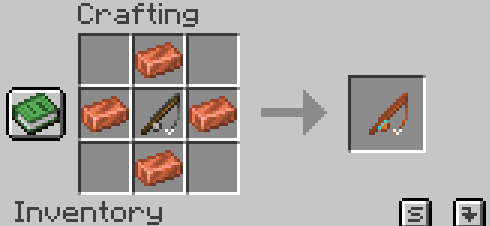
- Iron Fishing Rod (Can Prestige 2 Times): Offers higher base durability and tracking. Crafted with iron ingots, iron blocks, and your Starter Rod.
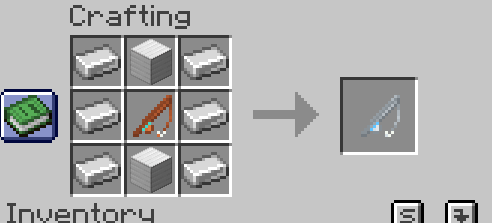
- Diamond Fishing Rod (Can Prestige 3 Times): Heavily cuts down wait times and increases rare loot chances. Crafted with diamonds, diamond blocks, and your Iron Rod.
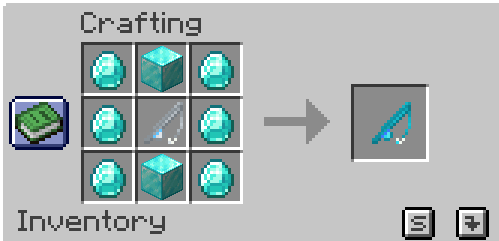
- Netherite Fishing Rod (Can Prestige 4 Times): The ultimate tool, maximizing your upgrade multipliers. Crafted using netherite scrap, gold ingots, netherite ingots, and your Diamond Rod.
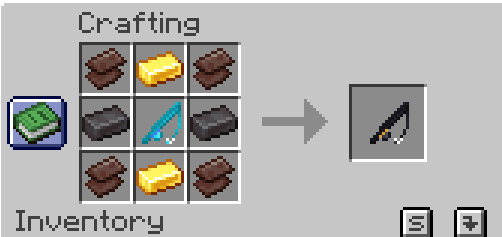
Included Utility Items
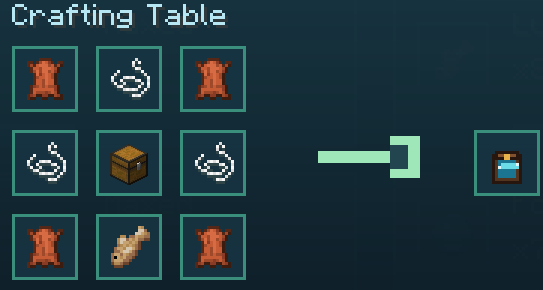
- The Fishing Bag: Automatically intercepts, vacuums, and stores your caught fish and treasure items seamlessly, completely saving your main inventory space. Crafted using leather, string, a chest, and a raw cod.
常见问题
Fishing Progression 支持哪些 Minecraft 版本?
Fishing Progression 支持 Minecraft Java 版 26.2,可用的加载器:Fabric。下载时注意选择和你游戏版本一致的文件。
Fishing Progression 怎么安装?
先用 PCL2 或 HMCL 启动器安装对应版本的 Fabric,再把下载的 .jar 文件放进游戏目录的 mods 文件夹,重新启动游戏即可。开启了版本隔离的,mods 文件夹在 versions/版本名 下面。

评论
登录后评论和评分