
截图
介绍
FishNoStuck
A small mod that fixes fish stop moving entirely MC-182763
Support with Minecraft 1.17.x-1.20.x for Fabric (Quilt maybe?)/Forge
How it works
The fish has an AI Goal that scans for the nearest fish, which will randomly select a leader and followers. Then it will let the follower fish follow the leader.
This mod applies bug fix to FollowFlockLeaderGoal by checking the nearest fish if it is a leader or not.
If not, it will add into the follower list.
If leader gets added into the follower list.
A Fish Leader will stop and not go to anywhere along with their followers (Forever!).
Unless you hit them or switch gamemode to survival and swim near them.
For Minecraft Bug Report, see: https://bugs.mojang.com/browse/MC-182763
Another fix in this mod is:
- Check entity predicate by using
EntitySelector.NO_CREATIVE_OR_SPECTATORinstead ofEntitySelector.NO_SPECTATORSin avoid entity goal. - Set
checkNoActionTimetofalseinFishSwimGoalto fix fish getting stuck at the current position - Decreased
schoolSizefrom leader fish if the follower fish is getting killed.
Performance Impact
This mod doesn’t improve any game performance, or it has very minor impact, especially for fish.
See FishNoStuck#1
Installation
- Install Fabric Loader/MinecraftForge
- Copy mod into
modsfolder
Backstory
I was working on Fish of Thieves by looking at FollowFlockLeaderGoal and figure it out how it works, then convert it to use Brain system.
By display debug data above an entity.
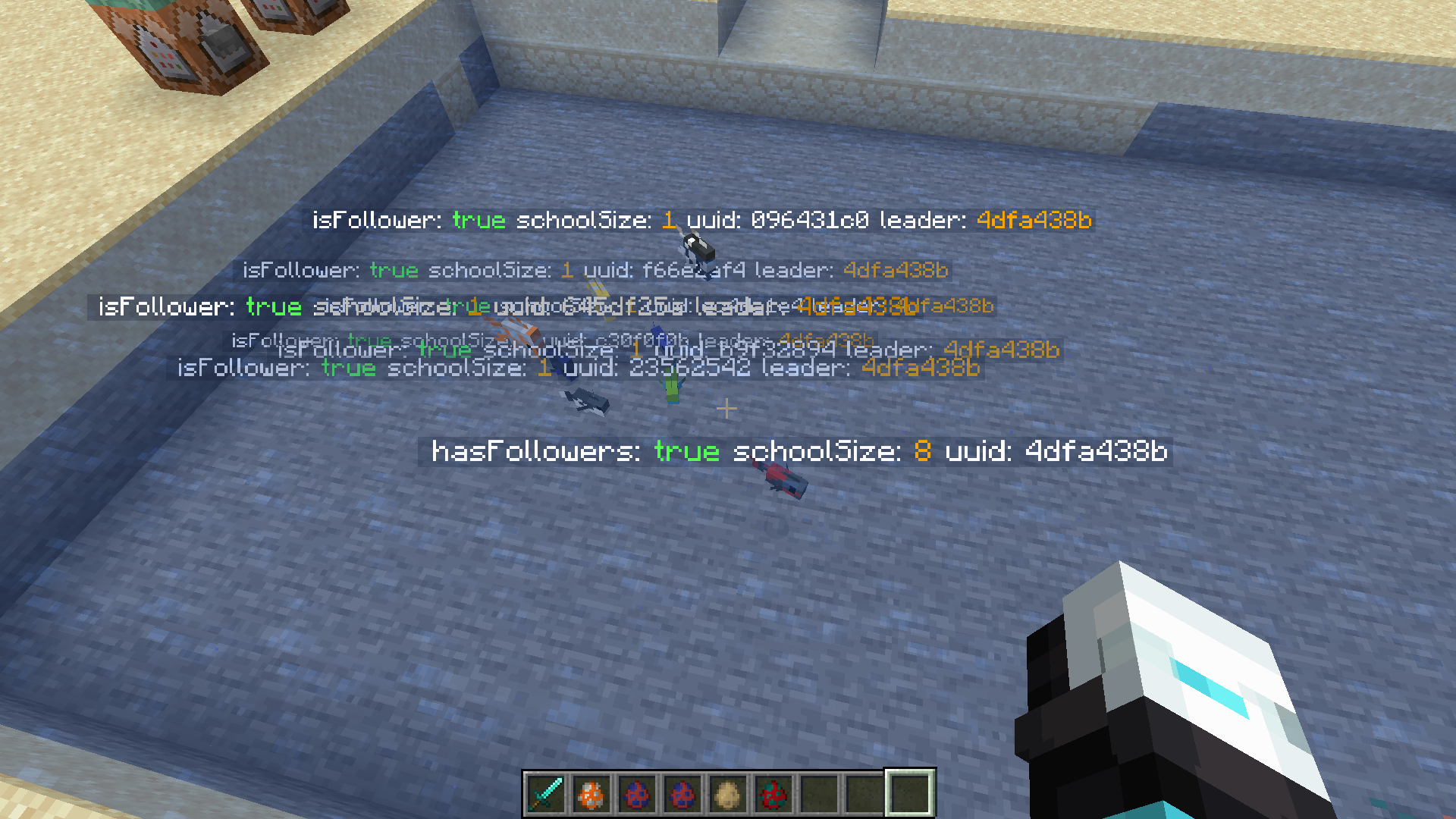
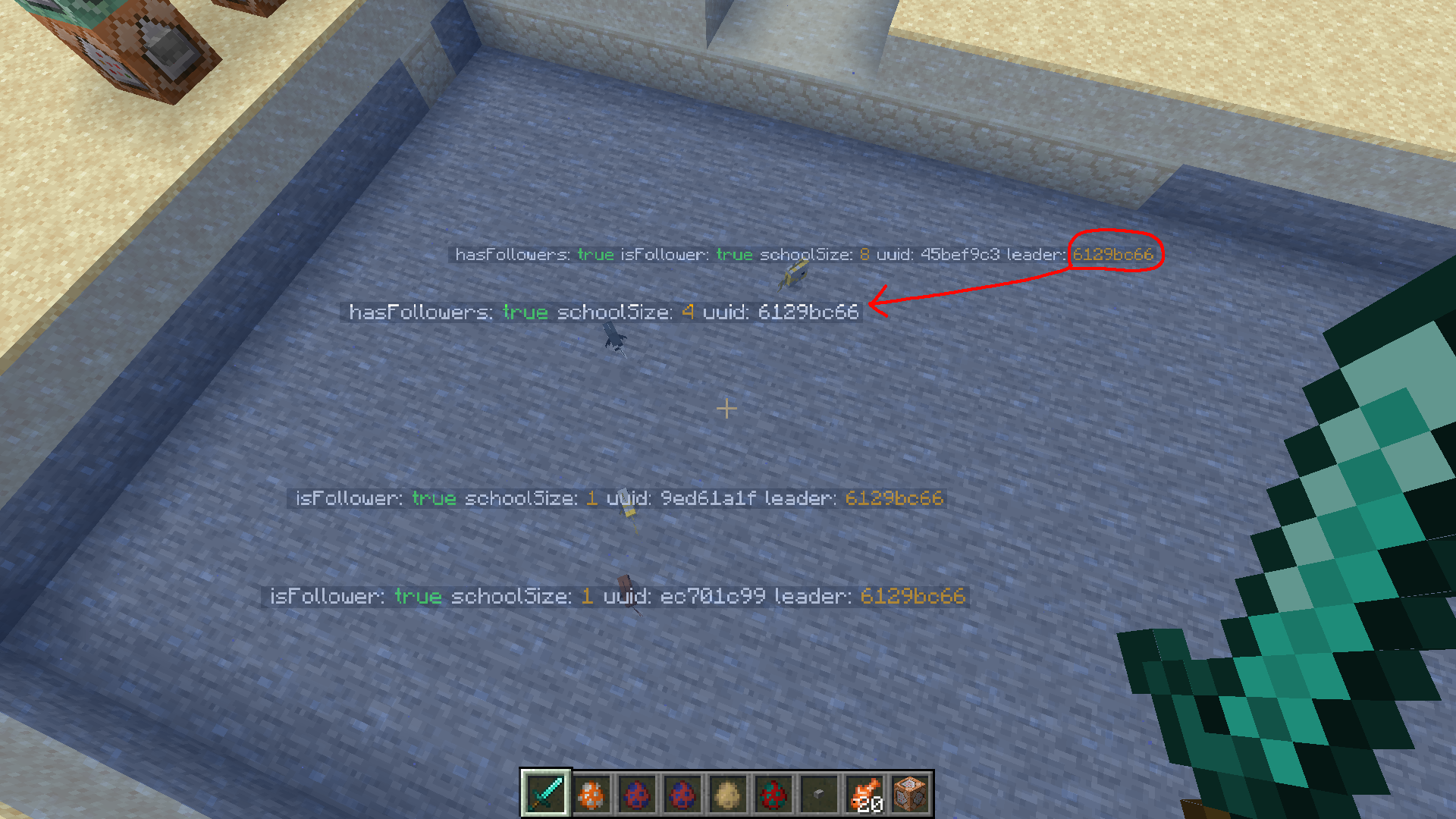
Then I realize something wrong. A fish with schoolSize=8 has property isFollower=true and has a leader. Which it should not be possible.
So that’s the beginning of this mod.
常见问题
Fish No Stuck 支持哪些 Minecraft 版本?
Fish No Stuck 支持 Minecraft Java 版 1.16.5–26.3,共 25 个版本,可用的加载器:Fabric / Forge / NeoForge / Quilt。下载时注意选择和你游戏版本一致的文件。
Fish No Stuck 怎么安装?
先用 PCL2 或 HMCL 启动器安装对应版本的 Fabric / Forge / NeoForge / Quilt,再把下载的 .jar 文件放进游戏目录的 mods 文件夹,重新启动游戏即可。开启了版本隔离的,mods 文件夹在 versions/版本名 下面。运行环境:仅服务端。
SteveKunG 的其他作品
查看全部 →
Fish of Thieves
这个模组添加了《盗贼之海》中的所有鱼类,海盗们有鱼吃啦!
More Planets – Galacticraft Add-on
这个附属模组为 Galacticraft 添加了全新的异星行星!
SteveKunG’s Lib
SteveKunG 的模组常用的前置库
Squid No Glitch
A tiny mod that fixes various vanilla bugs with the squid
评论
登录后评论和评分