介绍
FirePeripherals

What is this?
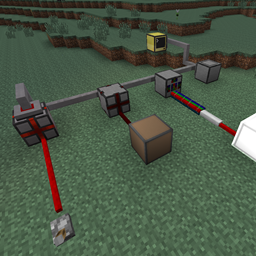
FirePeripherals is a pack of peripherals (obviously) for ComputerCraft that are meant to be connected to a LAN cable and can be used for various things. Actually, this pack contains:
– Redstone I/O Block (reading and emitting a redstone signal)
– Bundled I/O Block (reading and emitting a bundled cable signal from Project Red)
– Entity Detector Block (detecting an entity)
Recipes
Redstone I/O Block

Bundled I/O Block

Entity Detector Block

Code
Redstone I/O Block
redio = peripheral.wrap(“rio_1”)
redio.setOutput(true) — enables a redstone signal with strength 15
redio.setOutput(false) — disables the redstone signal
redio.setOutput(10) — outputs a redstone signal of 10
redio.setOutput(0) — disables the redstone signal
redio.getInput() — returns true/false if there is a redstone signal or not (any strength)
redio.getAnalogInput() — returns an integer from 0-15 of the redstone strength
— event returns: redstone
— state returns true/false if there is redstone
— strength returns an integer from 0-15 indicating the redstone strength
— id returns the id of the peripheral that threw the event
Bundled I/O Block
bundledio = peripheral.wrap(“bio_1”)
bundledio.getBundledInput() — returns an integer indicating bundled signal on input
bundledio.getBundledOutput() — return an integer indicating bundled signal outputting by this block
bundledio.setBundledOutput(2) — outputs a bundled signal on orange cable
bundledio.testBundledInput(2) — returns true/false if there is a orange bundled signal or not
bundledio.testBundledOutput(1) — returns true/false if this block is emitting a white bundled signal or not
event, input, id = os.pullEvent(“redstone”) — pulls an event with 3 return values
— event returns: redstone
— input returns an integer indicating the bundled signal
— id returns the id of the peripheral that threw the event
Entity Detector Block
entityd = peripheral.wrap(“edio_1”)
entityd.getLastEntityName() — return an string indicating last detected entity
event, entityName, id = os.pullEvent(“detector”) — pulls an event with 3 return values
— event returns: detector
— entityName returns an string indicating detected entity
— id returns the id of the peripheral that threw the event
How to install it?
Simply put the .jar file to your mods folder.
Remember! This pack needs ComputerCraft and ProjectRed to work fine. If you don’t have them, pack might be buggy.
http://www.computercraft.info/forums2/index.php?/topic/24542-mc-1710cc-174-fireperipherals-v10/
Changelog
– V1.0: Initial release
常见问题
FirePeripherals 支持哪些 Minecraft 版本?
FirePeripherals 支持 Minecraft Java 版 1.7.10,可用的加载器:Forge。下载时注意选择和你游戏版本一致的文件。
FirePeripherals 怎么安装?
先用 PCL2 或 HMCL 启动器安装对应版本的 Forge,再把下载的 .jar 文件放进游戏目录的 mods 文件夹,重新启动游戏即可。开启了版本隔离的,mods 文件夹在 versions/版本名 下面。
评论
登录后评论和评分