
截图
介绍

Find It
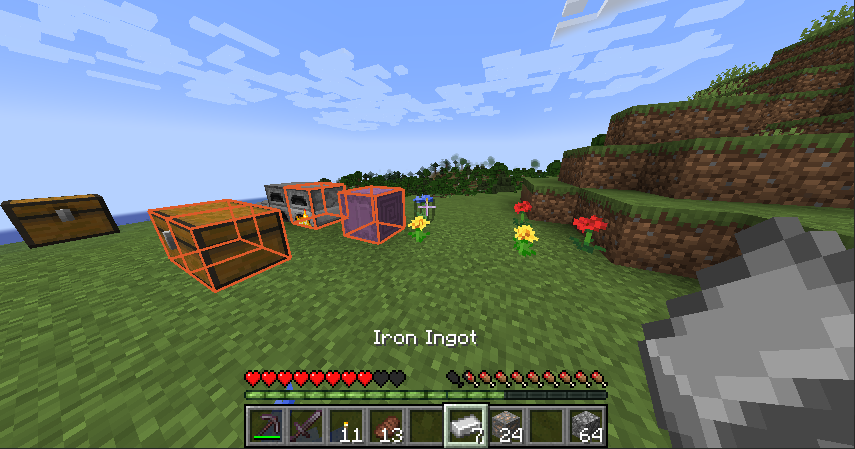
Find It allows you to find items you want in nearby inventories around you. Simply press ‘Y’ (Default keybind) on any item in your inventory (or JEI or similar) and look around for all the highlighted storage around you!
Note: It doesn’t look at chest where loot has not been generated (For example dungeons and such). This is in line with how the Spectator works.
Config
Client sided config that allows you to change the colour of the highlight as well as how long it will appear for. Accessible via your usual config files or changable in game using commands.
Colour
Changes the colour of the highlight.
/findit color <red> <green> <blue> where the red, green and blue values are between 0 and 255.
Timer:
Changes the time the higlight is shown for.
/findit timer <time> where time is the amount of ticks the highlight is displayed for, between 10 and 300.
常见问题
Find It 支持哪些 Minecraft 版本?
Find It 支持 Minecraft Java 版 1.21–1.21.5,共 3 个版本,可用的加载器:NeoForge。下载时注意选择和你游戏版本一致的文件。
Find It 怎么安装?
先用 PCL2 或 HMCL 启动器安装对应版本的 NeoForge,再把下载的 .jar 文件放进游戏目录的 mods 文件夹,重新启动游戏即可。开启了版本隔离的,mods 文件夹在 versions/版本名 下面。运行环境:客户端和服务端都要装。
Quarris 的其他作品
查看全部 →
Pretty Pipes: Fluids
Pretty Pipes 附属模组,新增流体管道,方便输送各种流体!

Enigmatic Graves
直观且持久的墓碑

Rebirth of the Mobs
Making monsters terrifying again. Made for Rebirth of the Night (RotN).

Eidolon Data Recipes
Adds data-packable recipes to Eidolon
评论
登录后评论和评分