
FavServer
Allows you to add a favorite server to the title screen and join it in one click.
截图
介绍
FavServer
Tired of opening the server list every time you want to play?
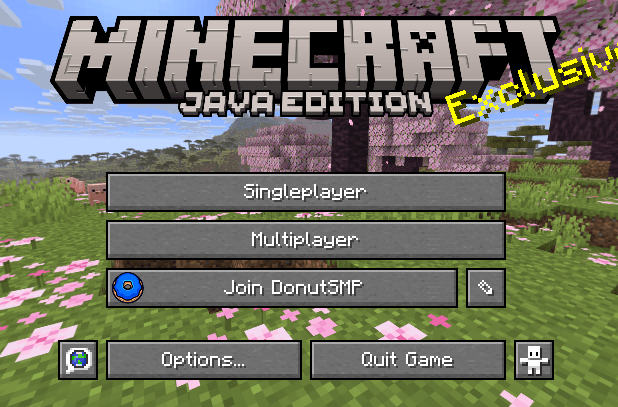
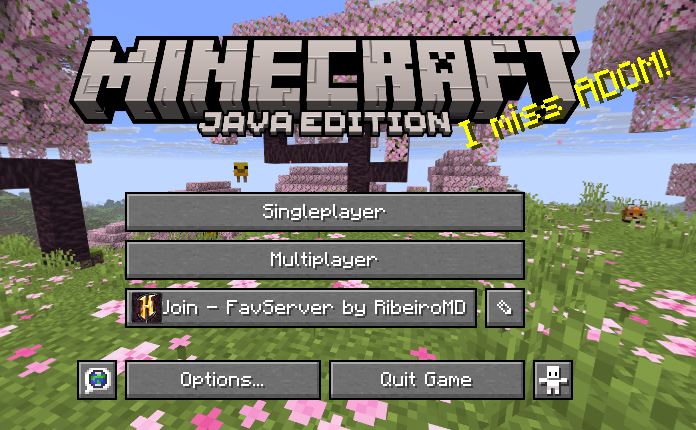
Now you can fix your favorite server right on the title screen, so you can join it in one click.
Features
– One-click join: replaces the Realms button with a button for your favorite server
– Live status: hover the button to see the server status and how many players are online
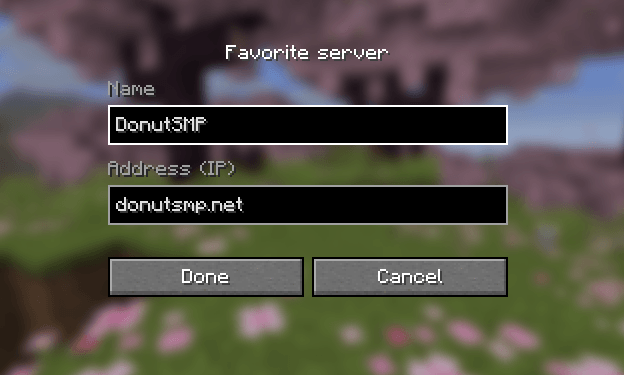
– Easy to edit: click the ✎ button next to it to change the server name and IP in-game
How to use
1. Open your game with FavServer mod
2. Click the ✎ button next to the server button
3. Type the server name and IP, then click Done
Requirements
– Minecraft 1.21.11
– Fabric Loader
– Fabric API
Languages
English and Portuguese (for now)
Idea suggested by Delgas from the YOYO community.
You can suggest ideas on my oficial discord
Made by RibeiroMD
常见问题
FavServer 支持哪些 Minecraft 版本?
FavServer 支持 Minecraft Java 版 1.21.6–26.1.2,共 9 个版本,可用的加载器:Fabric。下载时注意选择和你游戏版本一致的文件。
FavServer 怎么安装?
先用 PCL2 或 HMCL 启动器安装对应版本的 Fabric,再把下载的 .jar 文件放进游戏目录的 mods 文件夹,重新启动游戏即可。开启了版本隔离的,mods 文件夹在 versions/版本名 下面。


评论
登录后评论和评分