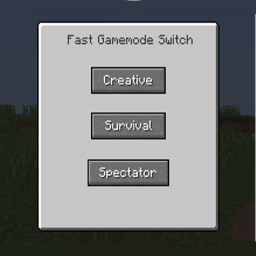
截图


介绍
- Hello, I am Enes Basmaci! I did a mod, which helps you to switch very fast your gamemode, you can have disable your commands, but this will work without problems. When I was playing minecraft in version 1.15.2 when I fall in lava, I was leave the game and to switch gamemode from codes. A month ago I was stay and was thinking how can I resolve that problem. I was opening my app and I start to write my code. When I finished I was very happy. I want also to share my mod because I think in this gamers world, there are very much people who is angry because he should do what I do, to open appdata and write gamemode creative. I think I resolve this problem. If you like the mod, please write in comments. If you find some bugs, write in comments….
What is different form fast gamemode switcher from Minecraft:
-You should have cheat on in Minecraft, but here no…
-That Gui stops the game
-And is more cheats on GUI….
The first snapshot from difficulty update.
I have just release the first snapshot…
I put in GUI normal, hard and peaceful mod.
I thinks is bugless but, you should try it
and say in comment your ideas… Have fun!!!
To see the GUI you should Press F4….
Or use command /fgsm
Have fun…..
I don’t know if I will do for fabric version, if you want write in comments…
✔10
✔50
✔100
✔200
✔500
✔1000
✔2000
✔3000
✔5000
✔10000
My youtube Channel:
常见问题
Fast Gamemode Switch Mod 支持哪些 Minecraft 版本?
Fast Gamemode Switch Mod 支持 Minecraft Java 版 1.12.2–26.2,共 17 个版本,可用的加载器:Forge / NeoForge。下载时注意选择和你游戏版本一致的文件。
Fast Gamemode Switch Mod 怎么安装?
先用 PCL2 或 HMCL 启动器安装对应版本的 Forge / NeoForge,再把下载的 .jar 文件放进游戏目录的 mods 文件夹,重新启动游戏即可。开启了版本隔离的,mods 文件夹在 versions/版本名 下面。
EnesBasmaci 的其他作品
查看全部 →
Fast Gamemode Switch Mod
The simplest solution for changing the gamemode of a player in older versions of minecraft, pauses the game, functionally GUI and more options to set...

F3 + F4 Gamemode Switcher for Older Versions
Brings the Vanilla-Style F3 + F4 Gamemode Selector to older Minecraft versions.
评论
登录后评论和评分