
FakeRanks
Client-side identity toolkit with fake ranks, badges, name spoofing, and skin stealing (1.21.11).
截图


介绍

FakeRanks
TierTagger and Tiers are required for this mod to work.
A highly customizable, fully client-side utility mod for Minecraft 1.21.11. Whether you are a content creator looking to record without being targeted, or simply want to enhance your visual experience, this mod gives you complete control over your in-game identity.
This is a stable, bug-free release optimized for performance, ensuring a seamless experience while you play.
Core Features
Name Spoofing
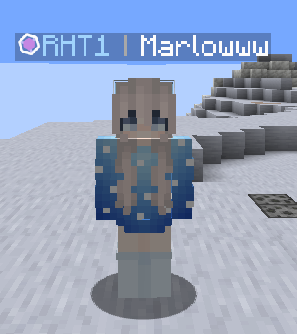
Protect your identity and avoid stream-snipers. The Name Spoofing module allows you to easily mask your real username on your client. Your spoofed name will appear seamlessly in the chat, tab list, and above your head on your screen, making it perfect for recording clean, distraction-free gameplay.
Dynamic Skin Stealing
See a skin you like in the lobby or during a match? The integrated skin stealer lets you copy and equip any other player’s skin on the fly. No need to close the game or browse skin websites; just grab it instantly and update your client-side appearance in seconds.
Fake Ranks & Media Badges
Customize your local interface by assigning yourself fake ranks (such as Admin, VIP, or custom text) and exclusive Media badges.
- Media Badge: Perfect for adding that official content creator aesthetic to your screen.
- Custom Ranks: Easily configure how your prefix looks in the tab list and chat interface.
Important Note
Because this mod is entirely client-side, all visual changes (fake ranks, media badges, spoofed names, and stolen skins) are only visible on your screen. Other players on the server will still see your original name and skin. This makes it a perfectly safe cosmetic and recording tool that won’t interfere with server rules.
常见问题
FakeRanks 支持哪些 Minecraft 版本?
FakeRanks 支持 Minecraft Java 版 1.21.11,可用的加载器:Fabric。下载时注意选择和你游戏版本一致的文件。
FakeRanks 怎么安装?
先用 PCL2 或 HMCL 启动器安装对应版本的 Fabric,再把下载的 .jar 文件放进游戏目录的 mods 文件夹,重新启动游戏即可。开启了版本隔离的,mods 文件夹在 versions/版本名 下面。运行环境:仅客户端。


评论
登录后评论和评分