
FakeFPS – Fake Your Frame Rate with Style
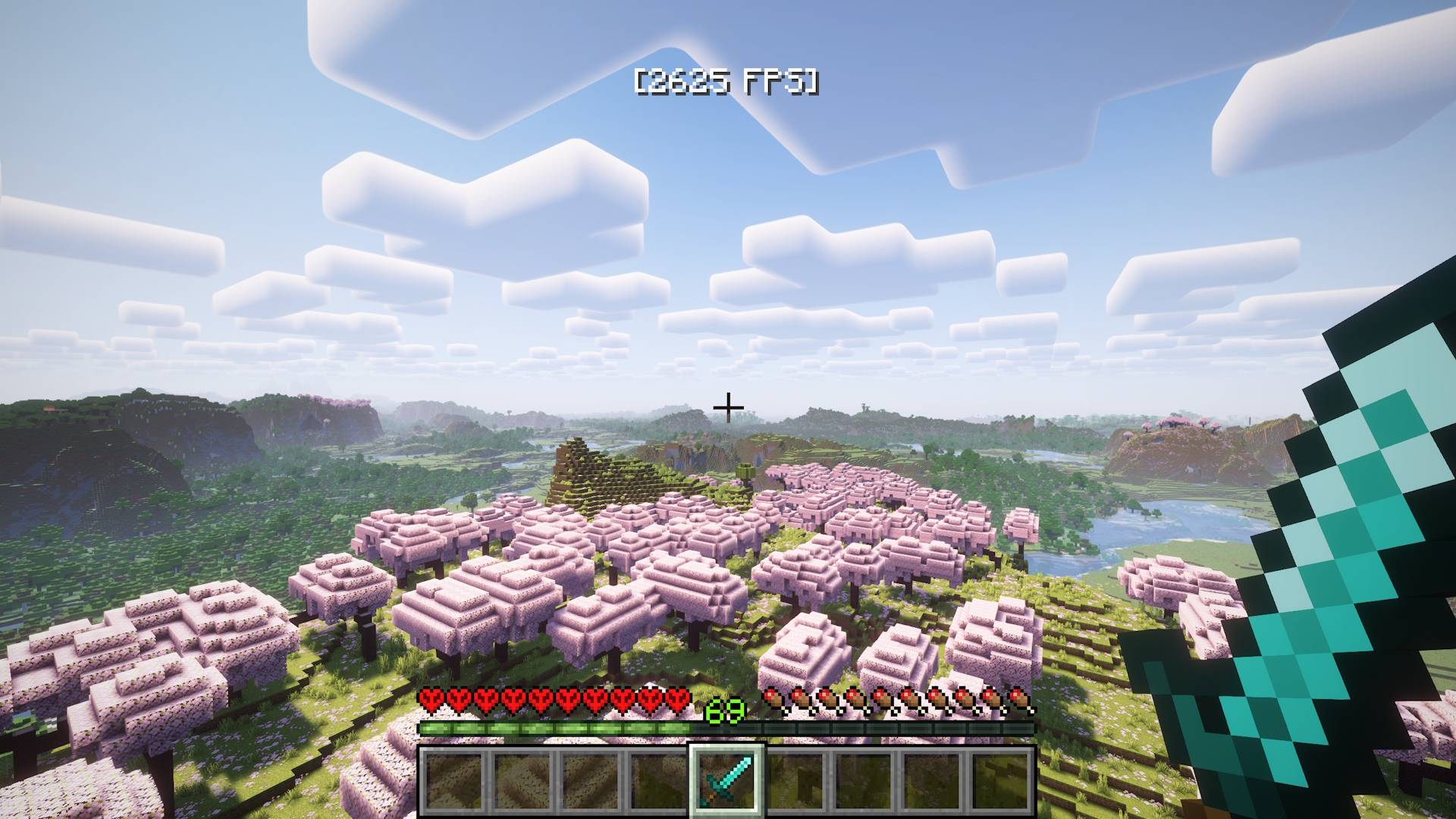
This simple mod displays fake FPS values on screen (like [456 FPS]) with randomized natural fluctuations.
截图
介绍
FakeFPS is a lightweight client-side mod that displays realistic-looking fake FPS numbers on your screen. The numbers change dynamically within a configurable range to simulate a smooth gameplay experience — even if your real FPS doesn’t agree.
🎮 Perfect For:
- 🖥 Streamers & YouTubers – make your gameplay look smoother on camera
- 📸 Cinematic recordings & screenshots – impress with high FPS overlays
- 🎨 Custom modpacks – add a cool touch to your HUD
- 🤫 Pranks or aesthetic use – make people wonder how you’re running 500 FPS on a potato
⚙️ Features:
- HUD Overlay – Displays a fake FPS counter (e.g.
[456 FPS]) on screen with smooth, realistic fluctuations. Choose from six positions: top/bottom, left/right, or center. - F3 Debug Screen Override (v1.1.0+) – The F3 menu shows your fake FPS too, in Minecraft’s native format. Completely seamless. Toggle it in the config or via command.
- Realistic FPS Behavior (v1.1.0+) – FPS drifts naturally toward a target value with occasional micro-dips to simulate chunk loading and GC pauses — much more convincing than random jumps.
In-Game Commands (Minecraft 1.21.11+ only) – Change your settings without touching any files or restarting the game. Full tab-complete support included.
/fakefps min <number> – set minimum FPS (v1.1.0+)/fakefps max <number> – set maximum FPS (v1.1.0+)/fakefps position <name> – change HUD position (v1.1.0+)/fakefps hud <true/false> – toggle HUD on and off (v1.1.1+)/fakefps f3 <true/false> – toggle F3 override (v1.1.0+)/fakefps status – show current settings (v1.1.0+)
Config File – All settings are stored in config/fakefpsmod.json. Old config files from v1.0.x are automatically migrated — no manual changes needed.
{
    "min_fps": 360,
    "max_fps": 540,
    "position": "top_center",
    "fake_f3": true
}
Valid positions: top_left, top_right, top_center, bottom_left, bottom_right, bottom_center
💬 Whether you’re going for cinematic perfection or just trolling your friends, FakeFPS gives you total control over how fast your game looks.
🛠️ Tech Details:
- Fully client-side mod (won’t sync or affect servers)
- Zero performance impact
- Tested with Fabric API 0.141.3 (1.21.11)
- Compatible with other HUD overlays and mods like ReplayMod, minimaps, etc.
- 📜 License: MIT
常见问题
FakeFPS – Fake Your Frame Rate with Style 支持哪些 Minecraft 版本?
FakeFPS – Fake Your Frame Rate with Style 支持 Minecraft Java 版 1.21.1–26.3,共 13 个版本,可用的加载器:Fabric / NeoForge。下载时注意选择和你游戏版本一致的文件。
FakeFPS – Fake Your Frame Rate with Style 怎么安装?
先用 PCL2 或 HMCL 启动器安装对应版本的 Fabric / NeoForge,再把下载的 .jar 文件放进游戏目录的 mods 文件夹,重新启动游戏即可。开启了版本隔离的,mods 文件夹在 versions/版本名 下面。
Adoman 的其他作品
查看全部 →
SwemCull — SWEM Horse Performance Fix
Massive FPS boost for SWEM horses — up to 20x with horses still visible. Client-side, no server needed.

AG Pack – [PvP, FPS Boost, Connected Textures]
AG Pack is a PvP-focused Minecraft 1.8.9 resource pack that boosts FPS and supports connected textures.

AG Pack [PvP, Dark Vanilla, Utility]
A 16x Dark Vanilla PvP resource pack for Minecraft 1.21+ featuring compact utilities, highlighted ores, low fire...
评论
登录后评论和评分