
Fake FPS Displays
The Fake FPS Mod is a customizable Fabric utility that displays a simulated, fluctuating frame rate overlay, allowing users to precisely control the base value, range, and position of the counter via an in-game config menu.
介绍

Overview
Fake FPS Displays is a lightweight Fabric utility that adds a realistic simulated FPS overlay designed to behave like a real hardware counter.
The overlay updates once per second and generates natural fluctuations similar to real frame rate changes under load, creating a convincing in game experience.
Features
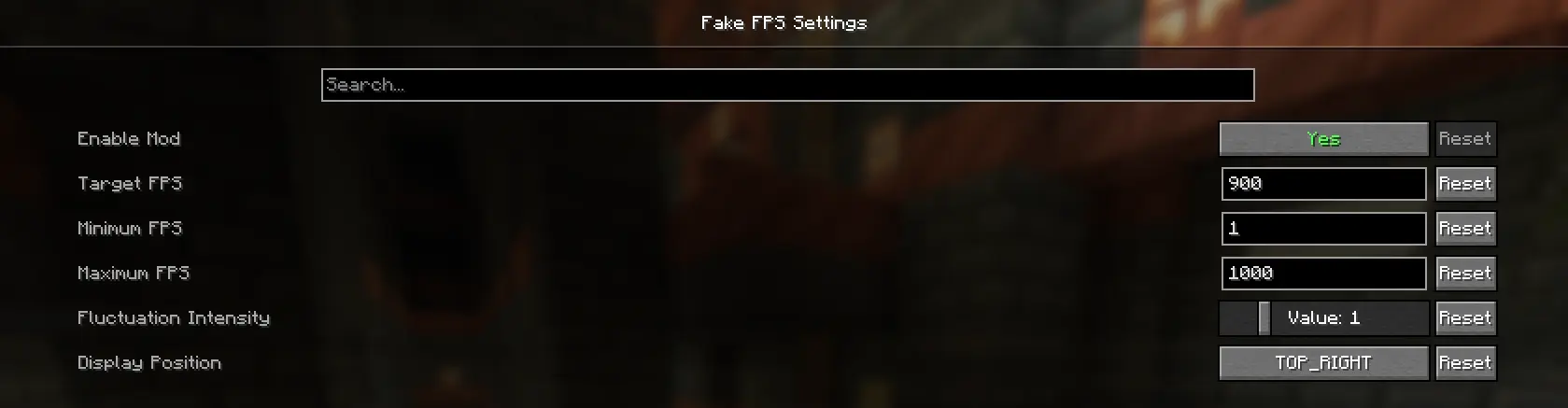
Precision FPS Caps: Set custom minimum and maximum limits so the counter stays within your chosen range. Granular Intensity Control: Six fluctuation levels (0–5) control how stable or unstable the FPS appears.
Flexibility:
Instantly place the overlay in any screen corner through the config menu. Professional Integration: Powered by Cloth Config with a clean UI and helpful tooltips for easy customization!
常见问题
Fake FPS Displays 支持哪些 Minecraft 版本?
Fake FPS Displays 支持 Minecraft Java 版 1.21.1–1.21.11,共 10 个版本,可用的加载器:Fabric。下载时注意选择和你游戏版本一致的文件。
Fake FPS Displays 怎么安装?
先用 PCL2 或 HMCL 启动器安装对应版本的 Fabric,再把下载的 .jar 文件放进游戏目录的 mods 文件夹,重新启动游戏即可。开启了版本隔离的,mods 文件夹在 versions/版本名 下面。

评论
登录后评论和评分