
Fake Armor
Craft cheap & stackable non-functional Fake Armor to decorate your Armor Stands
截图



介绍



All that glitters is not gold.
🤔 How does it work?
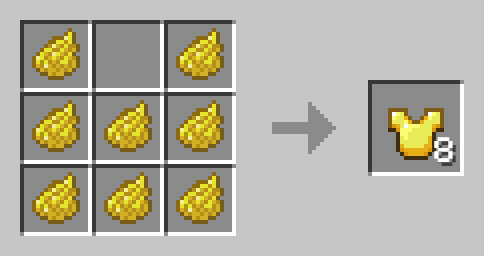
Craft Fake armor like any other Armor, but use Dye instead of valuable Materials. Fake Armor cam be worn, but provides no Armor. It can be also used to decorate Armor Stands.
Yellow Dye -> 8x Gold
Cyan Dye -> 8x Diamond
Black Dye -> 8x Netherite
Light Gray Dye -> 8x Chainmail
Gray Dye -> 8x Iron
Brown Dye -> 8x Leather
Orange Dye -> 8x Copper
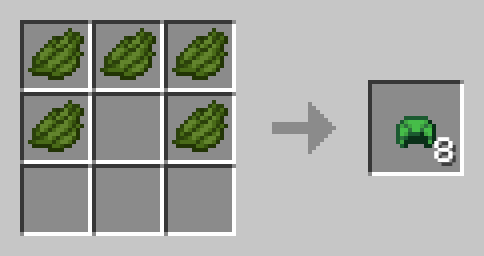
Fake Turtle Shell
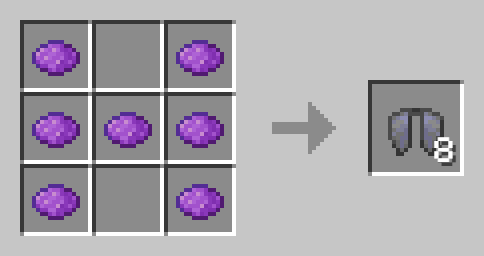
Fake Elytra
🛠️ Installation
Datapack Installation Guide
Copy the .zip archive into the “.minecraft/saves/yourworldname/datapacks” folder, where yourworldname is the name of your world.
Mod installation Guide
Copy the .jar archive into the folder your Mod Loader of choice provides.
⚙️ Compatibility
Previous to v1.3:Might not be compatible with certain Uncrafting/Recycling Mods that allow Armor to be converted back to their respective Materials efficiently.
❗Issues and Suggestions
Please report issues on My Discord.
常见问题
Fake Armor 支持哪些 Minecraft 版本?
Fake Armor 支持 Minecraft Java 版 1.21–1.21.10,共 7 个版本,可用的加载器:Fabric / Forge / NeoForge / Quilt。下载时注意选择和你游戏版本一致的文件。
Fake Armor 怎么安装?
先用 PCL2 或 HMCL 启动器安装对应版本的 Fabric / Forge / NeoForge / Quilt,再把下载的 .jar 文件放进游戏目录的 mods 文件夹,重新启动游戏即可。开启了版本隔离的,mods 文件夹在 versions/版本名 下面。运行环境:客户端 / 服务端。
fishbowlforever 的其他作品
查看全部 →
Sky Artifacts (Change Weather & Time)
Change Time, Freeze Time, Stop and Start Rain & Thunder with powerful Artifacts!

Nostalgic Bed
Replaces the modern Bed crafting system with the oldschool nostalgic Red Bed Recipe.

Builders Dream
Adds more than 100 Craftable Mini-Blocks which will make your Builds stand out!

No Raw Ore
Ore Blocks drop themselves, instead of Raw Ore, like in older Versions
评论
登录后评论和评分