
Fair Death — Keep Your Gear
Choose what you keep when you die (armour, tools, weapons, ores, ...). Operators change it from a chest menu. Server-side only!
截图
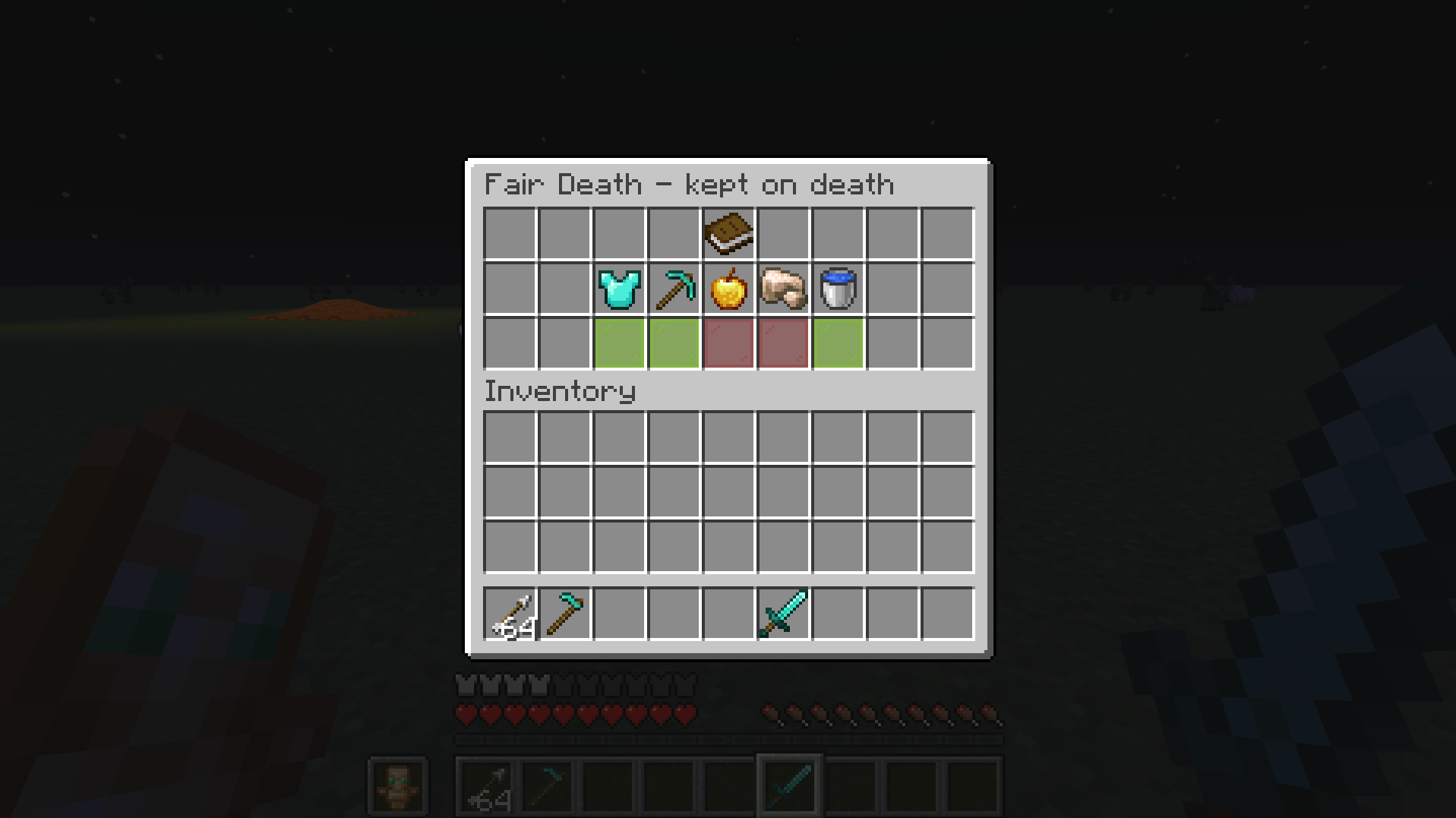
介绍
Choose what you keep when you die.
Vanilla
Server-side only
Chest menu and operators
/fairdeath settings opens a chest. Green: kept. Red: drops. Click to switch.
| Switch | Covers |
|---|---|
| Armour | armour pieces, elytra |
| Tools & weapons | everything else with durability |
| Food & Drinks | food, potions |
| Ores | ores, ingots, gems, netherite, storage blocks |
| Utilities | buckets, throwables, arrows, fireworks |
Find the rest
- Your death coordinates, in chat, for you only.
- Dropped items glow.
Fix
- Always kept: totem, spyglass, recovery compass, filled maps, signed books.
- Always drops: shulker boxes, bundles, anything that holds items.
- Curse of Vanishing still works.
Commands
/fairdeath check– is the item in your hand kept, and why./fairdeath settings– the switches (operators)./fairdeath reload– reload the config (operators).
Config and datapacks
config/fairdeath.json – the five switches, glowingDrops, deathCoordinates.
Item tags to add items: fairdeath:always_keep, fairdeath:always_drop, fairdeath:ores, fairdeath:utilities.
Enjoying the mod? Buy me a coffee on Ko-fi**
常见问题
Fair Death — Keep Your Gear 支持哪些 Minecraft 版本?
Fair Death — Keep Your Gear 支持 Minecraft Java 版 1.21.1–26.3,共 3 个版本,可用的加载器:Fabric / NeoForge。下载时注意选择和你游戏版本一致的文件。
Fair Death — Keep Your Gear 怎么安装?
先用 PCL2 或 HMCL 启动器安装对应版本的 Fabric / NeoForge,再把下载的 .jar 文件放进游戏目录的 mods 文件夹,重新启动游戏即可。开启了版本隔离的,mods 文件夹在 versions/版本名 下面。
BackupBackupFede 的其他作品
查看全部 →
Bulk Merchant
Trade your whole stock in one shift-click. Refills the payment slots from your inventory, right in the trade menu.
Bulk MegaPack
One gesture, one x64 stack. Shift-click a station's result and it keeps going until your stack runs out.

Emerald Reserve
Emerald is the NEW currency. A bank, an auction house and player payments. Every balance is backed by deposited emeralds.
评论
登录后评论和评分