
截图
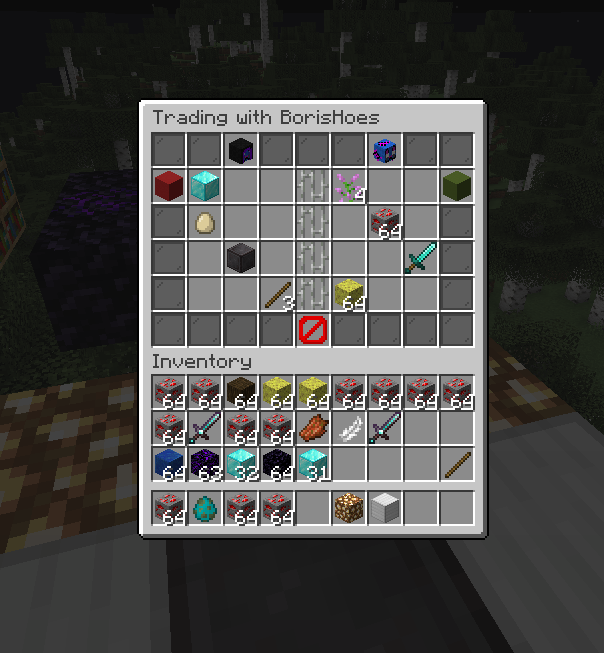
介绍
Fabric Trade
A simple server-sided mod to give players the ability to trade items safely with other players anywhere else on the server.
This mod should only be installed on a server.
Player Commands
- “
/trade“ Opens a GUI to select a player to trade - “
/trade <player>“ Requests to trade with the specified player - “
/tradeaccept [player]“ Accepts an incoming trade request from the specified player - “
/tradedeny [player]“ Denies an incoming trade request from the specified player - “
/tradecancel [player]“ Cancels an outgoing trade request to the specified player
Admin Commands & Configuration
Configuration can be done through the properties file generated when loaded on a server or through commands.
- “
/tradeconfig cooldown <0+>“ Sets the number of seconds before a player can trade with another player again - “
/tradeconfig timeout <0+>“ Sets the number of seconds before a trade request expires - “
/tradeconfig cooldown-mode <WHO_INITIATED/BOTH_USERS>“ Sets whether only the trade initiator must wait the cooldown, or both participants - “
/tradeconfig logCommandUsage <true/false>“ Sets whether successful command executions are logged to the server console
Permission Nodes
Trade uses the Fabric Permissions API (bundled via BorisLib) for command permissions. Each node has a fallback vanilla permission level for servers without a permissions mod.
Player Commands
| Node | Default | Description |
|——|———|————-|
| trade.trade.gui | ALL | Open the trade GUI (/trade with no argument) |
| trade.trade.others | ALL | Initiate a trade request with another player (/trade <player>) |
| trade.tradeaccept | ALL | Accept an incoming trade request |
| trade.tradedeny | ALL | Deny an incoming trade request |
| trade.tradecancel | ALL | Cancel an outgoing trade request |
Config
Config commands are generated dynamically by BorisLib per config value.
| Node | Default | Description |
|——|———|————-|
| trade.config | GAMEMASTERS | List all config values |
| trade.config.<name>.get | GAMEMASTERS | Read a specific config value |
| trade.config.<name>.set | GAMEMASTERS | Change a specific config value |
Try My Other Mods!
All server-side Fabric mods — no client installation required.
| | Mod | Description | Links |
|:————————————————————————————————————–:|————————–|———————————————————————————————————–|—————————————————————————————————————————————————————————————————————————————————————————————————————————————————————————————————————————————————-|
|  | Arcana Novum | Minecraft’s biggest server-only full-feature Magic Mod! Adds powerful items, multiblocks and bosses! |


|  | Ancestral Archetypes | A highly configurable, Origins-style mod that lets players pick a mob to gain unique abilities! |
|  | Ender Nexus | Highly configurable /home, /spawn, /warp, /tpa and /rtp commands all in one, and individually disablable. |
|  | Fabric Mail | An in-game virtual mailbox system for sending packages and messages between online and offline players. |
| | Fabric Trade | Adds /trade, a secure player-to-player trading interface. |
|  | Limited AFK | AFK detection and management with configurable kick thresholds for servers. |
|  | Links in Chat | Makes URLs posted in chat clickable. |
Translation Credits:
- Russian – Reset1712
LICENSE NOTICE
By using this project in any form, you hereby give your “express assent” for the terms of the license of this project, and acknowledge that I, BorisShoes, have fulfilled my obligation under the license to “make a reasonable effort under the circumstances to obtain the express assent of recipients to the terms of this License.
常见问题
Fabric Trade 支持哪些 Minecraft 版本?
Fabric Trade 支持 Minecraft Java 版 1.21–26.3,共 12 个版本,可用的加载器:Fabric。下载时注意选择和你游戏版本一致的文件。
Fabric Trade 怎么安装?
先用 PCL2 或 HMCL 启动器安装对应版本的 Fabric,再把下载的 .jar 文件放进游戏目录的 mods 文件夹,重新启动游戏即可。开启了版本隔离的,mods 文件夹在 versions/版本名 下面。运行环境:客户端和服务端都要装。
BorisShoes 的其他作品
查看全部 → Arcana Novum
Minecraft's Biggest Server-Only Magic Mod!

PulseNet
A server-sided fabric networking optimization mod that uses packet batching and other optimizations. Fully compatible with Krypton.
Ancestral Archetypes
A fabric server-side Origins-inspired mod that gives players mob-like abilities!
Fabric Mail
Server-sided mod that gives players the ability to leave messages and packages for offline players.
评论
登录后评论和评分