
F3 Lite
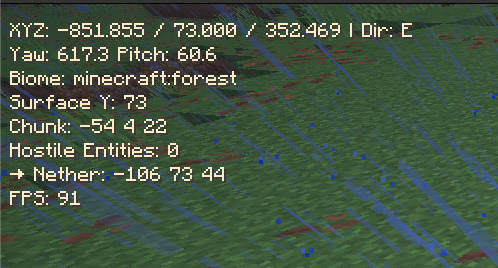
F3 Lite is a lightweight HUD overlay that gives you the most important debug info — without cluttering your screen with the full F3 menu.
截图

介绍
📜 F3 Lite
All the debug info you need, none of the clutter.
F3 Lite is a lightweight HUD overlay that gives you the most important debug info — without cluttering your screen with the full F3 menu. (Inspired by dream speed running HUD overlay)
✨ Features:
- Coordinates (XYZ) & Chunk info
- Biome name
- Yaw / Pitch / Facing direction with compass shorthand (N, NE, E…)
- Surface Y (highest block at your feet)
- Nether ↔ Overworld coordinate conversion
- Hostile entity count nearby
- FPS counter
Toggle overlay with a single key (default: F7)
⚡ Designed to be minimal, configurable, and performance-friendly.
Great for survival players who need quick info without spamming F3.
🧭 Why use F3 Lite?
- Easier on the eyes than the full debug screen
- Doesn’t block your view of the world
- Works seamlessly in Survival & Creative
- Ideal for speed runner, builders, explorers, and survival adventurers
常见问题
F3 Lite 支持哪些 Minecraft 版本?
F3 Lite 支持 Minecraft Java 版 1.21.8–1.21.9,共 2 个版本,可用的加载器:Fabric。下载时注意选择和你游戏版本一致的文件。
F3 Lite 怎么安装?
先用 PCL2 或 HMCL 启动器安装对应版本的 Fabric,再把下载的 .jar 文件放进游戏目录的 mods 文件夹,重新启动游戏即可。开启了版本隔离的,mods 文件夹在 versions/版本名 下面。运行环境:仅客户端。
评论
登录后评论和评分