
介绍
EyeMine – play Minecraft with your eyes!
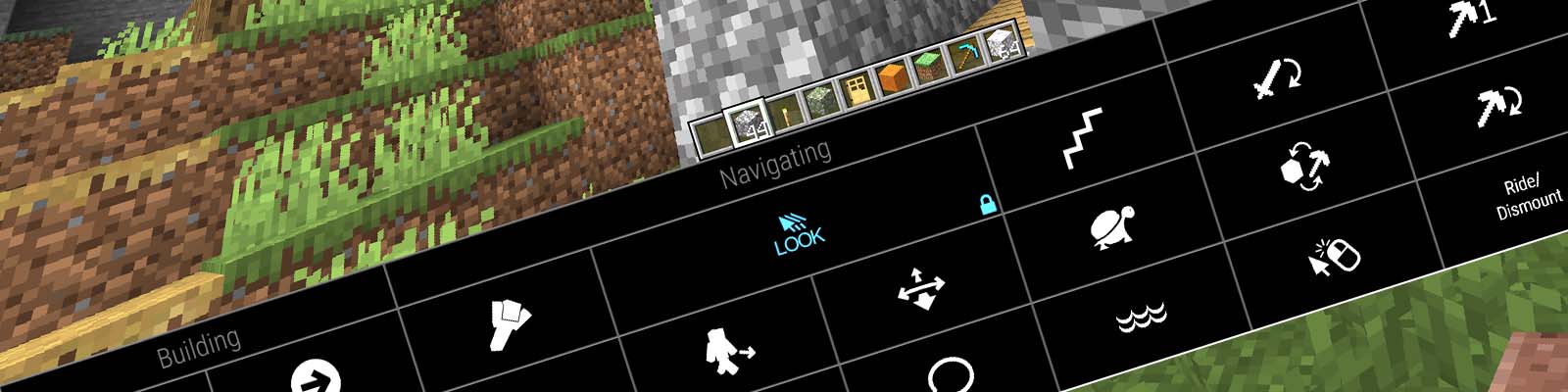
This mod adds various functionality to support eye control for users unable to operate conventional controls.
To play with eye control, please install the EyeMineV2 interface from the EyeMine wiki which provides the necessary on-screen keyboard to access the controls. You will also require an eye tracker, head mouse or another method of controlling the cursor.
Requires Architectury (Forge) or Architectury (Fabric). For an easier install, use the mod pack: [EyeMine Mod Pack](https://www.curseforge.com/minecraft/modpacks/eyemine-pack/)
⚠️ Important config ⚠️
Before playing, go to Options -> Controls -> Mouse and turn sensitivity right down to “yawn” and set Raw Input: OFF. You can adjust your mouse sensitivity later using the keys in the EyeMine keyboard or with the left/right arrow keys on a physical keyboard.
If you are using an unsupported eye tracker via mouse emulation, you need to manually turn on “mouse emulation mode” in the mod options: Mods -> EyeMine -> Config -> Modify “eyemine-config.toml” -> Basic -> “Using mouse emulation”
For older versions see EyeMine Classic
Authors: EyeMine was originally developed by kmcnaught for SpecialEffect and upgraded by mrbysco for more versions of Minecraft
Code + issue tracker: https://github.com/SpecialEffect/EyeMineMods/issues
Documentation: https://github.com/SpecialEffect/EyeMine/wiki
常见问题
EyeMine 支持哪些 Minecraft 版本?
EyeMine 支持 Minecraft Java 版 1.14.4–26.1.2,共 16 个版本,可用的加载器:Fabric / Forge / NeoForge。下载时注意选择和你游戏版本一致的文件。
EyeMine 怎么安装?
先用 PCL2 或 HMCL 启动器安装对应版本的 Fabric / Forge / NeoForge,再把下载的 .jar 文件放进游戏目录的 mods 文件夹,重新启动游戏即可。开启了版本隔离的,mods 文件夹在 versions/版本名 下面。
Mrbysco 的其他作品
查看全部 →
Bad Wither No Cookie – Reloaded
本地化凋灵和末影龙的死亡音效。
Just Enough Professions (JEP)
一个为 JEI 添加职业工作站的附属模组

生活调味料:胡萝卜版 Spice of Life: Carrot Edition
一款围绕食物展开的模组,探索新食物会获得奖励,而不是受到惩罚!
Measurements
允许使用卷尺测量距离。
评论
登录后评论和评分