
Extra Hotbar
Fabric client mod that adds dual-hotbar swapping utilities and compact HUD info overlays.
截图
介绍
Extra Hotbar
Fabric client mod that adds dual-hotbar swapping utilities and compact HUD info overlays.
Features
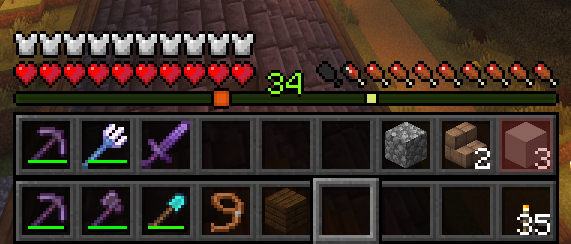
- Dual hotbar swap system:
- Swaps between your visible hotbar and a configurable secondary inventory row.
- Supports full-row swap and single-slot swap logic.
- Hold and tap swap behavior:
- Tap or hold the swap key for different actions (configurable).
- Per-slot double-tap swap:
- Double-tap number keys
1–9to swap only that slot. - Slot lock support:
- Lock specific hotbar slots to prevent them from being swapped.
- Active bar indicator:
- Shows whether primary or secondary bar is currently active.
- Panel cycle mode:
- Cycle HUD info display through:
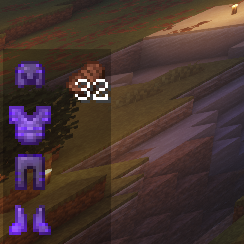
Off -> Armor -> Food -> Both. - Armor panel info:
- Shows equipped armor pieces and remaining durability.
- Food panel info:
- Lists edible items currently in inventory with hunger and saturation.
- Persistent client config:
- Settings are saved and reloaded from JSON config.
Controls (Default Keybinds)
R: Swap hotbars.H: Cycle HUD panels (Off -> Armor -> Food -> Both).K: Toggle lock on the currently selected hotbar slot.1–9double-tap: Swap a single corresponding hotbar slot.
You can rebind these in Minecraft controls.
In-Game Behavior
- Spectator mode: swapping logic is skipped.
- Locked slots:
- Full-row swaps skip locked slots.
- Single-slot swaps do not run for locked slots.
Configuration
Config file: config/extar_hotbar.json
Main settings:
secondaryInventoryRow(1–3)showSecondHotbarshowActiveIndicatorsecondHotbarYOffsetactiveIndicatorYOffsetenableDoubleTapSwapdoubleTapWindowMs(100–1000)enableHoldSwapholdSwapMs(100–1200)holdSwapsSingleSlotpanelMode(0–3)0 = Off,1 = Armor,2 = Food,3 = BothpanelXpanelYshowArmorDurabilityPercentlockedSlots(array of slot indices0–8)
常见问题
Extra Hotbar 支持哪些 Minecraft 版本?
Extra Hotbar 支持 Minecraft Java 版 26.1.1–26.1.2,共 2 个版本,可用的加载器:Fabric。下载时注意选择和你游戏版本一致的文件。
Extra Hotbar 怎么安装?
先用 PCL2 或 HMCL 启动器安装对应版本的 Fabric,再把下载的 .jar 文件放进游戏目录的 mods 文件夹,重新启动游戏即可。开启了版本隔离的,mods 文件夹在 versions/版本名 下面。运行环境:仅客户端。
potatotyper 的其他作品
查看全部 →
Central Waypoints
A Fabric Server-side waypoints mod that is global among all users. Also generates compass item to point users towards coordinates.

Server Auto Click
A Fabric server mod for Minecraft 26.1.2 that lets players use timed auto-attack and auto-consume commands without installing the mod client-side.

Disable Elytra / No Elytra
A Fabric server-side mod that disables elytras for specific dimensions.
评论
登录后评论和评分