
截图
介绍
Intro :
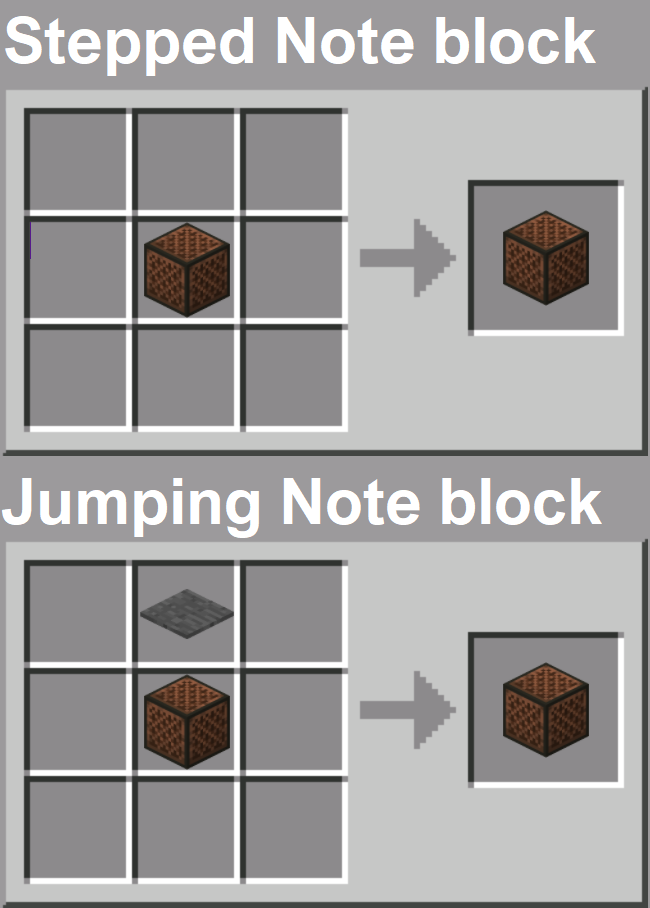
Extended Noteblock is a simple yet creative mod that enhances your musical experience in Minecraft. It introduces two new interactive note blocks:
- Jumping Note Block – Plays a musical note when you jump on it.
- Stepped Note Block – Plays a musical note when you walk on it.
This mod was originally a request from a CurseForge user, and it became a fun learning project. It is ultra-lightweight and designed to seamlessly integrate into your gameplay without any performance impact.
Discover More Amazing Mods!
<a href="https://modrinth.com/mod/awesome-dungeon"
title=”Download Awesome Dungeon – Explore Epic Dungeons in Minecraft”
target=”_blank”
rel=”noopener noreferrer”>
<img alt="Awesome Dungeon – New Structures and Loot-Filled Dungeons"
src=”https://cdn.modrinth.com/data/ptzsjBKT/ab4804bc31f91f53a5ffadc52162f1ab4c967cb5_96.webp” />
<a href="https://modrinth.com/mod/awesome-dungeon-the-end"
title=”Download Awesome Dungeon: End Edition – Custom End Dungeons”
target=”_blank”
rel=”noopener noreferrer”>
<img alt="Awesome Dungeon End Edition – Mysterious End Dungeons and Loot"
src=”https://cdn.modrinth.com/data/BzjQfCJW/e99cea660527b15662c828b33833a506e772ce3b_96.webp” />
<a href="https://modrinth.com/mod/awesome-dungeon-nether"
title=”Download Awesome Dungeon: Nether Edition – Dangerous Nether Dungeons”
target=”_blank”
rel=”noopener noreferrer”>
<img
alt=”Awesome Dungeon Nether Edition – Survive Deadly Nether Dungeons”
src=”https://cdn.modrinth.com/data/gW1httFP/2b963bb4be8659f1f3492100aa9c48066ab699f0_96.webp” />
<a href="https://modrinth.com/mod/awesome-dungeon-edition-ocean"
title=”Download Awesome Dungeon: Ocean Edition – Underwater Dungeons Adventure”
target=”_blank”
rel=”noopener noreferrer”>
<img
alt=”Awesome Dungeon Ocean Edition – Discover Submerged Dungeons and Treasures”
src=”https://cdn.modrinth.com/data/hn56Bq5n/0b21eff420e6c04c3820efebd77ab9bf2ee82d76_96.webp” />
<a href="https://modrinth.com/mod/disable-new-world-creation-screen"
title=”Disable New World Creation Screen – Bring Back the Classic Minecraft World Menu”
target=”_blank”
rel=”noopener noreferrer”>
<img
alt=”Disable New World Creation Screen – Bring Back the Classic Minecraft World Menu”
src=”https://cdn.modrinth.com/data/hpXiq9nb/6eb794a665a467ed7307803da1e26a1316f6a0e5_96.webp” />
Enjoy this mod? Don’t miss future updates! Click the Follow button on the project page to get notified when new content is released. 💚🚀
Partners :
This project is proudly supported by BisectHosting. Check out their services to easily host your projects with quality and reliability.
<a title="Get the best Minecraft server hosting with BisectHosting – Use code JTL for a discount!"
href=”https://www.bisecthosting.com/jtl”
target=”_blank”
rel=”noopener noreferrer”><img
src=”https://www.bisecthosting.com/partners/custom-banners/789de297-fbf1-423b-aa14-990433cf8f58.webp”
alt=”BisectHosting – Use code JTL for a discount!”
width=”1168″ height=”155″/>
Call to Action :
Have questions? Need help? Join us on Discord or visit our GitHub to get involved with the community and contribute!
常见问题
Extended Noteblock 支持哪些 Minecraft 版本?
Extended Noteblock 支持 Minecraft Java 版 1.16.5–1.19.2,共 6 个版本,可用的加载器:Forge。下载时注意选择和你游戏版本一致的文件。
Extended Noteblock 怎么安装?
先用 PCL2 或 HMCL 启动器安装对应版本的 Forge,再把下载的 .jar 文件放进游戏目录的 mods 文件夹,重新启动游戏即可。开启了版本隔离的,mods 文件夹在 versions/版本名 下面。运行环境:客户端和服务端都要装。
JTorleon Studios Team 的其他作品
查看全部 →
Library Ferret
jtorleon studios 模组的共享代码

Better Villages
这个模组改进了原版 Minecraft 村庄!

Awesome Dungeon Ocean
这个模组会在海洋中添加地牢,例如沉船、遗迹等。

Awesome Dungeon Nether
Add awesome dungeon in your Nether !
评论
登录后评论和评分