
介绍
中文介绍正在准备中,下面暂时显示原文。
Adds a button to the statistics screen to export data to a text file.
About
Simply click the relevant button and your statistics will be exported to a file for later viewing.
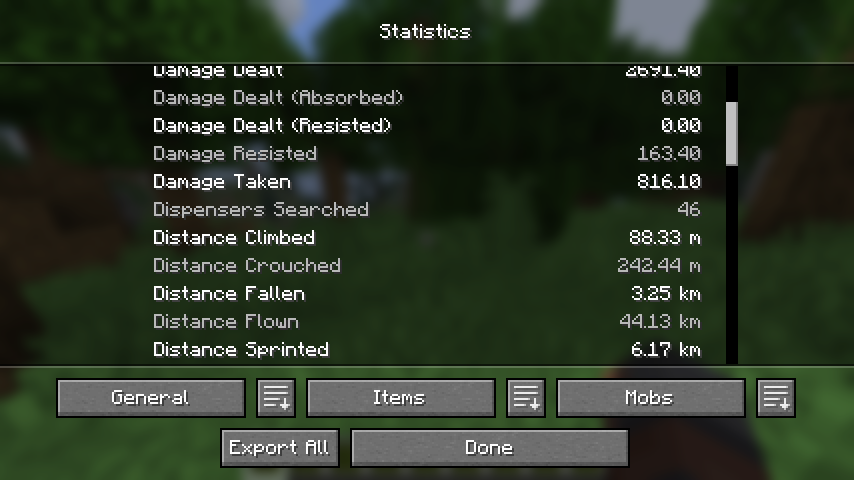
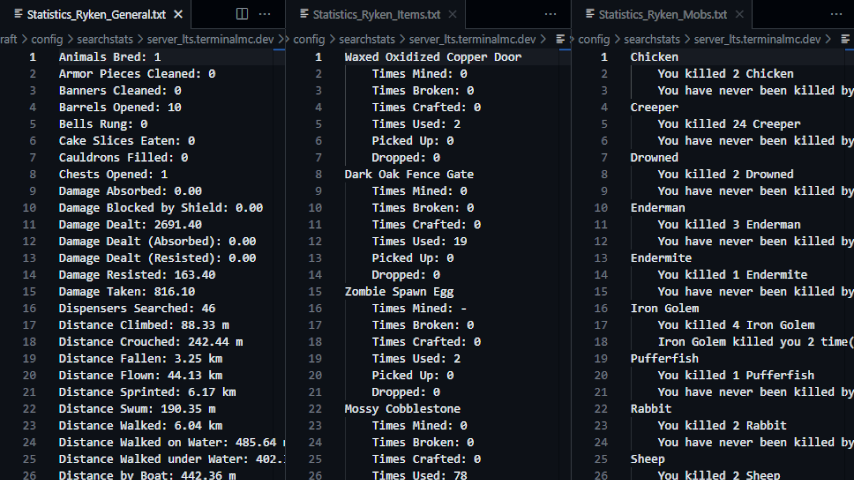
- File contents are translated according to your in-game language.
- When you click the export button, a new folder (named for the world or server that you are
currently in) is created in the.minecraft/config/exportstatsfolder, and the data files are
placed in the created folder. - If you click the export button again while in the same world or server, the old files will be
replaced with new ones.
Related
- SearchStats by TerminalMC
- Adds a search bar to the statistics screen to quickly find specific entries.
- Better Statistics Screen by TheCSDev
- Completely overhauls the statistics screen and makes it more useful.
Contact


常见问题
Export Stats 支持哪些 Minecraft 版本?
Export Stats 支持 Minecraft Java 版 1.20–26.1.2,共 17 个版本,可用的加载器:Fabric / Forge / NeoForge。下载时注意选择和你游戏版本一致的文件。
Export Stats 怎么安装?
先用 PCL2 或 HMCL 启动器安装对应版本的 Fabric / Forge / NeoForge,再把下载的 .jar 文件放进游戏目录的 mods 文件夹,重新启动游戏即可。开启了版本隔离的,mods 文件夹在 versions/版本名 下面。
NotRyken 的其他作品
查看全部 →
Client Sort
by TerminalMC
多功能且易用的物品栏整理。
2085万
1 个月前
Modrinth · CurseForge

Xaero Zoomout
by TerminalMC
将 Xaero's World Map 的最小缩放比例从 0.0625x 降低至 0.0025x,让你一览无余!
1116万
6 个月前
Modrinth · CurseForge

Command Keys
by TerminalMC
强大的命令宏模组。
319.2万
27 天前
Modrinth

Chat Notify
by TerminalMC
有人提到你的名字时会播放提示音,还能设置自定义提醒。
221.9万
27 天前
Modrinth · CurseForge
评论
登录后评论和评分