Expanded Inventory
Expand your vanilla inventory with customizable, persistent 3x3 storage modules and upgradeable belts.
截图
介绍



Credits
– Design help: IkBlox
Expanded Inventory
A wearable belt that gives you real, modular extra inventory space — attached directly to your vanilla inventory screen, not hidden behind a separate menu.
How it works
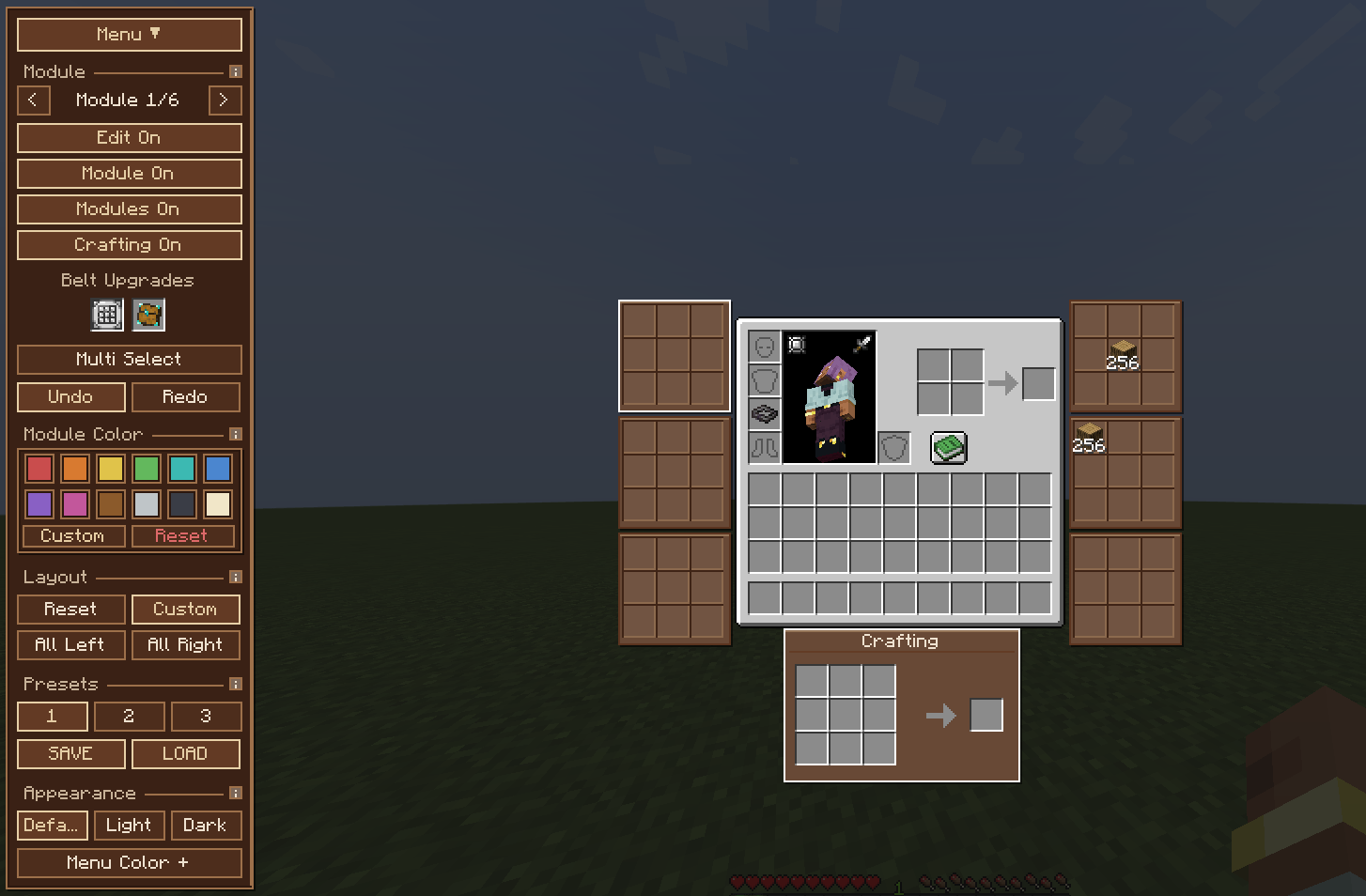
Craft and wear a belt (Leather through Netherite) in a Curios or Trinkets accessory slot. Each tier unlocks a fixed number of real, server-synced 3×3 storage modules that render right next to your vanilla inventory:
| Belt | Modules | Upgrade slots |
|---|---|---|
| Leather | 1 | — |
| Copper | 2 | — |
| Iron | 3 | — |
| Gold | 4 | — |
| Diamond | 5 | 1 |
| Netherite | 6 | 2 |
These aren’t a fake preview — every module is a genuine, authoritative slot group, synced the same way your normal inventory is.
Upgrades
Diamond and Netherite belts have dedicated upgrade slots:
- Stack Upgrade I / II — raises the stack limit inside your modules to 128 / 256.
- Crafting Upgrade — unlocks a true 3×3 crafting grid, not vanilla’s 2×2. Works in your survival inventory, in Creative, and (see below) in other menus too.
Edit Mode
A collapsible Menu control opens a drawer for arranging everything:
- Drag-and-drop module positions, or use a preset layout (Balanced, All Left, All Right, Custom).
- Three save slots for your own custom layouts, with undo/redo.
- Per-module colors, plus a light/dark theme and a custom menu color.
- Multi-select for batch operations (move, recolor, enable/disable several modules at once).
- The Crafting module can be toggled on/off independently — no need to remove the Crafting Upgrade item just to hide it.
- Small “i” info buttons next to each section explain what it does.
- Mouse-wheel and middle-click-drag scrolling, so everything stays reachable at any GUI scale.
Crafting anywhere
With the Crafting Upgrade equipped, the 3×3 grid works outside your own inventory too — open a chest, furnace, anvil, enchanting table, or another mod’s storage screen, and the crafting grid is right there with you. No separate crafting table trip required.
常见问题
Expanded Inventory 支持哪些 Minecraft 版本?
Expanded Inventory 支持 Minecraft Java 版 1.20.1–1.21.11,共 5 个版本,可用的加载器:Fabric / Forge / NeoForge。下载时注意选择和你游戏版本一致的文件。
Expanded Inventory 怎么安装?
先用 PCL2 或 HMCL 启动器安装对应版本的 Fabric / Forge / NeoForge,再把下载的 .jar 文件放进游戏目录的 mods 文件夹,重新启动游戏即可。开启了版本隔离的,mods 文件夹在 versions/版本名 下面。
Horizzon 的其他作品
查看全部 →
Expanden Inventory
Expand your vanilla inventory with customizable, persistent 3x3 storage modules and upgradeable belts.

Horizzon’s Ultimine
Ultimine brings fast, reliable vein mining and tree chopping to your server and singleplayer worlds. Available as both a Paper/Spigot Plugin and a Vanilla Datapack with full enchantment and durability support.

Gemancy
Gemancy adds RPG-style gems, Curios charms, long-duration elixirs, End crystal ore, and armor socketing for NeoForge 1.21.1.
评论
登录后评论和评分