
Expanded Iron Bundles
Bundles with more storage space, and new functionalities in the future.
截图
介绍
Expanded Iron Bundles
Small mod that provides bundles with more storage space, and new functionalities in the future.
Warning
The version 0.0.1 and 0.0.2 of the mod have an issue where inserting more than 127 of a single item type will cause it to “disapears” from the bundle.
The version 0.0.3 of the mod fixes this issue and may bring back some items bugged bundles.
Features
Current
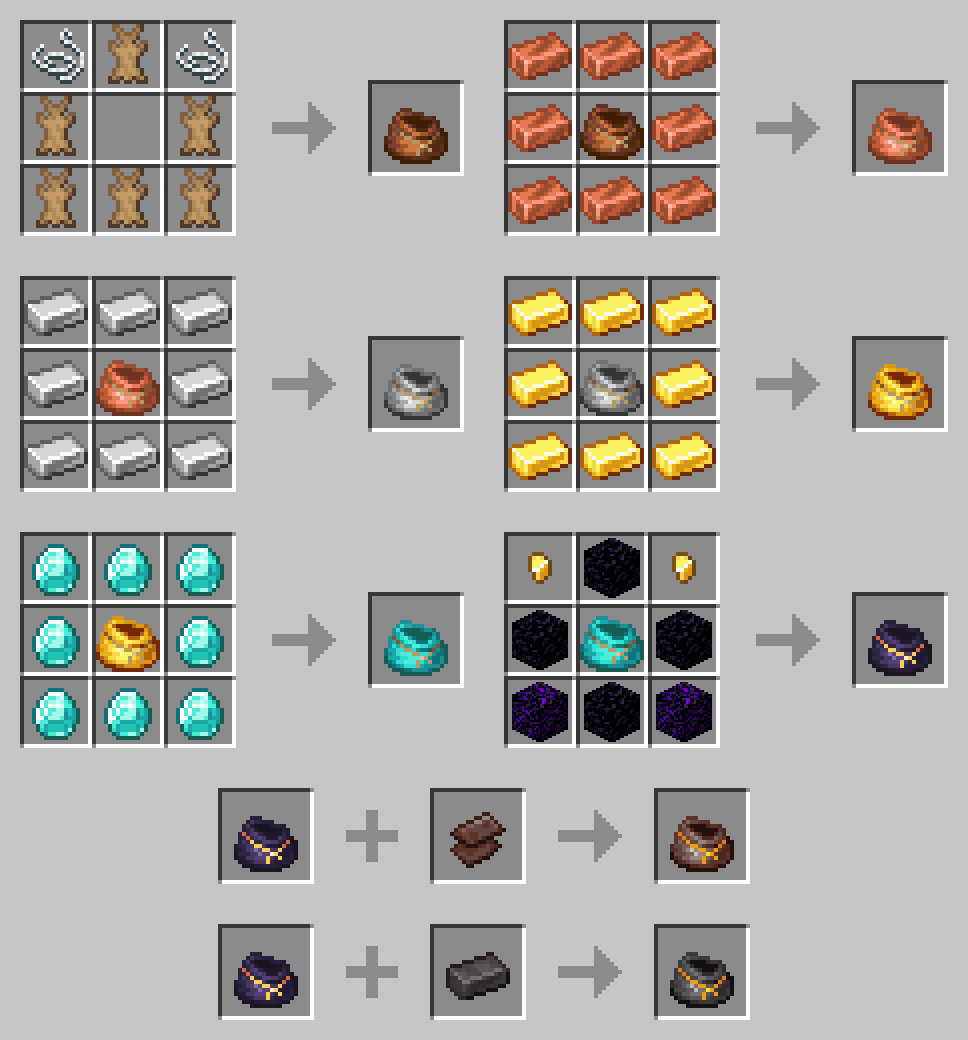
- Recipe for the vanilla bundle with rabbit hide
- Multiple variants with more storage space and special properties
- Copper Bundle (128 slots / 2 stacks)
- Iron Bundle (256 slots / 4 stacks)
- Gold Bundle (384 slots / 6 stacks)
- Diamond Bundle (512 slots / 8 stacks)
- Ancient Scraps Bundle (896 slots / 14 stacks)
- Netherite Bundle (1024 slots / 16 stacks & Immune to fire and lava)
Planned
- Versions for Forge and previous versions of Minecraft
- A config file to enable/disable specific bundles, change capacity
- Better visuals for the occupancy bar
- More bundles with special mecanics (i.e.: Ender Bundle, …)
- Bundle modifiers (i.e.: Piston to throw items further, …)
- Imrpoved bundle mecanics (i.e.: Swapping last inserted item, Thrown single stack, …)
Versions
Fabric
✖️ 1.18 and earlier – Should be comming soon…
✔️ 1.19 & 1.19.1 – Actively supported
Forge
✖️ 1.18 and earlier – Should be comming soon…
✖️ 1.19 & 1.19.1 – Will come once Forge supports it
Requirements
Fabric
- Fabric API
- NBT Crafting
Forge
N/A
Known Issues
- The original bundle is not showing in the creative menu
- Recipes aren’t unlocked when picking up one of the ingredients
- The bundle’s inventory preview shows a cross when the occupancy reaches 64 or more
License
Apache V2
常见问题
Expanded Iron Bundles 支持哪些 Minecraft 版本?
Expanded Iron Bundles 支持 Minecraft Java 版 1.19–1.19.1,共 2 个版本,可用的加载器:Fabric。下载时注意选择和你游戏版本一致的文件。
Expanded Iron Bundles 怎么安装?
先用 PCL2 或 HMCL 启动器安装对应版本的 Fabric,再把下载的 .jar 文件放进游戏目录的 mods 文件夹,重新启动游戏即可。开启了版本隔离的,mods 文件夹在 versions/版本名 下面。运行环境:客户端和服务端都要装。
评论
登录后评论和评分