
EXP Counter
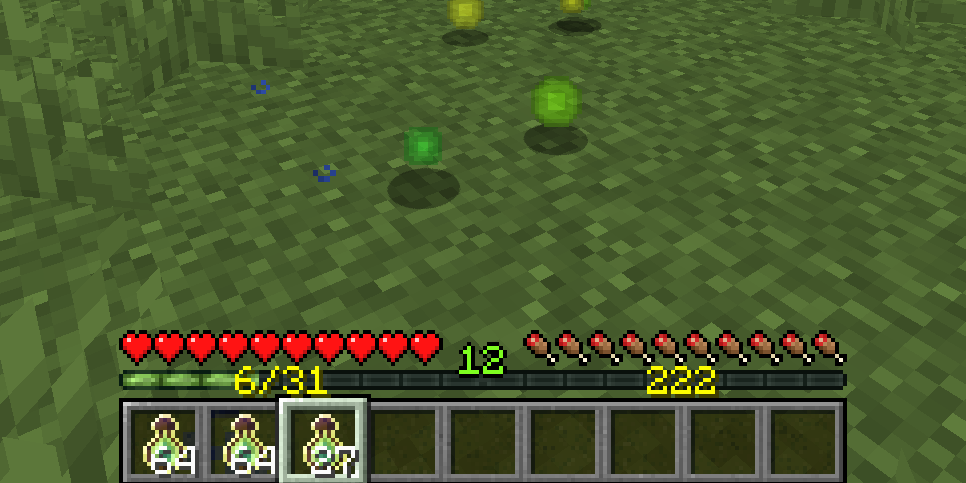
See your total XP and see exactly how much you need to level up, fully configurable
截图

介绍


This fully configurable client-side mod displays the experience points you’ve gathered toward your next level, and your total accumulated XP.

Configuration
You can configure this mod directly in-game or edit the JSON file config/expcounter.json in your profile folder. If you’re using Fabric and want to adjust the config values in-game, you’ll need to install Mod Menu.
show_next_level – Whether the counter of xp collected towards the next level should be displayed
show_total – Whether the total accumulated XP should be displayed
color_next_level – Color of the counter of xp collected towards the next level should be displayed in decimal
color_total – color of the total XP counter in decimal
position_off_centre_next_level – X-axis offset off center of the xp to next level counter
position_y_next_level – Y-axis position of the xp to next level counter
position_off_centre_total – X-axis offset off center of the total xp counter counter
position_y_total – Y-axis position of total xp counter


常见问题
EXP Counter 支持哪些 Minecraft 版本?
EXP Counter 支持 Minecraft Java 版 1.18–26.3,共 32 个版本,可用的加载器:Fabric / Forge / NeoForge / Quilt。下载时注意选择和你游戏版本一致的文件。
EXP Counter 怎么安装?
先用 PCL2 或 HMCL 启动器安装对应版本的 Fabric / Forge / NeoForge / Quilt,再把下载的 .jar 文件放进游戏目录的 mods 文件夹,重新启动游戏即可。开启了版本隔离的,mods 文件夹在 versions/版本名 下面。运行环境:仅客户端。



评论
登录后评论和评分