ExcuseMe
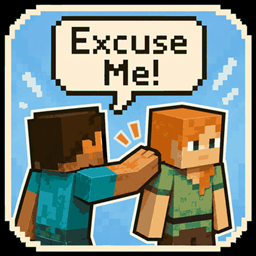
Get someone’s attention without punching them — just tap them on the shoulder!
介绍
Ever wanted to get someone’s attention, but the only way was to punch them?
Excuse Me adds a simple way to tap another player on the shoulder instead!
① How to use
Right-click another player with an empty hand.
- The other player hears a notification sound.
- A banner appears telling them who tapped their shoulder.
- No damage or knockback!
- There’s a short cooldown to prevent accidental spam.
② Customization
You can customize:
- Ringtone
- Notification volume
- Notification pitch
- Banner position
- Banner size
You can also test your current notification settings without needing another player.
③ Mute & Ban
Don’t want to be disturbed?
- Mute shoulder-tap notifications whenever you want.
- Mute can also be toggled with a keybind.
- Ban individual players from sending you shoulder-tap notifications.
- Unban them whenever you want.
④ Commands
/excuseme music ringtone
View or change your ringtone.
/excuseme sound volume
Change the notification volume.
/excuseme sound pitch
Change the notification pitch.
/excuseme banner place
Change the banner position.
/excuseme banner size
Change the banner size.
/excuseme set test
Test your current notification settings.
/excuseme set reset
Reset your settings.
/excuseme set ban
Block notifications from a specific player.
/excuseme set unban
Remove a player from your ban list.
/excuseme mute
Turn notifications on or off.
⑤ Installation
Excuse Me needs to be installed on both the client and the server.
Currently supports:
- Minecraft 1.21.1
- NeoForge
⑥ License
Released under CC0.
Feel free to use, modify, redistribute, or include it in modpacks!
No more punching your friends just to get their attention.
常见问题
ExcuseMe 支持哪些 Minecraft 版本?
ExcuseMe 支持 Minecraft Java 版 1.21.1,可用的加载器:NeoForge。下载时注意选择和你游戏版本一致的文件。
ExcuseMe 怎么安装?
先用 PCL2 或 HMCL 启动器安装对应版本的 NeoForge,再把下载的 .jar 文件放进游戏目录的 mods 文件夹,重新启动游戏即可。开启了版本隔离的,mods 文件夹在 versions/版本名 下面。
评论
登录后评论和评分