
Everything Descriptions
Give everything an unobtrusive in-game description!
介绍




📖 About:
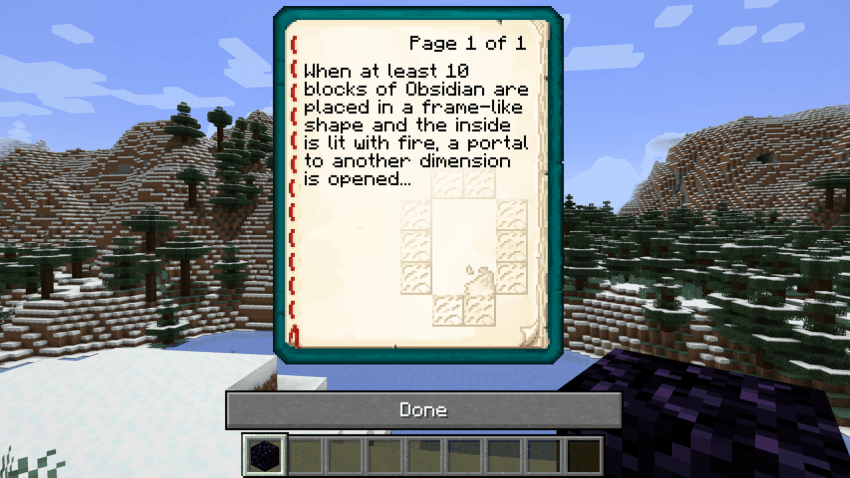
Inspired by Enchantment Lore from the same developer, Everything Descriptions adds the ability to add a description to… Everything! Blocks, items, and even mobs! Simply press [i] when looking at or holding them, and you’ll get a nifty little description come up written by our lovely Discord community!
Designed with the baseline intent to act as a small guide to make players utilise some of Minecraft’s more obscure mechanics, Everything Descriptions is set up in such a way that one can add descriptions to any mob, block or item via addition in a lang resource pack!
✅ Features:
- Framework that makes it possible to add a description to everything in the game!
- Currently supports held items, highlighted blocks, and looked at mobs
- Useful descriptions come pre-bundled with the mod
- Add custom descriptions via resource packs!
- Useful for beginners and especially mod and modpack developers
- Perfect to create tutorials for your mod or modpack
- Currently supported on Forge 1.20, 1.19, and 1.18
🔧 Configuration:
- Hotkey to open descriptions can be set in the Keybinds in-game
- Descriptions can be added or changed using resource packs
❓ How to add descriptions:
Simply put… Throw a line like the following into your lang file of choice (It doesn’t matter which one:)
“everydesc.[modid]:[block/item/mob]”: “Description!”
… And the mod will add an info page on it for anybody to read! If you want your page to have a special background, add a line like the following matching the description line:
“everydesc.[modid]:[block/item/mob].bg”: “[modid]/[name].png”
… And you’re Gucci!
🖼️ Preview:
Description for Obsidian with custom background:
Video showcase/explanation:
🧾 Changelog:
1.0 – Jan 18, 2024:
Initial release for 1.18 & 1.19
1.0.1 – Mar 29, 2025:
Initial release for 1.20-1.20.4

常见问题
Everything Descriptions 支持哪些 Minecraft 版本?
Everything Descriptions 支持 Minecraft Java 版 1.18.2–1.20.4,共 7 个版本,可用的加载器:Forge。下载时注意选择和你游戏版本一致的文件。
Everything Descriptions 怎么安装?
先用 PCL2 或 HMCL 启动器安装对应版本的 Forge,再把下载的 .jar 文件放进游戏目录的 mods 文件夹,重新启动游戏即可。开启了版本隔离的,mods 文件夹在 versions/版本名 下面。
InfernalStudios 的其他作品
查看全部 →
Neko’s Enchanted Books
为 Minecraft 中的每本附魔书提供独特材质!

Shield Expansion
为盾牌加入弹反、附魔、等级和自定义功能,让盾牌玩法更有趣!

Infernal Expansion
在官方更新之外扩展下界,加入大量新生物和方块,同时保持原版风格!

End’s Phantasm
我们一直没有等到的原版友好型末地更新
评论
登录后评论和评分