
Ethereal Dreamscape
Replaces the vanilla sleep screen with immersive, cinematic dream narratives and atmospheric visual effects.
截图


介绍
Ethereal Dreamscape: Narrative Sleep Overhaul
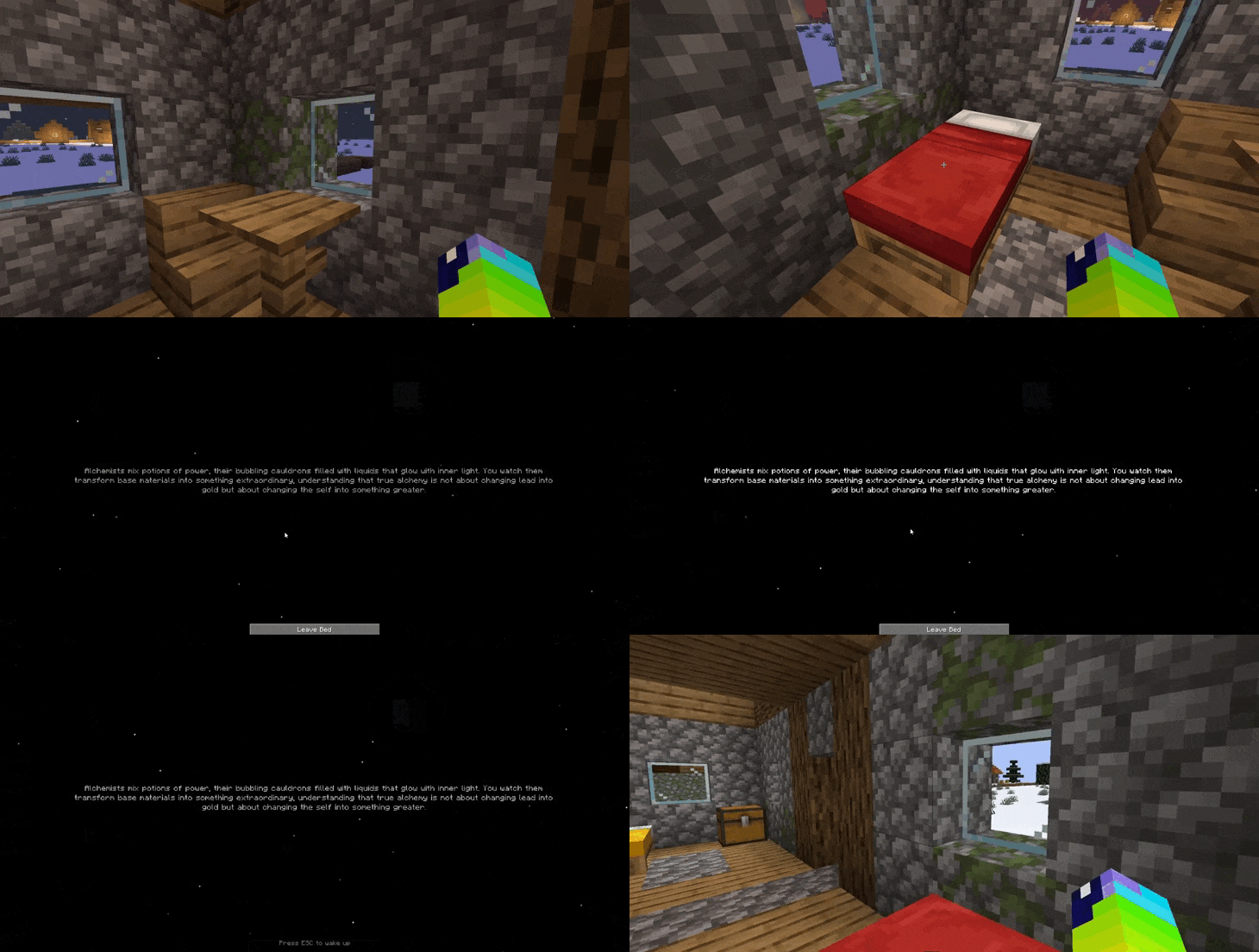
Ethereal Dreamscape is a total reimagining of the sleeping mechanic in Minecraft. Instead of a simple skip-to-dawn, every night becomes a journey into the subconscious of your character, turning a routine action into a cinematic storytelling experience.
✨ Key Features:
150+ Unique Narrative Visions: Discover a vast library of poetic and mysterious dreams. From encounters with ancient kings to whispers from the void, no two nights feel the same.
Cinematic Immersion:
Experience a complete visual isolation. The world fades away, replaced by a deep void filled with drifting mystical particles and pulsing ancient text.
True RPG Depth:
Perfectly suited for RPG and Hardcore modpacks. It adds a layer of roleplay and “lore-feeling” that makes your world feel alive and reactive to your character’s journey.
Enhanced Atmosphere:
Subtle visual effects like “Magic Dust” particles and soft text glows create a meditative, high-end aesthetic.
Player Control:
You are no longer forced awake by the server. Stay in the dream as long as you wish to finish the story; wake up only when you are ready by pressing ESC.
Full Localization: Optimized for global players with built-in support for English and Russian.
🎮 Why add this to your Modpack?
Standard sleeping is a technical pause; Ethereal Dreamscape is a narrative reward. It enhances the “soul” of your gameplay, making the nighttime something to look forward to rather than avoid. Whether you are building a medieval kingdom or surviving a gothic horror world, these dreams provide the perfect atmospheric bridge between days.
常见问题
Ethereal Dreamscape 支持哪些 Minecraft 版本?
Ethereal Dreamscape 支持 Minecraft Java 版 1.20.1–1.21.11,共 17 个版本,可用的加载器:Fabric / Forge / NeoForge。下载时注意选择和你游戏版本一致的文件。
Ethereal Dreamscape 怎么安装?
先用 PCL2 或 HMCL 启动器安装对应版本的 Fabric / Forge / NeoForge,再把下载的 .jar 文件放进游戏目录的 mods 文件夹,重新启动游戏即可。开启了版本隔离的,mods 文件夹在 versions/版本名 下面。运行环境:客户端和服务端都要装。
bios79 的其他作品
查看全部 →
Bhop+
True BHop is a Minecraft mod that recreates Counter-Strike movement physics with real bunny hopping, air acceleration, and strafe mechanics. Build speed, keep momentum, and control movement in the air just like in CS:GO.

Ethereal Dreamscape
Replaces the vanilla sleep screen with immersive, cinematic dream narratives and atmospheric visual effects.
BetterWeather
The perfect weather mod for any modpack. Adds immersive auroras, solar eclipses with daytime mob spawning, sandstorms, and overhauled rain/fog.

BetterWeather
The perfect weather mod for any modpack. Adds immersive auroras, solar eclipses with daytime mob spawning, sandstorms, and overhauled rain/fog.
评论
登录后评论和评分