Shadow Fog Effect for EtBW2
Add visual effects for shadow mists, suitable for use as a game mechanic
截图
介绍
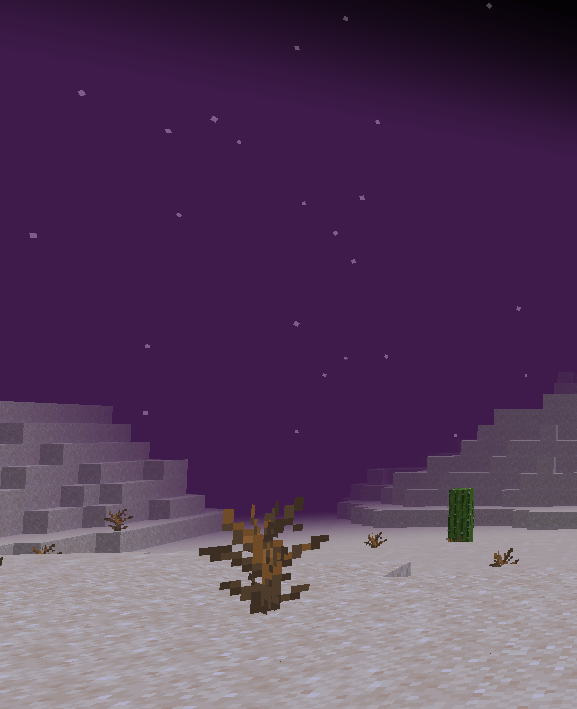
This mod was made for the “Explore the Bright World 2” modpack and adds purple shadow fog effects.
Enter the command: “/etbw shadow_effect <true/false>” This will turn onc
enable/disable the visual effect of the shadow fog.
The special mechanisms currently included are as follows:
- Vision restriction can be lifted by equipping a full set of specific armor.
- During the fog, we’ll resist the generation of peaceful creatures.
- Personalized configuration support.
- Currently, you can adjust these parameters by configuring the file (config/etbw_two-common.toml)
– Change the fog color (Decimal RGB)
– Set of gear to resist visual obstructions (at least one full set of armor)
– The dimensions affected by the color of the fog.
License Notice: Everyone is free to use this mod to create fog mechanics for other modpacks, as long as it’s not for commercial use or redistribution 😀
When using this mod to create a modpack, please make sure to host the link from this website!
中文简述
Brief description in Chinese
本模组为《探索光明的世界2》整合包的特殊剧情机制而制作,增加了紫色暗影迷雾的视觉效果。
可以使用“/etbw2 shadow_effect <true/false>”指令启用或禁用该机制。
期间视野将会受到限制,但是通过全套特定装备(可通过配置设置,暂未设置默认装备),可以解除视野限制的机制。
此外,该状态下将不会自然生成和平生物。就像在夜晚一样
支持配置迷雾颜色、恢复原生视野的套装,以及迷雾颜色所应用的维度。
* 本模组允许各位自由使用在自己的整合包中,但要注明发布链接!同时请大家遵守EULA协议,请各位不要用于任何商业用途!感谢各位的理解与支持!
常见问题
Shadow Fog Effect for EtBW2 支持哪些 Minecraft 版本?
Shadow Fog Effect for EtBW2 支持 Minecraft Java 版 1.20.1,可用的加载器:Forge。下载时注意选择和你游戏版本一致的文件。
Shadow Fog Effect for EtBW2 怎么安装?
先用 PCL2 或 HMCL 启动器安装对应版本的 Forge,再把下载的 .jar 文件放进游戏目录的 mods 文件夹,重新启动游戏即可。开启了版本隔离的,mods 文件夹在 versions/版本名 下面。
StarmapleFantasy 的其他作品
查看全部 →
Explore the Bright World 2 (Demo Version)
An adventure based on minecraft 1.20.1 for the coexistence of forge and fabric to modpack.

Armors API
An API for matching a full set of armor

EtBW2 Curios
"Explore the Bright World 2" Modpack Custom Curios Addon
Shadow Cataclysm
A minecraft custom content mod for Explore the Bright World 2 modpack
评论
登录后评论和评分