
Essential Core
Essential Core is an effective mod for server security. Restore inventories, chunks, inspect blocks, entities, etc., and enjoy advanced logs.
截图


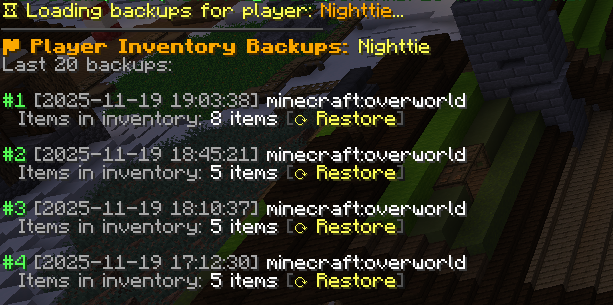
介绍
Essential Core
Our multi-threaded processing allows you to get the best performance when using the mod.
Overview
• Records player actions (block breaking/placement, interactions, containers, etc.)
• Open Inventories, Ender Chests, and offline player ender chests.
• Performs periodic backups of player inventories and chunks
• Allows for rollback/restore of chunks and inventories
• Has an interactive inspector (with pagination) for consulting history
• Uses background processing (multithreaded) to avoid lagging the server
Core Features
• Fast and efficient data logging for various categories (blocks, containers, interactions, chat, commands, etc.).
• Rollbacks and restores (player/chunk) via commands.
• Multi-threaded
• Logs in files by category → player → date: essential-core /logs///.log.
Configurable via config.toml (enable/disable logs, command filter, and thread count).
• Inspector with pagination and clickable buttons for navigation.
• Undo to revert the last rollback.
What does it log?
• NEW: inventory — Player inventory log
• NEW: enderchest — Player enderchest log
• The implemented log categories (FileLogger.java file) include — each log goes to essential-core/events///.log:
• block_break — block breaking by player
• block_place — block placement
• interactions — interactions with blocks/entities (right-click)
• containers — container opening with summarized content
• chat — chat messages
• commands — commands executed by players (filterable)
• sessions — player login/logout
• item_pickups — picking up items from the ground
• item_drops — dropped items (Event: EntityJoinLevel detects ItemEntity)
• item_transactions — (method exists in FileLogger; see note below)
• dimensions — dimension change
• game_mode — gamemode change
• entity_death — entity death
• entity_kills — entity killed by player
• console_commands — commands executed on the console
• server_events — server start/stop
• Observation: some logs are recorded with the player as “SERVER” or “CONSOLE” when applicable (e.g., entity_death records in entity_death/SERVER/.log).
Commands
Alias: essentialcore, ecore and core
• /ecore status — Shows mod status: queues, threads, latest backups, processing time, memory usage.
• /ecore inspect — Toggles inspector mode: toggleInspect.
* Subcommands (while in /nc inspect mode):
* /ecore inspect block [page] — Inspects the block’s history (actions + interactions).
* /ecore inspect player [page] — Player’s action history.
• /ecore player — Displays the player’s last backups.
• /ecore chunk — Shows information about the current chunk (last backup, last players to enter, etc.).
• /ecore backup all | player | chunks — Forces a backup.
• /ecore rollback chunk — Restores the chunks in an area around the player to the state of the indicated backup number.
• /ecore rollback player — Restores the player’s inventory (player must be online).
• /ecore inventory — Open the inventory of an online or offline player.
• /ecore enderchest — Open the enderchest from an online or offline player.
• /ecore reload — Reloads the config.toml configuration.
• /ecore pause — Pause Mod.
Future updates
• MySQL support
• Curios inventory support
Mod inspired by coreprotect!
Need help? Access Discord.
https://discord.gg/cQjHxv3mWv
Use Discord to report bugs and problems.
The source code will be provided if the mod is well-received, thank you.
常见问题
Essential Core 支持哪些 Minecraft 版本?
Essential Core 支持 Minecraft Java 版 1.21–26.1.2,共 5 个版本,可用的加载器:NeoForge。下载时注意选择和你游戏版本一致的文件。
Essential Core 怎么安装?
先用 PCL2 或 HMCL 启动器安装对应版本的 NeoForge,再把下载的 .jar 文件放进游戏目录的 mods 文件夹,重新启动游戏即可。开启了版本隔离的,mods 文件夹在 versions/版本名 下面。运行环境:仅服务端。
Nighttie 的其他作品
查看全部 →
Better Pickaxe Trims
新增锻造模板纹饰,可个性化定制并升级你的镐。探索耐久提升、额外经验、更快挖掘等效果。

Multi Arrow Effects [Multiple Effects on One Arrow]
Combine arrows with potion effects and carry multiple effects in a single shot.

Auto Pickup Filter [Loot Filter]
Disable automatic collection of any item (vanilla or modded) with a single click.

Better Swords Trims
Adds new smithing trims specially designed to personalize and enhance your swords and armor. Discover powerful combat effects, area damage, glowing detection, and more.
评论
登录后评论和评分