介绍
An API that allows mods to add their own equipment slots, based on baubles, but allowing mods to register dedicated slots for special items.
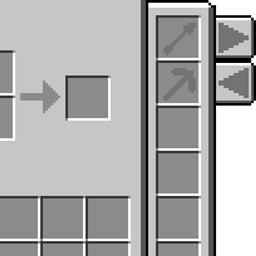
Press the R key or click the pickaxe in the corner of the player inventory screen to open the equipment screen.
The equipment screen will show all the registered slots. If there are more than 8 you can click the arrow buttons to go to other pages.


– All the slots here are only for demonstration purposes, they aren’t included in the mod.
How to use the API:
The API is very simple, it mostly consists of registering an EquipmentType, which handles what can be placed in a slot, the appearance of that slot, and what happens when that slot changes.
Registering a basic slot:
EquipmentApi.registerEquipment(YOUR_EQUIPMENT_ID, new EquipmentType() {

	ResourceLocation overlay = new ResourceLocation(YOURMODID, "textures/YOUR_SLOT_OVERLAY.png");

	@Override
	/* The texture to overlay on the slot (displays below the item) */
	public ResourceLocation getSlotOverlay(ItemStack stack) {
		return overlay;
		// you may also want to do `return stack == null ? null : overlay;`
		// this will make the background image disappear when you place an item in the slot
	}

	@Override
	/* Whether the player can take the supplied stack out of the slot */
	public boolean canRemoveStack(ItemStack stack, EntityPlayer player) {
		return true;
	}

	@Override
	/* Whether the player can place the supplied stack in the slot */
	public boolean canPlaceStack(ItemStack stack) {
		return stack != null && stack.getItem() != null && stack.getItem() == Items.arrow;
	}

	@Override
	/* The maximum stack size of this slot */
	public int getStackLimit() {
		return 64;
	}

	@Override
	/* The text description to show on hover, "\n" will work */
	public String getSlotDescription(EntityPlayer player) {
		return "Arrows";
	}

	@Override
	/* This is called whenever the slot is changed */
	public void onChange(ItemStack from, ItemStack to,
			EntityPlayer player) {

	}
});
常见问题
Equipment API 支持哪些 Minecraft 版本?
Equipment API 支持 Minecraft Java 版 1.7.10,可用的加载器:Forge。下载时注意选择和你游戏版本一致的文件。
Equipment API 怎么安装?
先用 PCL2 或 HMCL 启动器安装对应版本的 Forge,再把下载的 .jar 文件放进游戏目录的 mods 文件夹,重新启动游戏即可。开启了版本隔离的,mods 文件夹在 versions/版本名 下面。
thecodewarrior1 的其他作品
查看全部 →
LibrarianLib
一套内容丰富的工具、实用程序和框架。

Catwalks 2
外观精美、速度飞快的玩家交通工具
Refraction
一个基于光照操控的模组,用于The Modding Trials
Catwalks
A mod that adds Catwalks and Caged Ladders to make traveling long distances easier—they also look cool
评论
登录后评论和评分