
截图


介绍
EntityNames
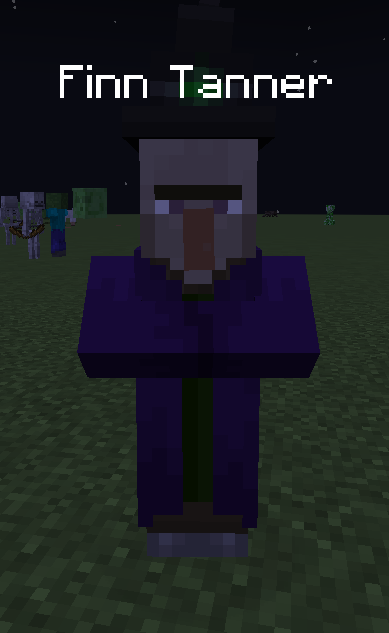


It’s rude to call Tom, the Skeleton, “Skeleton”. I mean, he has a name, doesn’t he‽ Now, you can have manners, and call mobs by their names! If you don’t want to call them by their names, you can make names display in other formats, such as:
- First name only (e.g.
James) - First and last name (e.g.
James Bond) - First, last, and nickname (e.g.
James "FatSnail" Bond) - Nickname only (e.g.
James)
Finally, you can have conversations with your friends that go something like this:
- <Troyzen> Bro, Tom is absoloutely annihilating me right now. Holy, s@!t.
- <xXPeter_GamezXx> Lmao, skill issu- oh f@@k, I just accidentally looked Tom in the eyes. HELP! HELP!
xXPeter_GamezXx was slain by Enderman- <Troyzen> Lmao, who’s the one with the skill issue no-
Troyzen was slain by Skeleton- <Troyzen> 😐
Note for Servers
This mod is mostly client-side but if you would like to change death messages to show generated names, you can install it on the server. Just note that players without the mod on your server will also see the generated names in death messages, so keep that in mind.
Config
You can add first/last names, and also change the display mode. See the Gallery for preview images. Changing the text colour is possible too. 🙂
Multiplayer Notice
I have no idea if the names will sync between you and your friends. Each mob/entity has an ID given by Minecraft itself, and that ID is used to generate the names. I’m not sure if Minecraft syncs these IDs automatically or not.
Modpacks
Please. Use this mod in your modpacks. 😂
常见问题
EntityNames 支持哪些 Minecraft 版本?
EntityNames 支持 Minecraft Java 版 1.21.4,可用的加载器:NeoForge。下载时注意选择和你游戏版本一致的文件。
EntityNames 怎么安装?
先用 PCL2 或 HMCL 启动器安装对应版本的 NeoForge,再把下载的 .jar 文件放进游戏目录的 mods 文件夹,重新启动游戏即可。开启了版本隔离的,mods 文件夹在 versions/版本名 下面。运行环境:仅客户端。

评论
登录后评论和评分